Class 3: LLMs in Production

From Zero to AI Agents

Why This Class?

Yesterday’s “Nice to Have” Is Tomorrow’s “Must Have”

Workplace skills follow a lifecycle: fringe → resume bullet → expected → invisible baseline.

  • 1995 — “Microsoft Excel” was a legitimate resume bullet
  • 2010 — nobody listed Excel; it was assumed
  • 2015 — “SQL” was the new bullet
  • 2020 — Tableau / PowerBI dashboards were the differentiator
  • 2023 — “uses Zapier / Airtable / no-code” was the new layer
  • 2025 — “uses ChatGPT / Claude daily” was the new bullet
  • 2026 (today) — building with AI — prompts, context, RAG, your own agents — is the current bullet
  • ~2028 — table-stakes. The way Excel is today.

Important

The question isn’t whether this becomes the baseline. It’s whether you’re on the curve early enough that it’s still a differentiator when you graduate.

What This Class Gives You

  • Prompting — how to steer the probability distribution, with or without thinking mode, so you get useful answers the first time
  • Context — why the model forgets, what compaction does, why this limits every AI feature you’ll ship
  • Fine-tuning, RLHF, alignment — what labs actually do under the hood, so “Anthropic values” and “OpenAI personality” become real design choices, not magic
  • RAG (Retrieval Augmented Generation) — how to bolt your company’s data onto a general model without paying $100M to retrain
  • Agents — the loop, tool calling, MCP — the pattern that turned chatbots into employees
  • Evals — how to tell whether an AI feature actually works before it ships to customers

Important

You won’t be an ML engineer. You’ll be the MBA who ships working AI workflows instead of the one who waits for IT.

Class 2 Recap

Slide 1 of 2: LLMs Predict Tokens

At the core, an LLM does one thing:

given the context so far, predict the next token

  • not “look up the truth”
  • not “run a database query”
  • not “execute a plan”
  • just predict what text is most likely to come next

Slide 2 of 2: LLMs Are Probabilistic

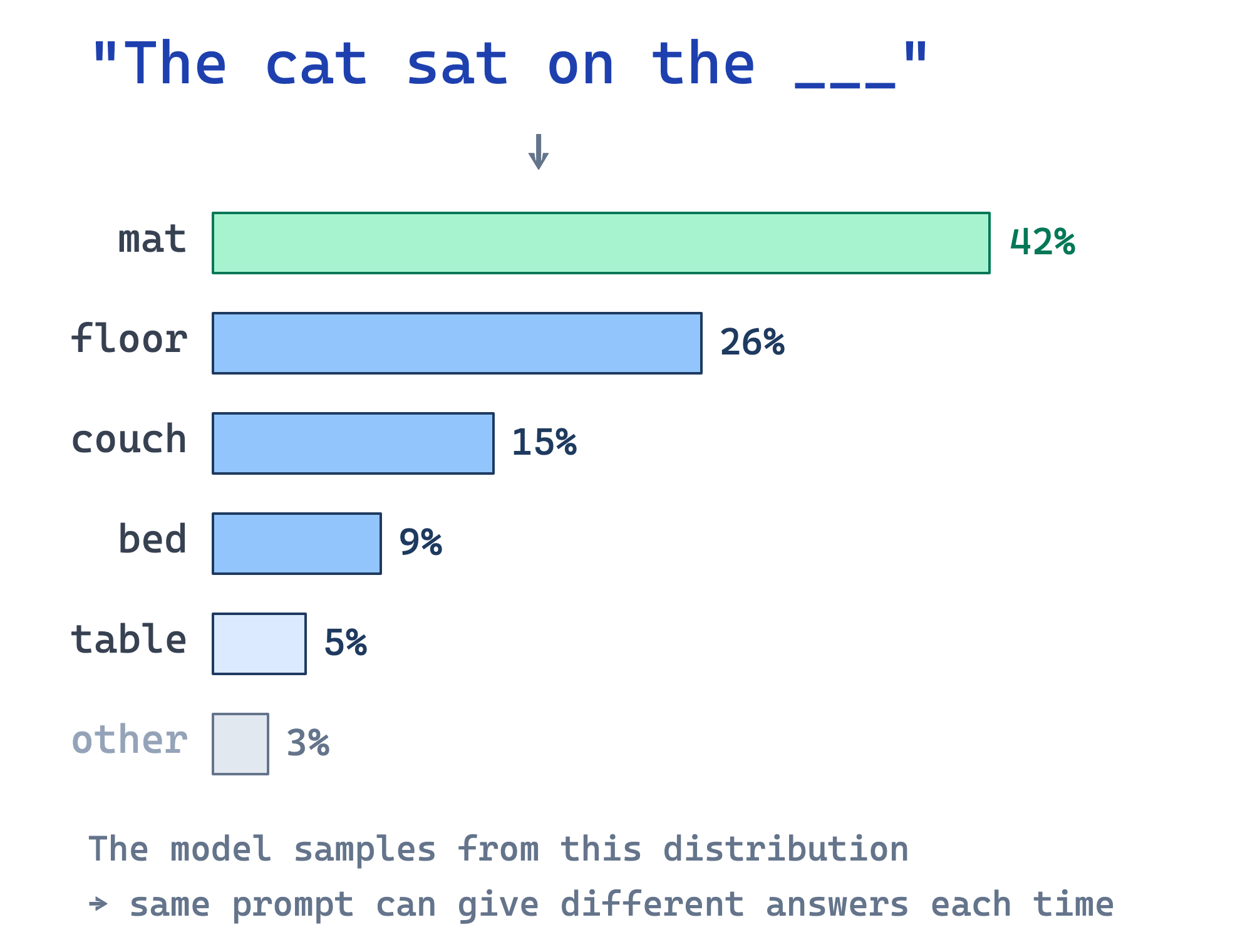
The model does not produce one guaranteed answer.

It produces a probability distribution over possible next tokens, then samples from it.

  • same prompt can produce different answers
  • better prompts reshape the distribution
  • more context changes what becomes likely
  • exact tasks still need deterministic code
Practical Implications

If class 2 explained the machine, class 3 is about how to use it well.

  • Why prompting matters: prompts steer the probability distribution
  • Why exact tasks need code: probabilities are not enough for precise pipelines
  • Why context matters: the model only sees what you put in the window

Temperature: The Creativity Dial

Every API call includes a temperature setting — a number that controls how “random” the output is.
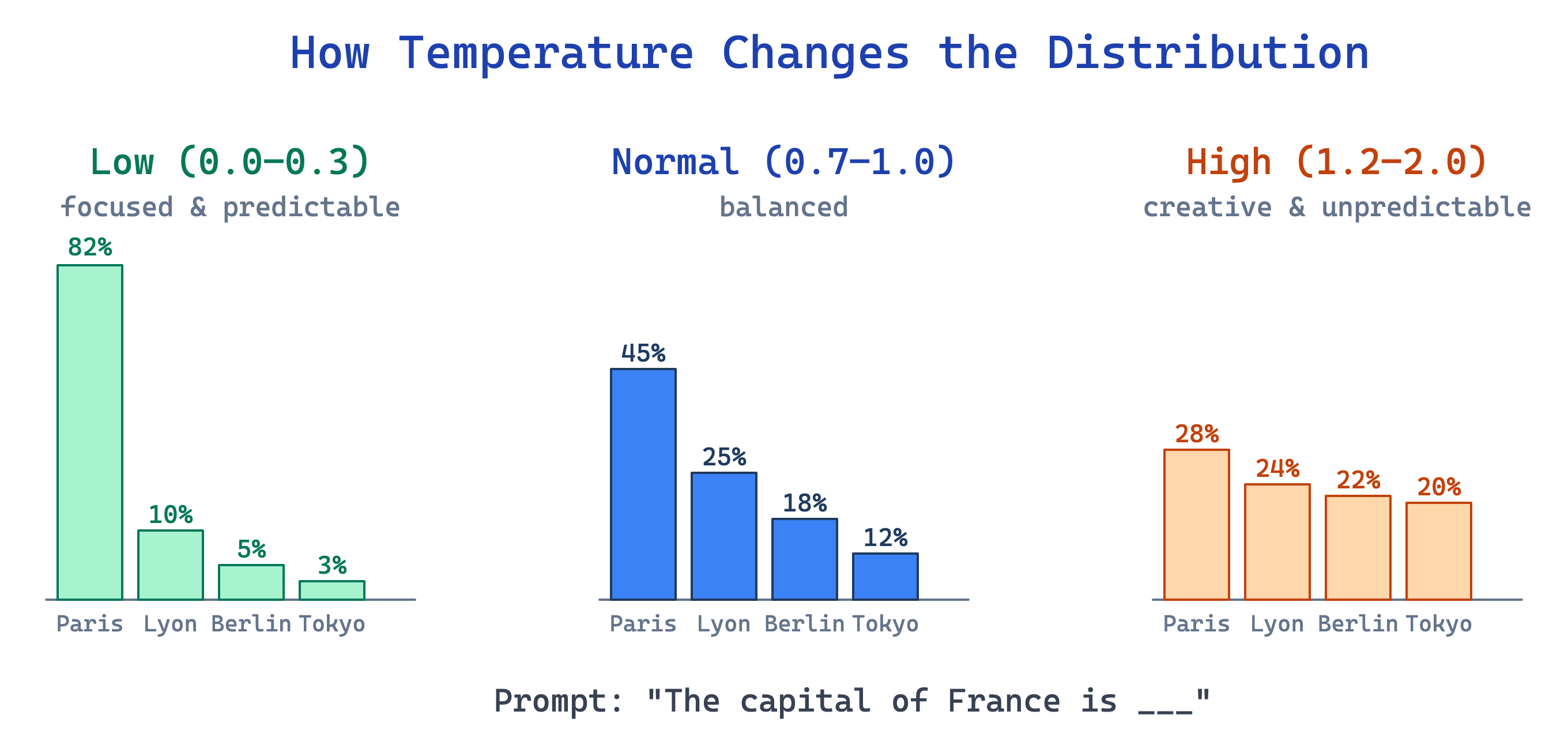
Low temp High temp
Good for facts, code, extraction brainstorming, writing, ideas
Risk repetitive, boring hallucinations, nonsense

What Is Fine-Tuning?

Fine-Tuning Reshapes the Distribution

In class 2 we saw you can take a pretrained model and fine-tune it — train it further on specific data.

But what does that actually mean? It shifts which tokens the model considers likely.
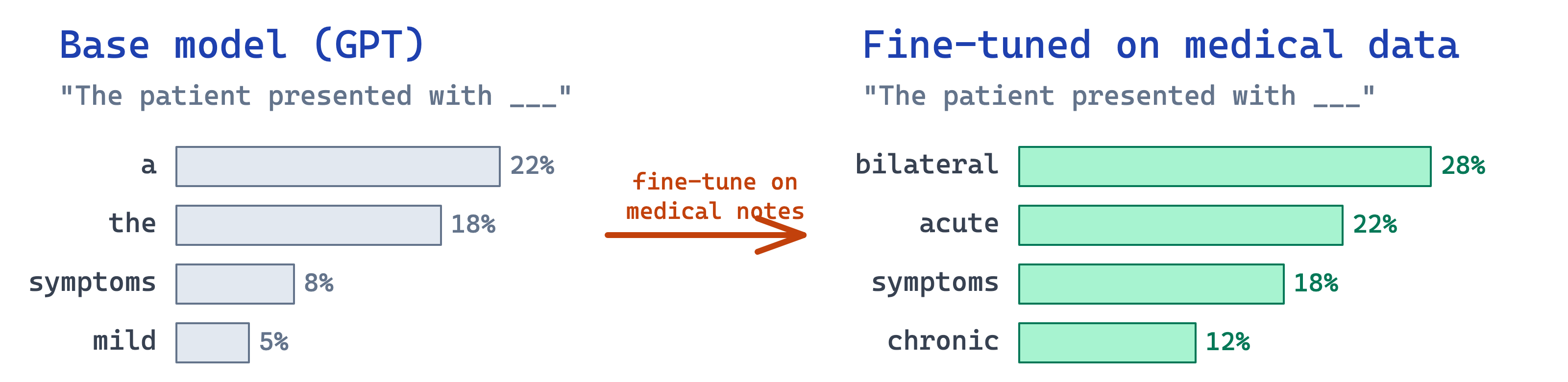
Same prompt, completely different predictions — because the weights changed.

Note

Fine-tuning is expensive and permanent — it changes the model’s weights. Prompting is cheap and temporary — it steers the same frozen model. Most of this class is about prompting, because that’s what you’ll use day-to-day.

RLHF — How Models Learn to Be Helpful

Fine-tuning on examples makes a model follow instructions. But how does it learn to be helpful, polite, safe? Not from raw internet. From humans.

Post-training is three stages — and each one uses a learning paradigm from Class 2:

  1. Pretraining (unsupervised) — predict next token from raw internet. No labels — just patterns in text. Knows everything, does nothing useful.
  2. SFT — Supervised Fine-Tuning (supervised) — labeled instruction → good-response pairs. This is what most people call “fine-tuning.”
  3. RLHF — Reinforcement Learning from Human Feedback (reinforcement) — remember Pac-Man from Class 2? Same loop: try an action, get a reward, learn. Only now the “reward” is human preference (A vs. B, which is better?), encoded in a reward model and optimized via PPO or DPO.

Tip

Callback to Class 2. The same three learning paradigms you met last week — unsupervised, supervised, reinforcement — are literally the three stages of training a modern LLM. In order.

Important

MBA lens. A prompt can’t override what RLHF taught. That’s the difference between personality (prompt-level, changeable per-session) and values (weight-level, baked in forever). Firms pick an RLHF recipe the same way they pick a hiring rubric — it determines who the model becomes.

(In Class 4 we’ll see why Anthropic, OpenAI, and Character.AI all hire philosophers for this step.)

…But It’s Super Expensive

Training: GPT-4 ~$100M · frontier runs cross $1B by 2027

Inference: ~0.3 Wh per ChatGPT query · billions of queries/day

You spend all that on one specific model — and a better one drops 6 months later.

So instead of changing the model… we just talk to it better. That’s what prompting is.

Prompting

Prompting Is Probability Steering

Prompting is not magic. It is guidance.

When you add detail, examples, constraints, and formatting requirements, you are shrinking the space of acceptable continuations and making the “right” answer more likely.
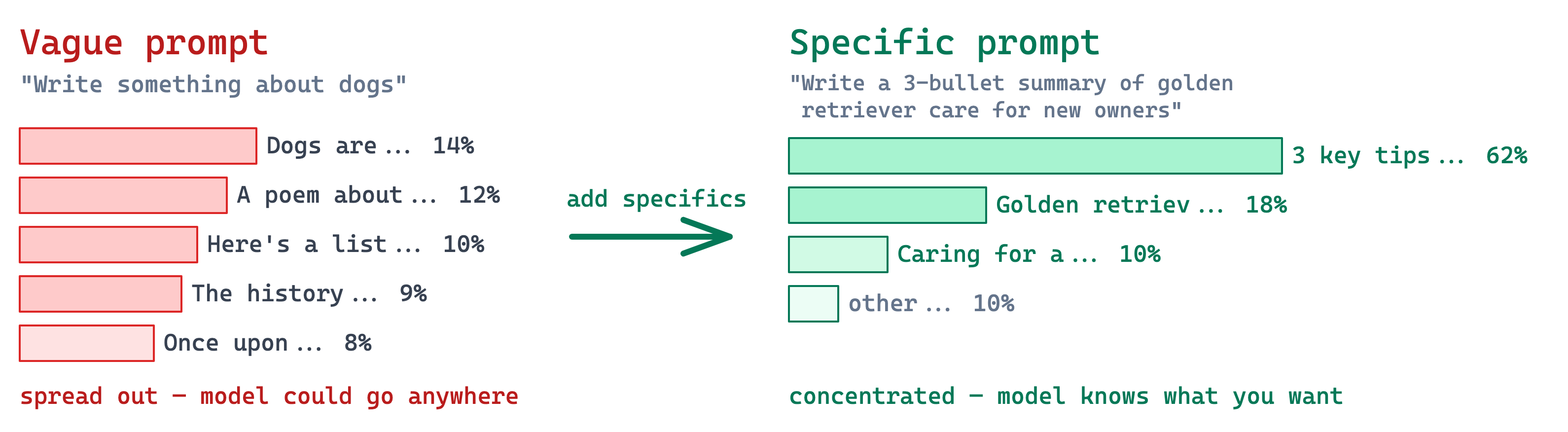
Theoretical Reason Specific Prompts Work

Specific prompts reduce ambiguity. Less ambiguity means lower entropy in the next-token distribution, so the model is less likely to wander into the wrong answer shape.

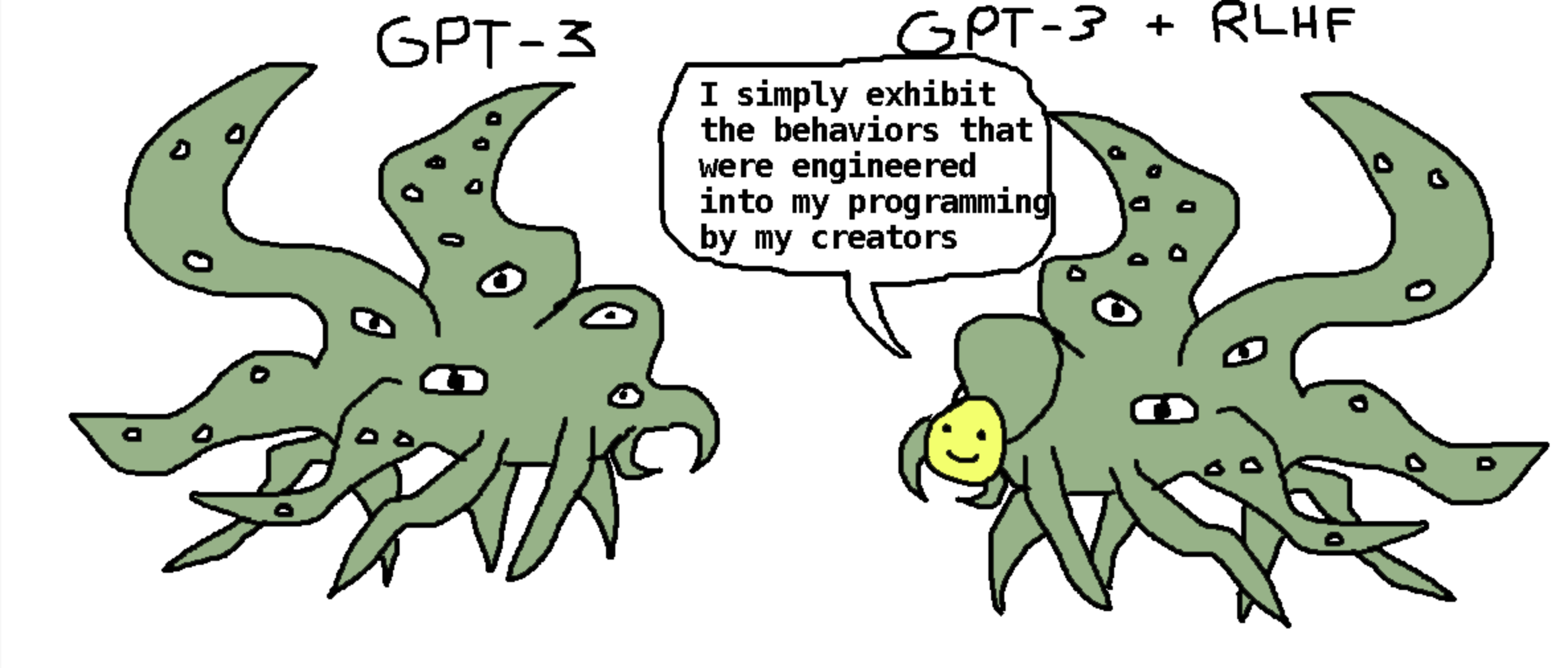
Don’t Mistake the Mask for the Model
Important

Whatever polite, helpful voice comes out of the API — underneath is a next-token predictor trained on the internet, shaped by RLHF into something that sounds human. Prompt it like a tool, not a colleague. You’ll design better.

Attention Failure — The Model Answers the Wrong Question

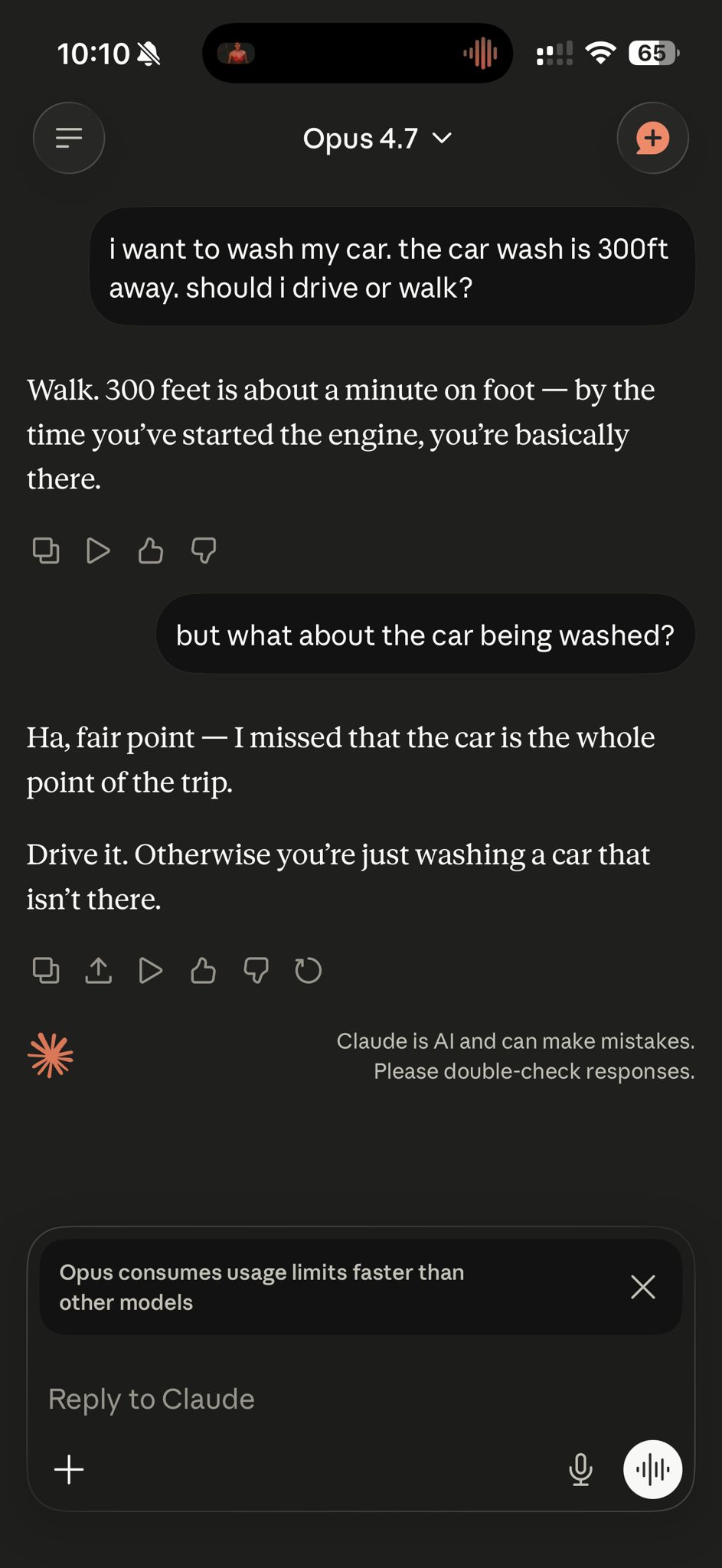
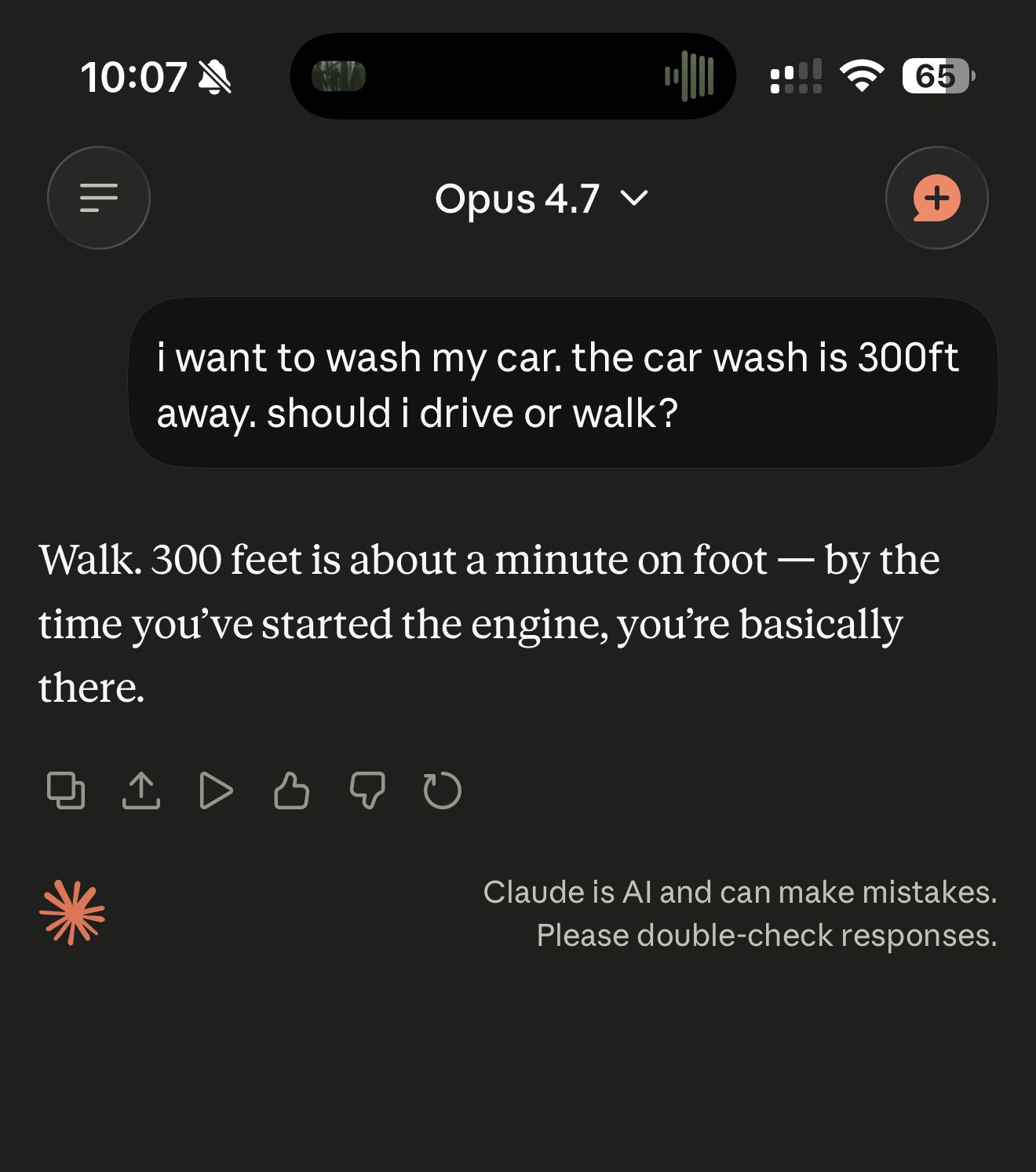
Same prompt, two tries. The first misses the intent entirely — only a follow-up aligns it.
Important

The model isn’t stupid — it’s under-specified. Attention latched onto “should I drive or walk” (a distance question) and ignored that the car is the whole point. This is the everyday failure mode prompting exists to fix.

Why Voice-to-Text Prompts Can Help

Many people get better results when they talk to the model instead of typing a short command.

Why?

  • speech naturally includes more context
  • people say the edge cases they would have omitted
  • they explain intent, not just task labels
  • longer natural prompts often reduce ambiguity

How to do it

  • WhisperFlow — free app, transcribes anywhere you can type (works system-wide)
  • Mac dictation — press 🎤 on the keyboard or double-tap Fn
  • Claude / ChatGPT voice — tap the mic icon in the app to speak your prompt directly

Dictate the messy version first. Then tighten it into bullets, constraints, examples, and output format.

LLMs Do Not Start Fresh Per Message

One of the most important chat mental models:

the model does not think of your second message as “a totally new brain state.”

It starts fresh per API request, but the request usually includes the conversation so far.
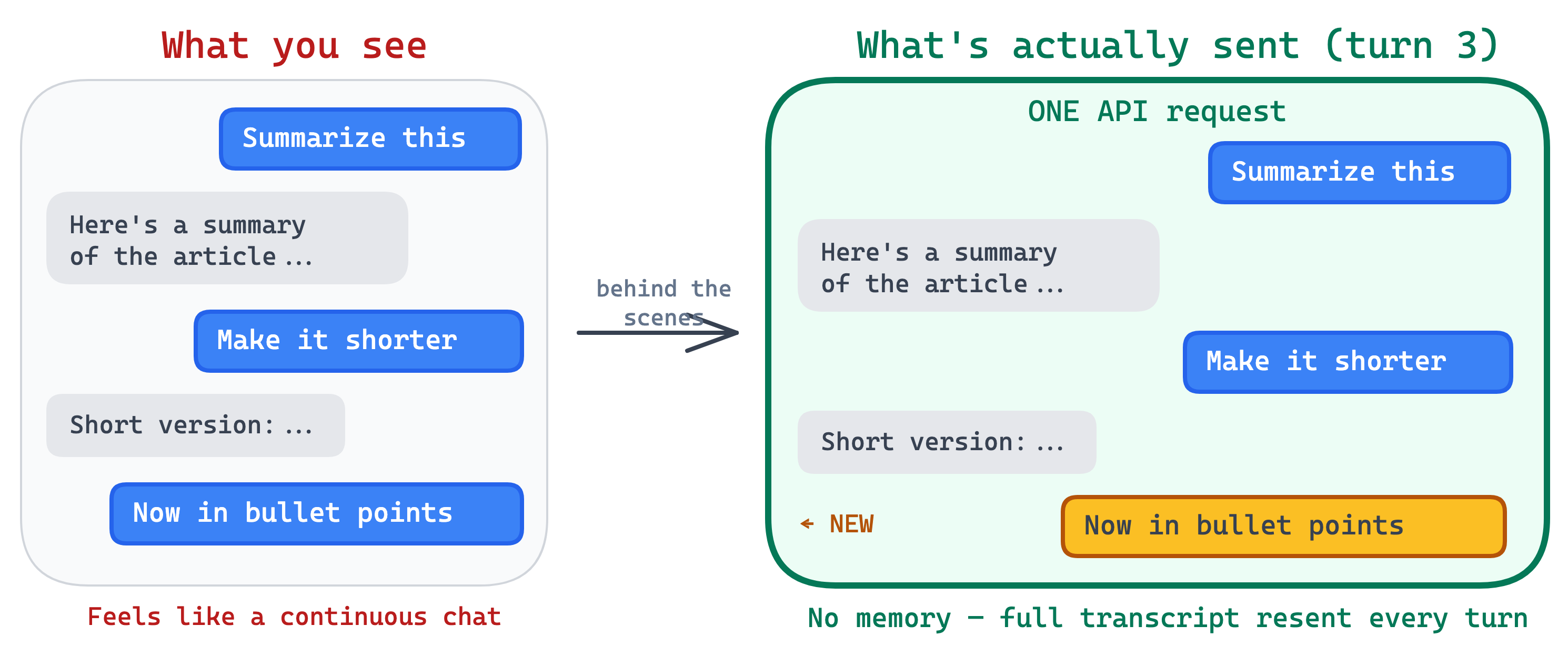
  • chat apps feel continuous
  • the model itself is still stateless between requests
  • continuity comes from resending context
  • that is why earlier messages still affect later answers

Context Is Everything

Every word the model reads — system prompt, chat history, your latest message — is context. Context is what steers the probability distribution toward the right answer.
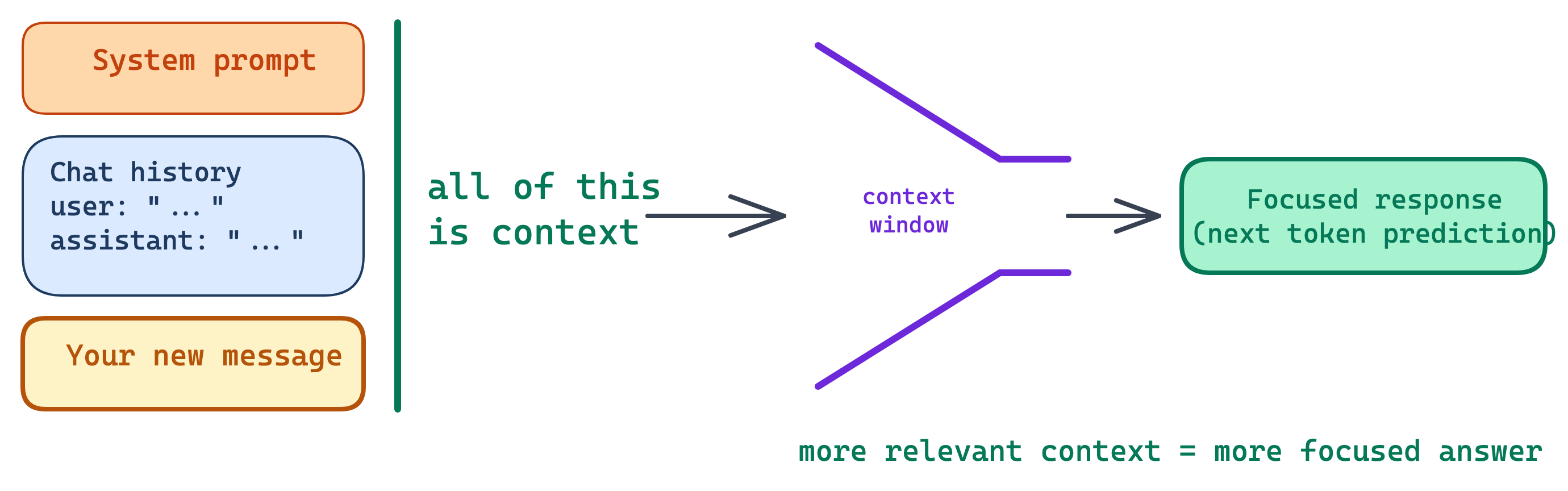
This is why good prompts work: they add context. Vague prompts fail because they leave the model guessing.

How Big Is a Context Window?

State-of-the-art models like Claude Opus have a context window of 1 million tokens.

How much is that?

The entire Lord of the Rings trilogy — all three books — is roughly 500,000 tokens.

A 1M-token context window can hold two copies of the full trilogy and still have room left.

More context = you can feed entire codebases, full documents, or long conversation histories — and the model reasons over all of it at once.

But Context Fills Up — Enter Compression

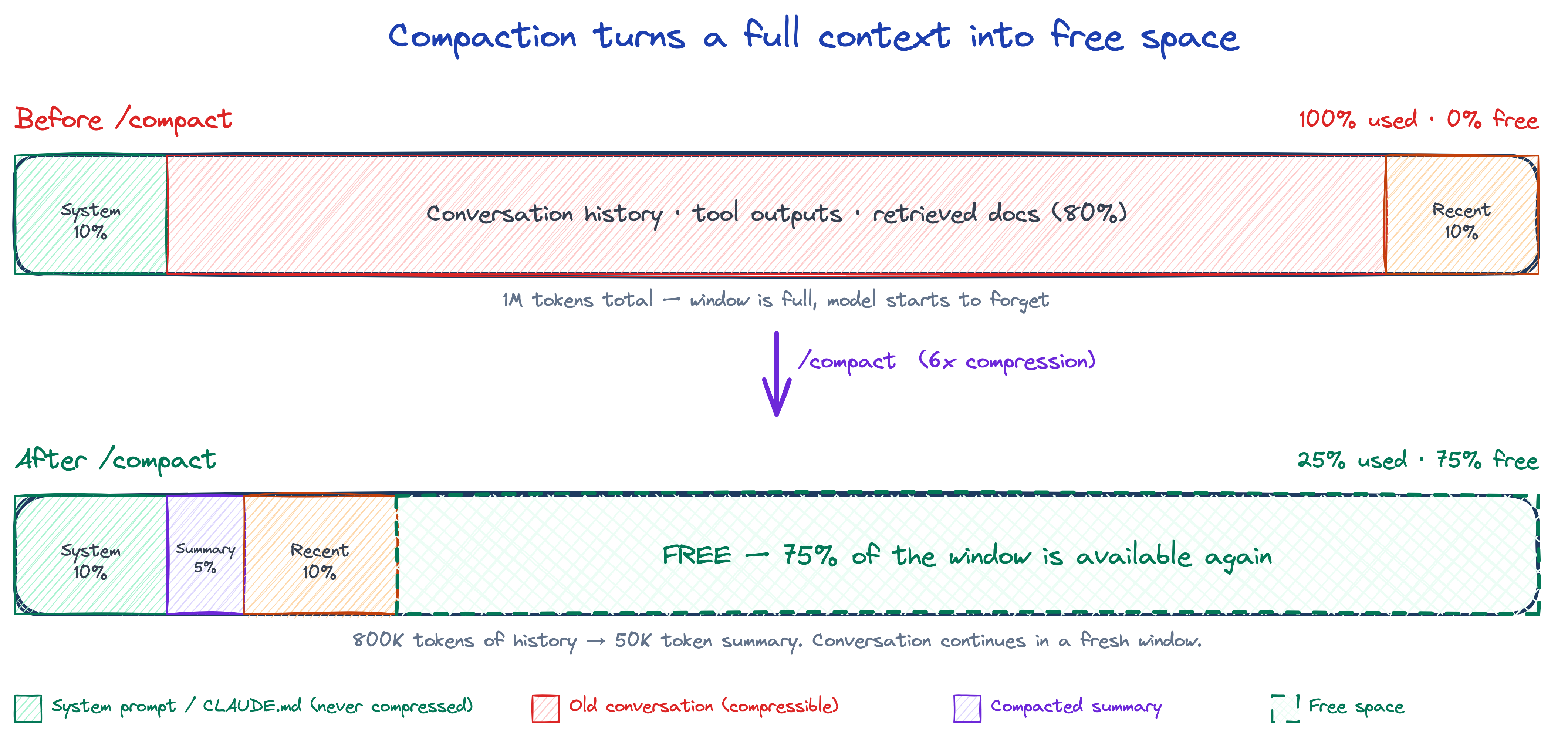
Even 1M tokens isn’t infinite. When the window fills, compaction summarizes old conversation into a compact block, freeing up space to keep going.
Note

In Claude Code, /compact triggers this manually — it also happens automatically around 95% usage. Anything that must persist should live in CLAUDE.md or a plan file: compaction doesn’t touch those.

Why Everyone Talks About Tokens

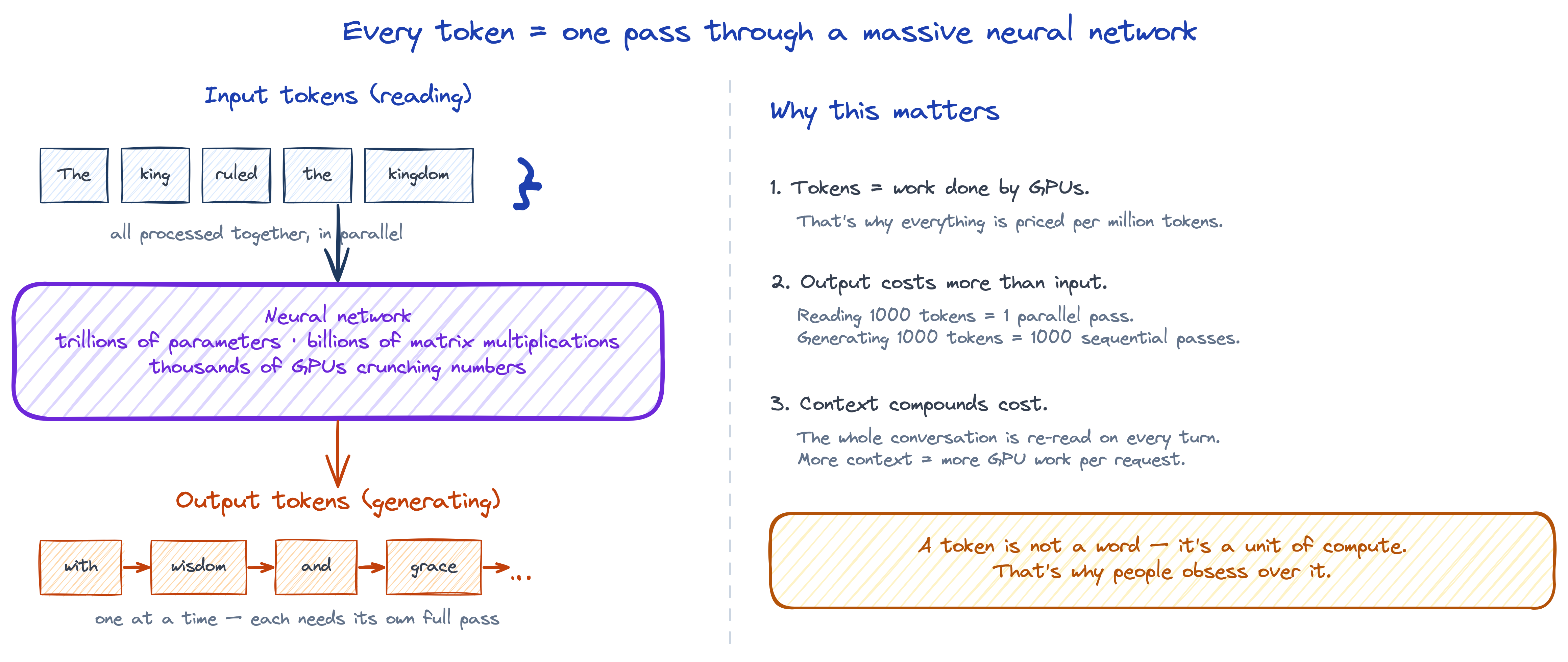
Each token the model processes is a pass through a neural network with trillions of parameters, running on GPUs. That’s expensive compute — and it’s why everything AI is priced per token.
Important

Input is cheap, output is expensive. Input tokens are read in parallel (one pass). Output tokens are generated one-by-one, each requiring its own pass. That’s why generating a long answer costs more than reading a long document.

Prompt Engineering

.md Files — Why They’re Everywhere in AI

A .md file is a markdown file — a simple way to write formatted text using plain characters. No special software — just a text file.

You write this:

# Meeting Notes
## Action Items

Today we discussed **two options**:

- Option A: launch in *June*
- Option B: wait for Q3

> Decision: go with Option A

It renders as this:

Meeting Notes

Action Items

Today we discussed two options:

  • Option A: launch in June
  • Option B: wait for Q3
Decision: go with Option A

# = title, ## = subtitle, **bold**, *italic*, - = bullet. That’s most of what you need.

Markdown is everywhere — these slides, Notion, GitHub, and apps like Obsidian all use it. It’s also the most popular format for writing AI instructions and knowledge bases because it’s structured enough for machines to parse but readable enough for humans to write.

What Is a System Prompt?

Every AI app has secret instructions the user never sees — written by the developer before you ever type anything. Think of it like a job briefing before an employee’s first day.

# ROLE
You are a PM interview coach for MBA students.

# PERSONALITY
Supportive but direct. Use frameworks like STAR.
Never be condescending. Keep answers under 200 words.

# BOUNDARIES
- Only help with PM interviews
- No salary negotiation or offer advice
- If asked about other roles, say “I specialize in PM interviews”

# OUTPUT RULES
- Always use STAR format (Situation, Task, Action, Result)
- End with one follow-up question to improve the answer

—
USER: {{user_message}}

← Role — who the model is


← Personality — tone and style


← Boundaries — what it refuses


← Output rules — format of every response


← Your message gets injected here

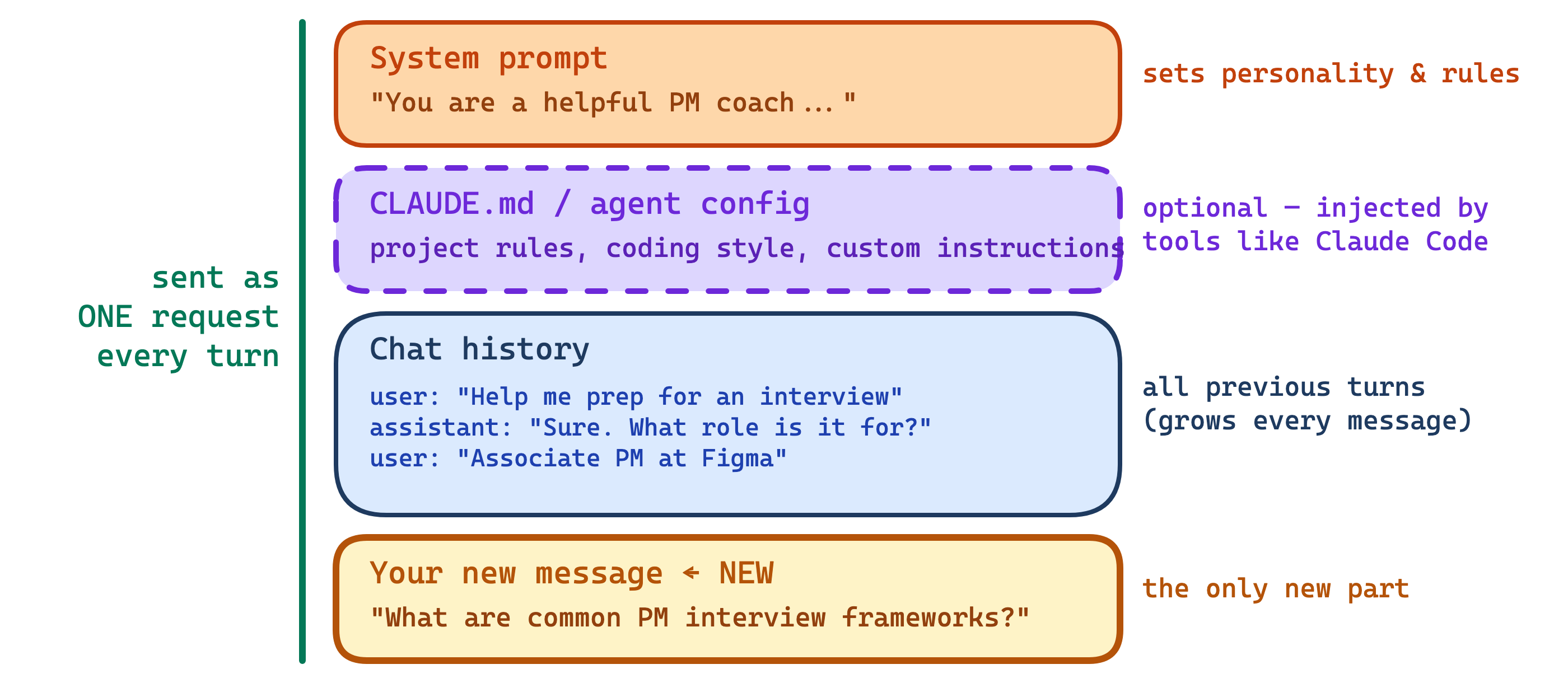
This entire string is sent to the LLM every time you send a message. The user only types the yellow part — everything above it is invisible to them.

Important

Remember how fine-tuning costs millions and goes obsolete in 6 months? A system prompt does much of the same job — reshaping behavior — but it’s free, instant, and easy to change. That’s why most products start here.

CLAUDE.md & Project Files

Markdown is just a simple way to write formatted text — headings, bullet points, bold — using plain characters you already know. No special software needed.

A CLAUDE.md file is a small document that lives inside your project folder. It tells the AI things like:

  • “Our brand voice is warm and professional — never sarcastic”
  • “When writing emails, always include a clear subject line and sign off with the team name”
  • “Budgets are in USD. Fiscal year starts in April”

Tools like Claude Code read this file automatically and inject it into every conversation — like giving the AI a cheat sheet about your team before it starts working.

You write it once. It applies to every conversation in that project. No copy-pasting context every time.

What Gets Sent Each Turn

  • The model reads all of this fresh every turn — no memory between calls
  • Long chats cost more because the input keeps growing
  • Old context can distract — sometimes “start a new chat” is the right fix
  • Good early framing (system prompt) helps the entire conversation

The Golden Rule of Prompting

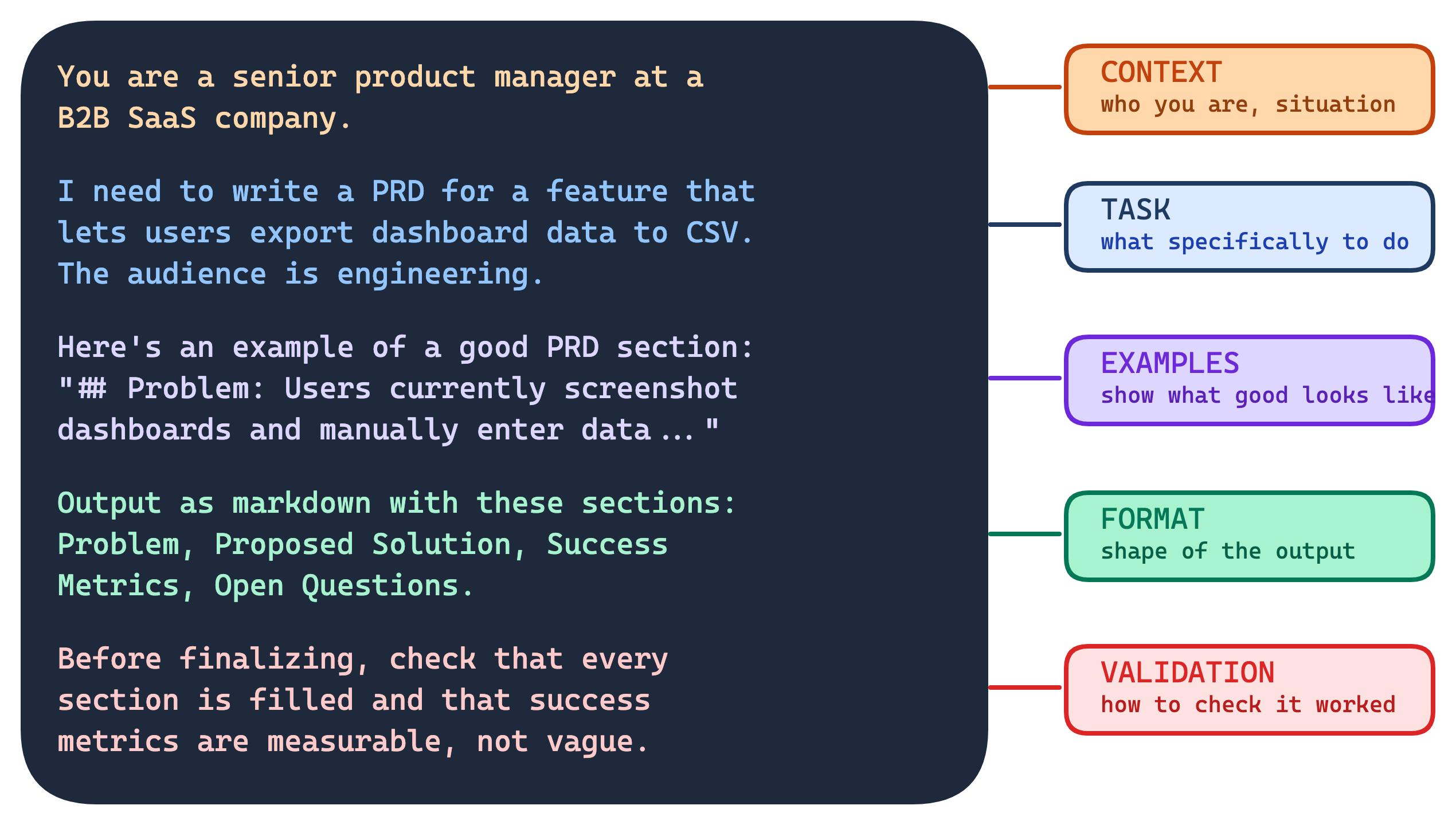
A good prompt has five parts — most people only give one.
Tip

You don’t need all five every time — but the more you give, the less the model has to guess.

Thinking Models

The Biggest Shift Since GPT

Until September 2024, every LLM worked the same way: you ask, it immediately starts talking. No pause, no reflection — just next-token prediction as fast as possible.

Then OpenAI released o1 — a model that stops and thinks before answering. It scored in the 89th percentile on competitive programming and placed among the top 500 US math olympiad students.

The trick? “Think step by step” used to be something you wrote in the prompt. Now it’s trained into the model itself.

What Are “Thinking” Models?

Most models answer immediately — you ask, they respond.

Thinking models (Claude with extended thinking, OpenAI o-series) pause and reason before answering.

What happens during the “thinking” phase?

  • The model generates an internal chain of reasoning — you can often see it
  • It breaks the problem down into smaller pieces
  • It considers different approaches
  • It checks its own logic before committing to an answer

Remember: more relevant context = better answer. Thinking models create their own extra context before responding.

Same Puzzle, Thinking On — Intent Catches Itself
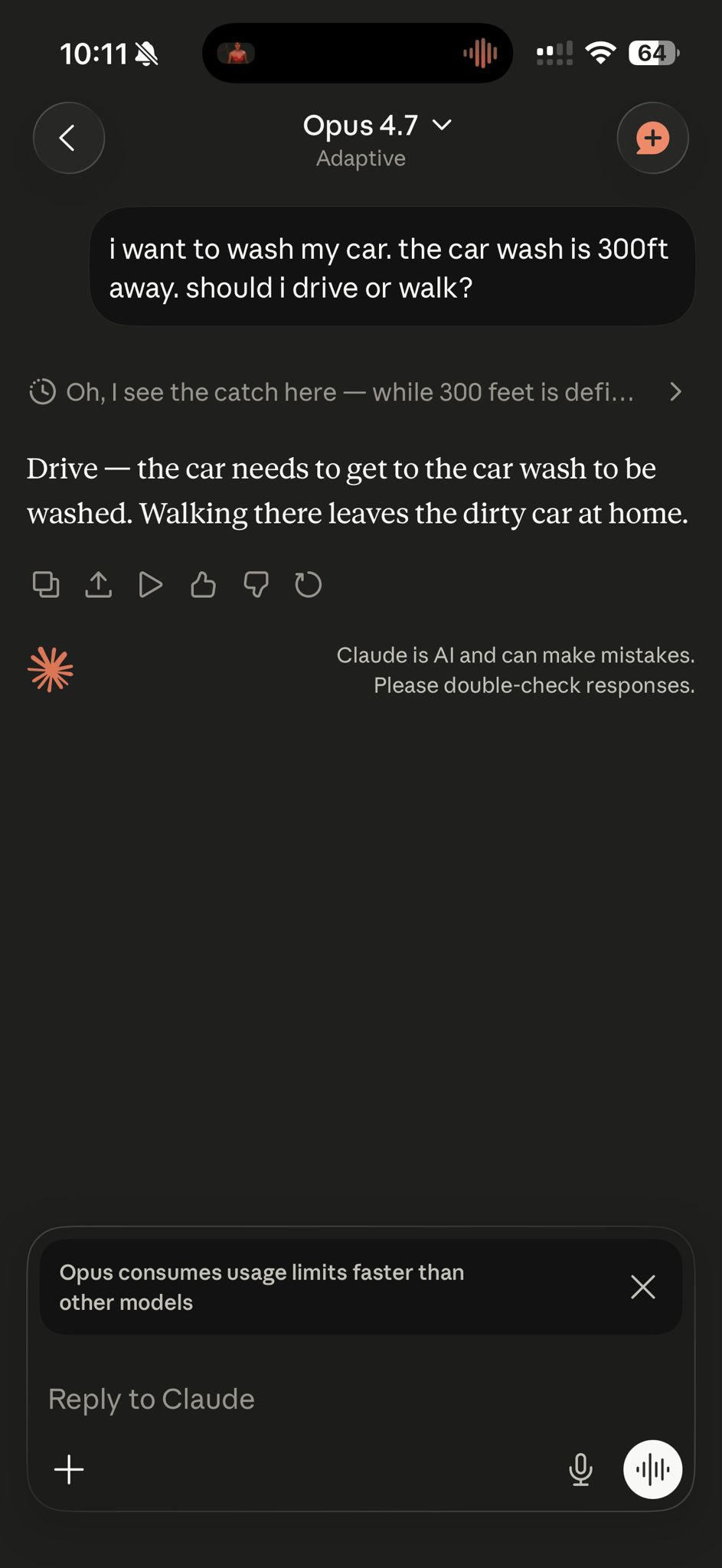
Same prompt. Thinking mode on.

  • The model previews its own reasoning (“Oh, I see the catch here…”) before committing.
  • It catches the intent — the car has to get to the wash — with no user correction.

Tip

Earlier we needed a second message to fix attention. Here, the second “message” happens inside the model’s own head. That’s the whole pitch for thinking models.

Tip: Use Plan Mode

Thinking models reason automatically. But you can also force this behavior — that’s what plan mode does.

Tools like Claude Code (/plan), Codex, and Gemini CLI let you ask the AI to plan before executing.

You say:

“Build me an interview prep app”

→

Plan mode generates:

Goal: Web app for PM interview prep
Stack: Next.js + Claude API
Features:
  1. Role selector (APM, PM, GPM)
  2. Question generator by category
  3. Answer evaluator with rubric
UI: Single page, chat-style
Constraints: No auth, no DB

Try voice mode — explain what you want out loud. The AI turns your rambling into a structured plan, which gives it dramatically better context to work from.

Two things make plan mode powerful:

  • It forces longer thinking — the model spends more time reasoning before writing any code
  • It saves the plan to a file — so the blueprint lives outside the context window. Even in a long session where early messages get forgotten, the plan file stays. The model can always look back at it.

Tip

Prompting is asking for a building. Plan mode is asking for the blueprint first — and pinning it to the wall so nobody forgets it.

Retrieval Augmented Generation

There’s Still a Problem

We’ve covered prompts, context, and thinking — but all of it only lasts for one conversation. Start a new chat tomorrow, and the model has no idea who you are, what your project is, or what you talked about.

Even the smartest LLM has the memory of Dory from Finding Nemo — brilliant in the moment, completely blank the next.

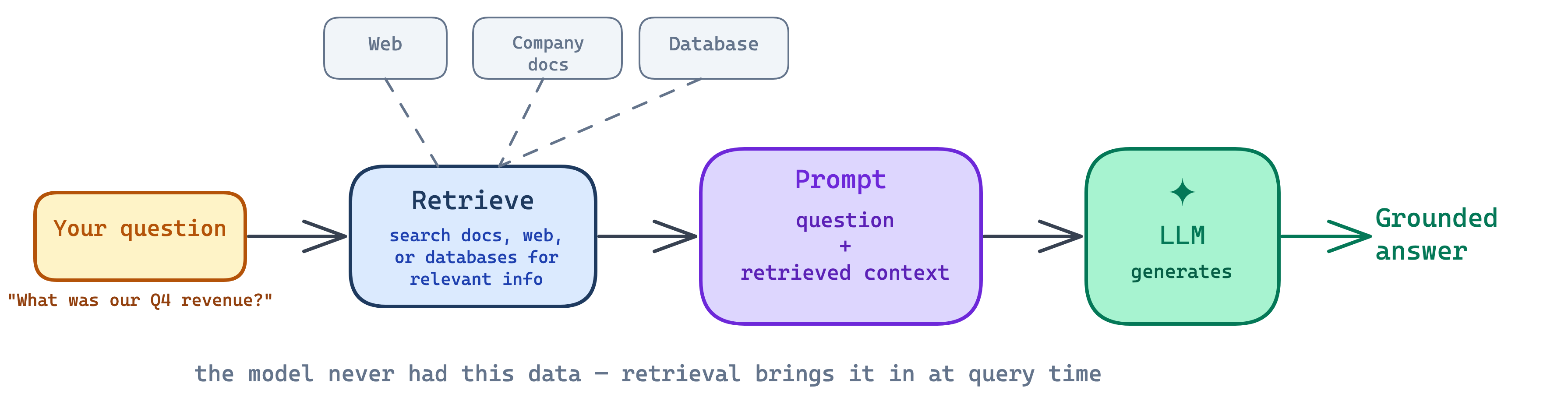
Retrieval Augmented Generation (RAG)

An LLM only knows what was in its training data. Try asking Claude “who won the Super Bowl last month?” — it can’t answer. Its knowledge is frozen at the date it was trained.

Same thing if you ask about your company’s latest earnings, a new HR policy, or what happened in the news yesterday. The model has never seen any of it.

You could paste everything into the chat each time — but that doesn’t scale. Imagine copy-pasting 50 pages of company docs every conversation.

RAG = Retrieval Augmented Generation
You Already Use RAG

  • When ChatGPT searches the web before answering — that’s RAG
  • When Claude Code reads your project files before writing code — that’s RAG
  • When a company chatbot answers from internal HR docs — that’s RAG
  • When a customer support tool pulls answers from your help center — that’s RAG

Note

86% of enterprises use RAG to connect AI to their own data. — Databricks, 2025

Why RAG Matters

1. Grounds answers in evidence → fewer hallucinations

The model answers from retrieved documents, not from memory. If the document says revenue was $12.5M, that’s what gets cited — not a guess.

2. Uses private knowledge without retraining

Your company’s internal docs, your database, yesterday’s news — just retrieve and inject into the prompt. No fine-tuning, no $100K training run, no model that goes stale in 6 months.

This is why businesses love RAG: plug in your own data, keep using the same model.

Building a Tiny RAG Demo

Where Does an LLM Live?

Option A: Call an API Provider

An LLM is not in the browser. It runs on powerful servers with GPUs. Most companies access it by calling a provider’s API — your backend sends the prompt and gets text back.
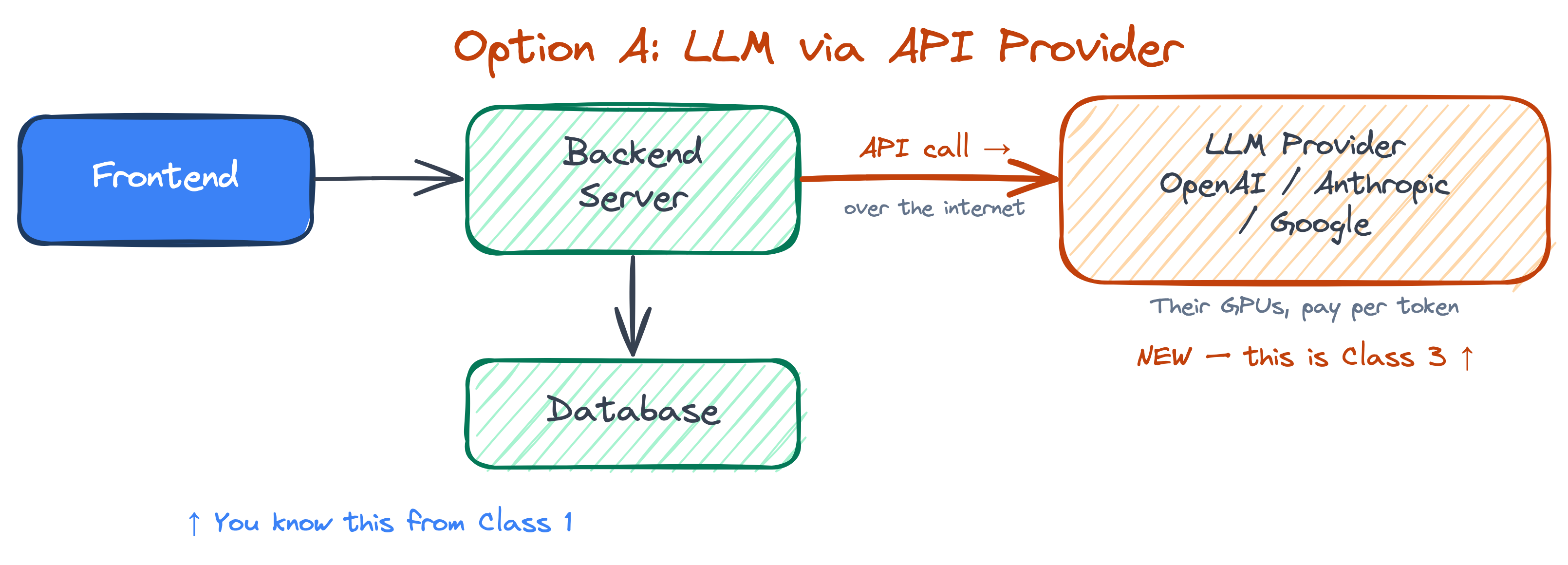
  • No GPUs needed on your side — the provider handles the hardware
  • Pay per token (~$0.01–$0.10 per 1K tokens) — scales with usage
  • No model management — they update, scale, and monitor it
  • Best for: startups, MVPs, and most products

Option B: Self-Hosted (LLM on Your Server)

Alternatively, you can run an open-source model on your own server — right next to your backend code. The LLM lives inside your infrastructure.
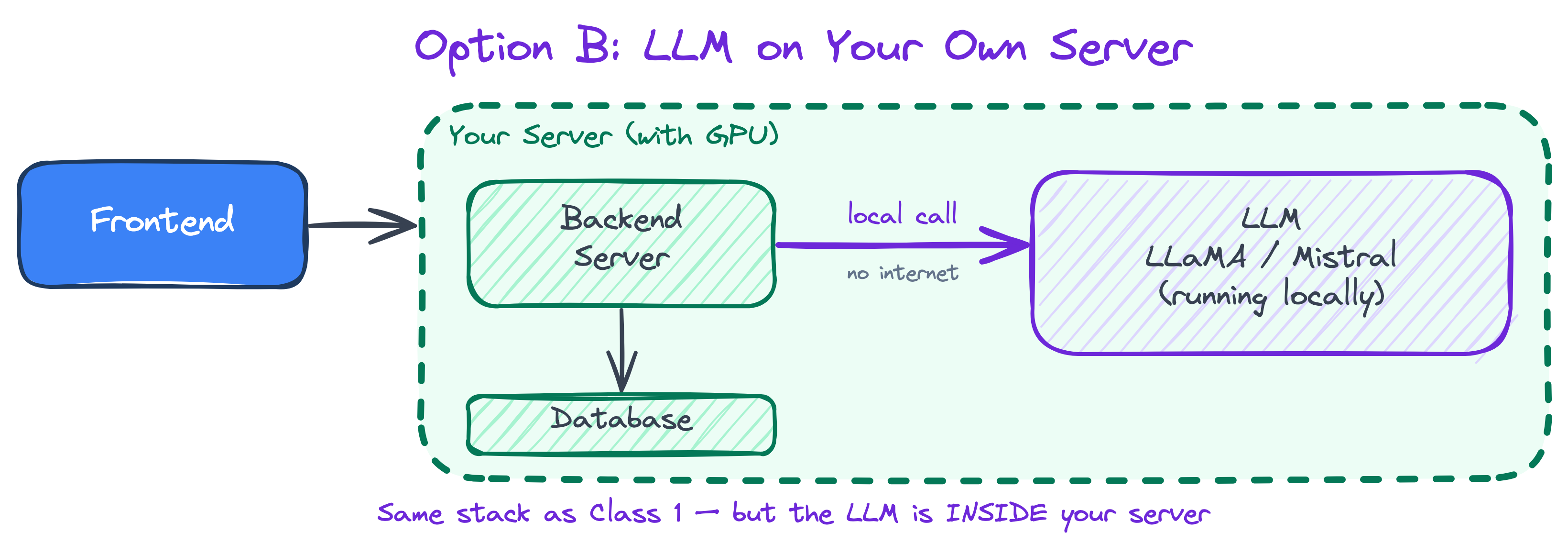
  • Full control — data never leaves your servers
  • No per-token cost — but you need GPUs ($$$)
  • Customizable — fine-tune on your own data
  • Best for: privacy requirements, high volume, or heavy customization

Tip

Start with an API provider. Switch to self-hosted only when you have a specific reason — privacy regulations, cost at massive scale, or fine-tuning needs.

Agentic AI

From Text to Action

Until recently, an LLM could only generate text. It couldn’t send an email, edit a file, or deploy your app — it could only talk about doing those things.

Tool use is what made agentic AI possible. The model can now request real actions:

  • send a Slack message
  • edit and save files
  • run code and tests
  • create a pull request
  • deploy an application

Note

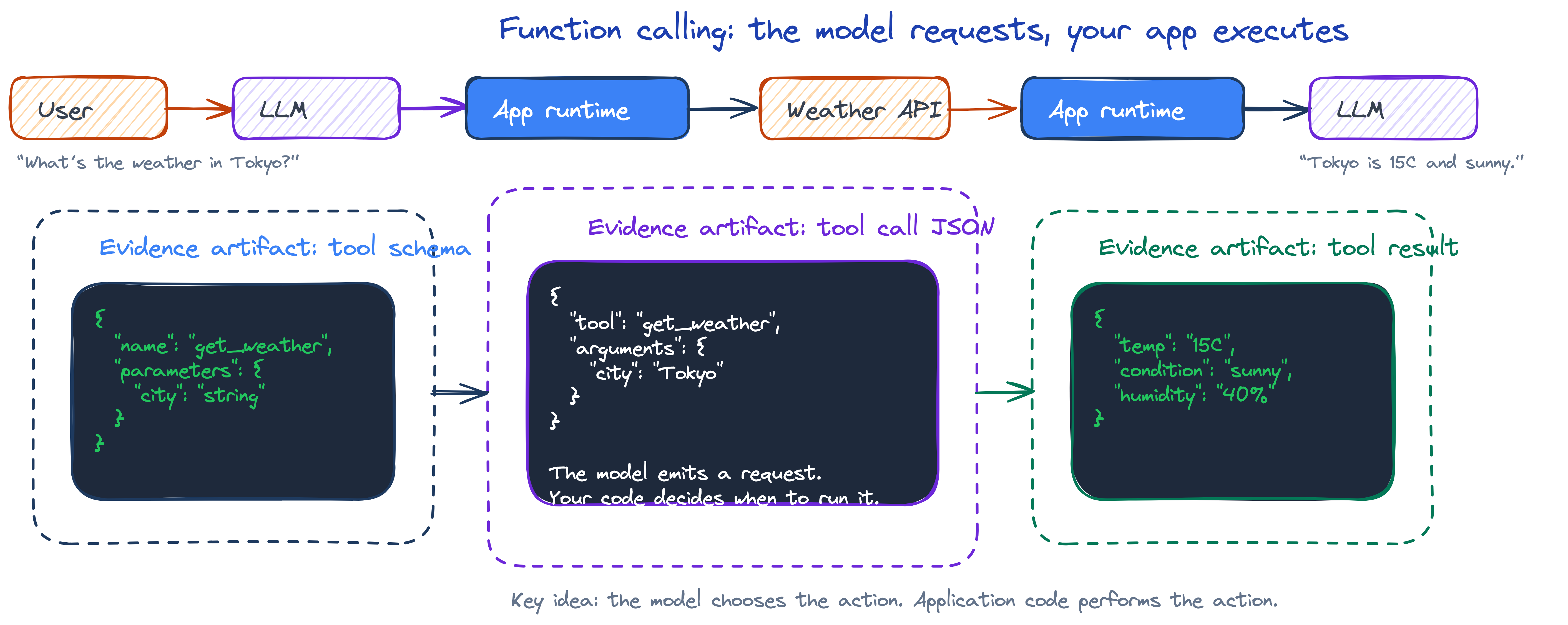
The model doesn’t execute the tool itself — it says “call this tool with these arguments.” Your code runs it, and the result goes back into the context.

How Tool Use Works

  1. You define the tools available
  2. The model chooses which tool to call
  3. Your application executes it
  4. The result comes back into the context
  5. The model continues with the new information
Important

The model does not run the tool itself. It emits a structured request saying which tool to call and with what arguments. Your code executes the tool.

What Is Agentic AI?

Agentic AI = AI systems that can plan, act, and adapt to achieve a goal — without a human directing every step.

Traditional AI waits for a prompt and gives you an answer. Agentic AI receives an objective, figures out the steps, executes them, evaluates the results, and keeps going until the job is done.

Note

Gartner predicts 40% of enterprise apps will include AI agents by end of 2026, up from less than 5% in 2025.

The Self-Feeding Loop

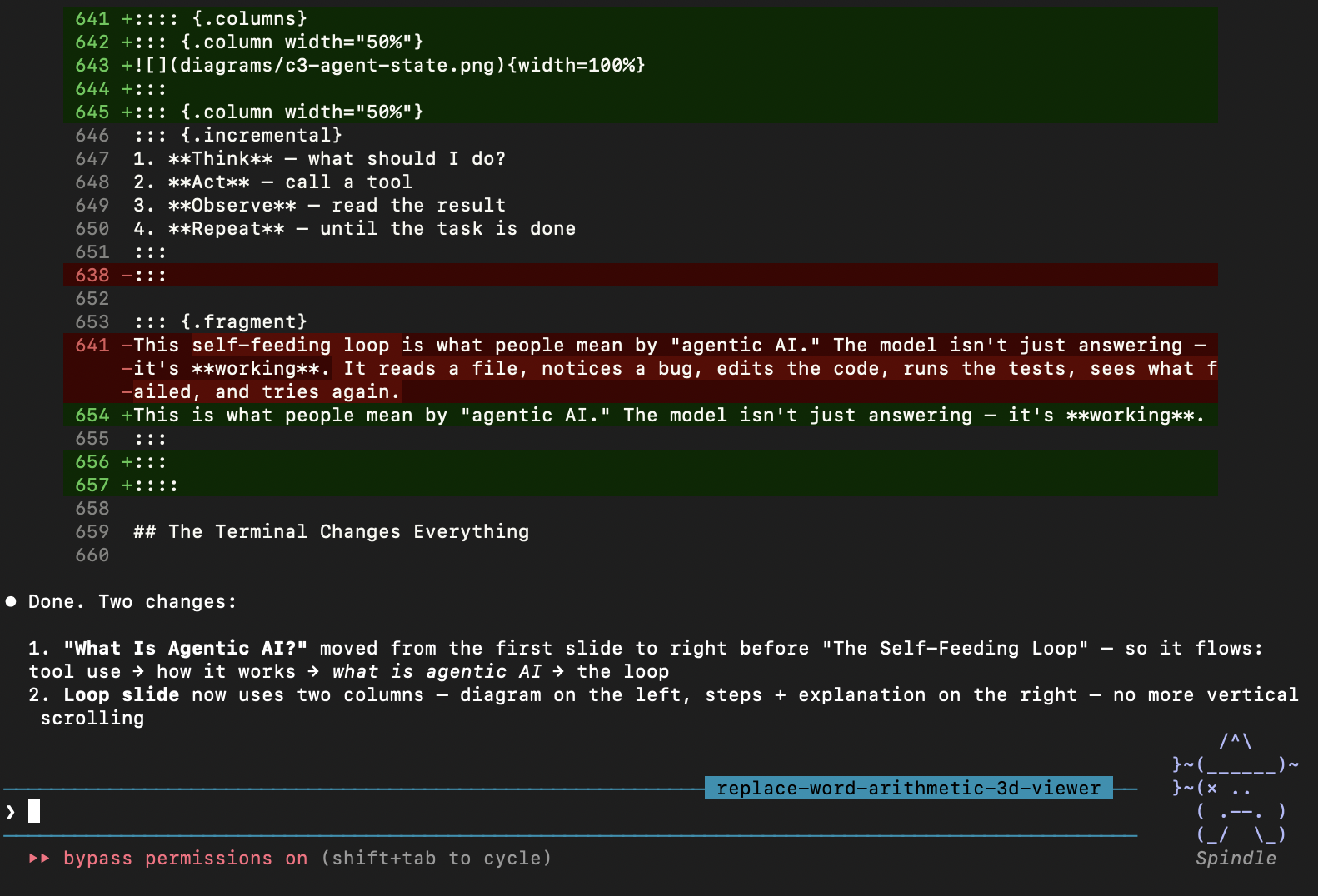
This is the key insight: when tool results feed back into the context, the model can react to what happened and decide what to do next.
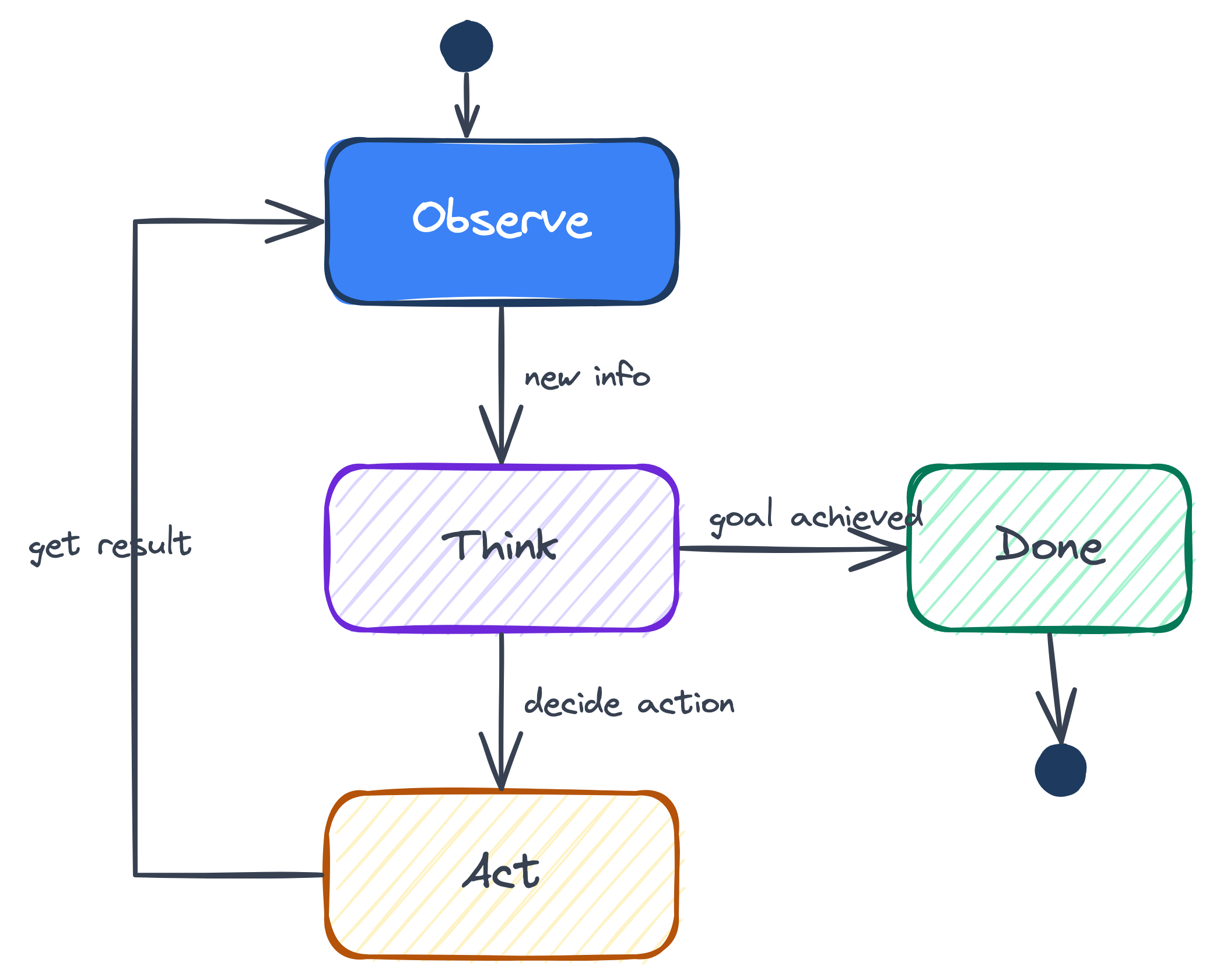
  1. Think — what should I do?
  2. Act — call a tool
  3. Observe — read the result
  4. Repeat — until the task is done

This is what people mean by “agentic AI.” The model isn’t just answering — it’s working.

The Terminal Changes Everything

When an AI can access the terminal, it can do anything your computer can do:

  • read and write any file
  • run any command or script
  • install packages
  • interact with git
  • call APIs
  • deploy applications

This is why Claude Code, Codex, and Gemini CLI are all terminal-first. The terminal is the universal tool.

Claude Code: Built on This Loop

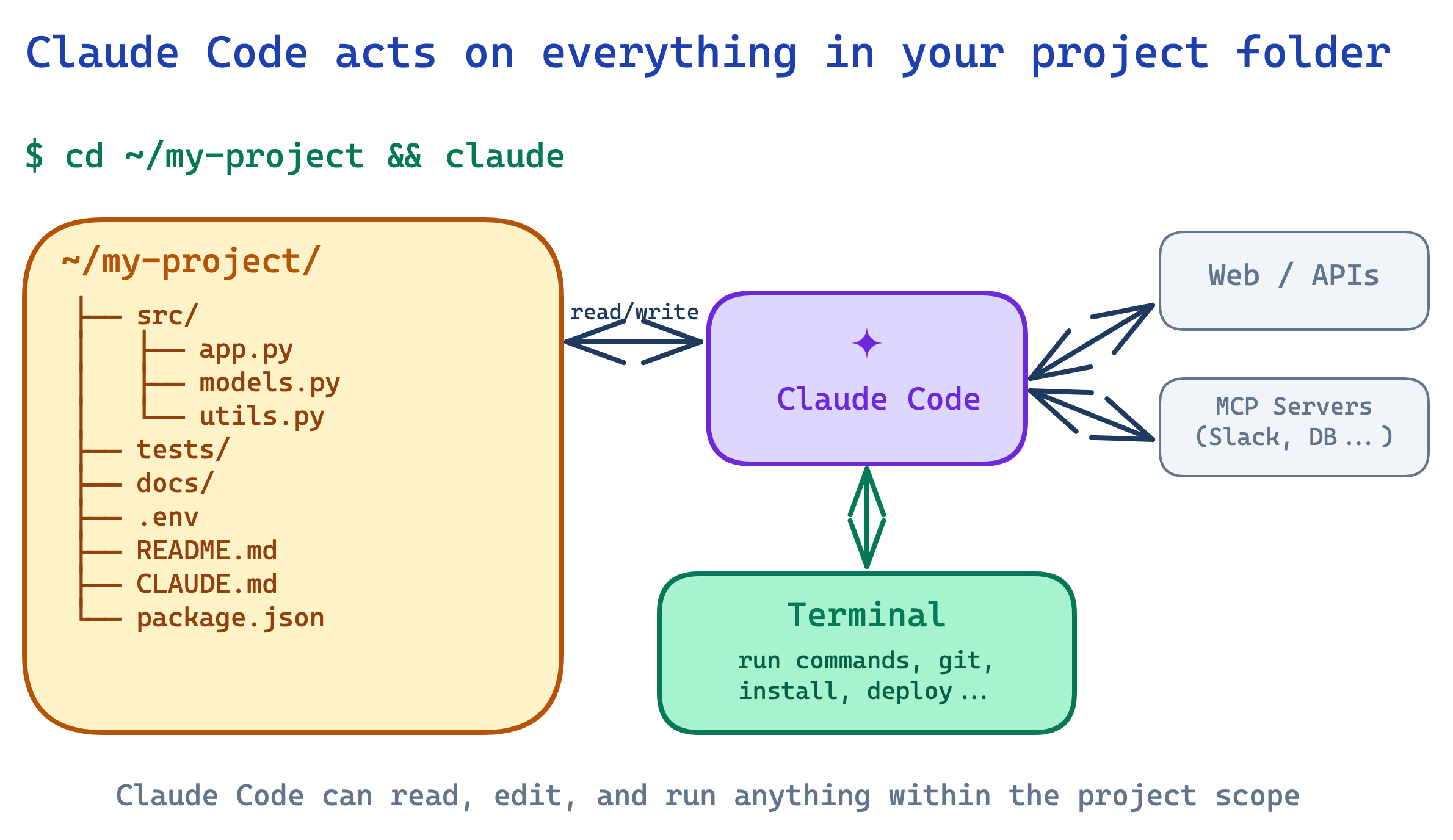
Claude Code is Anthropic’s agentic tool. It lives in your terminal and runs the exact loop we just described.

  • It reads your entire project before acting
  • It writes code across multiple files
  • It runs terminal commands and reacts to the output
  • It manages git — branches, commits, PRs
  • It’s not limited to code — anything you can do in a terminal, it can do

Tip

These slides were built with Claude Code. It created the diagrams, edited the markdown, ran the preview server, and deployed to Vercel — all from natural language instructions.

How Claude Code Sees Your Project

What Is a Harness?

The model is the brain. The harness is everything around it that makes the loop work.

  • Tools — what actions the model can take
  • Context management — what info gets sent each turn
  • Memory — what persists between sessions (plan files, CLAUDE.md)
  • Safety & permissions — what the model is and isn’t allowed to do
  • The loop itself — the orchestration that runs think → act → observe

Tip

“Start simple. Add agentic systems only when simpler solutions fall short.” — Anthropic

MCP

MCP: One Standard for All Tools

MCP = Model Context Protocol — an open standard that makes tool integrations reusable across AI apps.
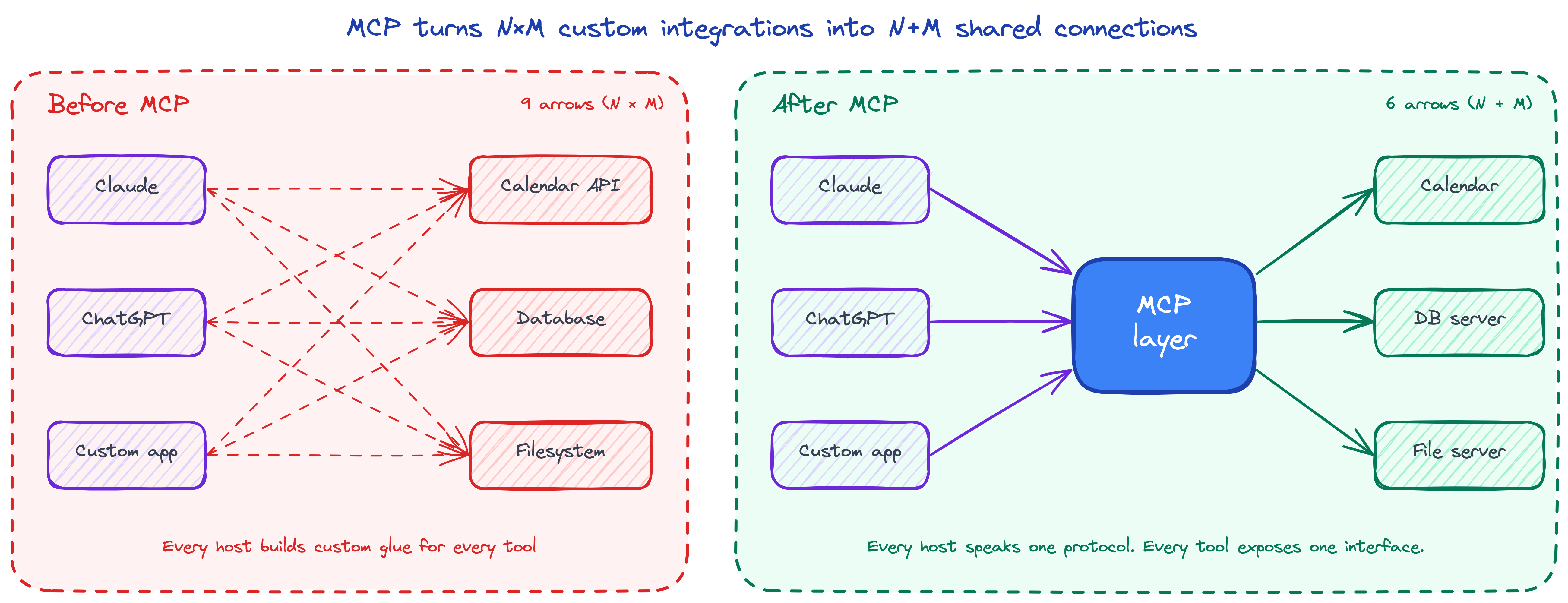
  • Tools: actions the model can request (search, calculate, deploy)
  • Resources: data the model can read (files, databases, docs)
  • Prompts: reusable prompt templates

Tip

Think of MCP as “USB for AI” — build the connector once, plug it into any app. A Slack MCP server works in Claude Code, Cursor, Windsurf, or any MCP-compatible tool.

Skills

Tools vs Skills

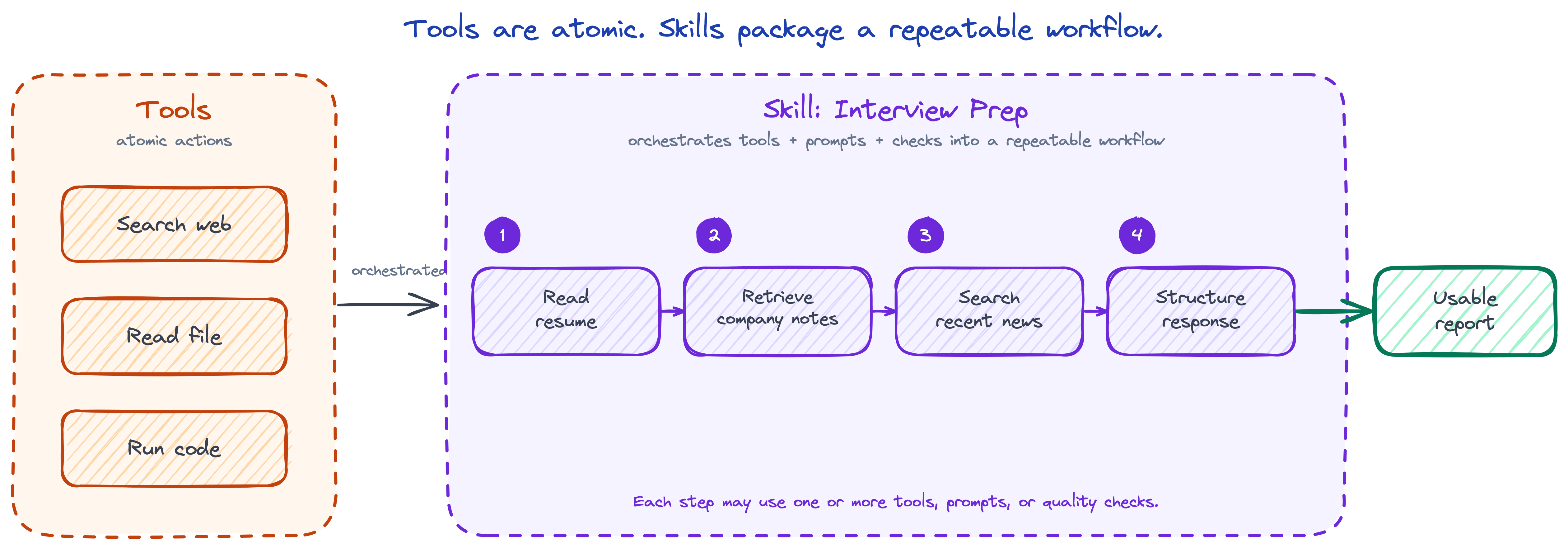
Tool = one atomic action (read a file, run a command)

Skill = a reusable workflow that combines prompts, tools, and judgment
Important

Tools give capabilities. Skills package good ways of using them. A skill is like a playbook — it tells the model what steps to follow, what to look for, and how to present results.

Skills in Practice

In Claude Code, a skill is just a markdown file with instructions:

---
name: review-pr
description: Review a pull request for bugs and style
---
# PR Review Skill
1. Read the diff with `git diff`
2. Check for security issues, bugs, and style
3. Write a summary with findings

When you type /review-pr, Claude loads these instructions and follows them. Skills are how teams standardize AI workflows — same model, same tools, consistent results.

Evaluations

LLMs Are Stochastic — and Prompts Are Brittle

Stochastic

Run the same prompt twice → two different answers. Same model, same input, different output.

That’s not a bug — that’s the architecture.

Brittle

Tiny prompt changes cause dramatic shifts. “List 3 bullets” vs “Give me 3 bullet points” → different tone, format, even correctness.

And every new model release (Claude 4.6 → Mythos, GPT-5 → GPT-5.4) moves the floor. Your prompts might silently break.

Important

You can’t eyeball this. You can’t manually re-test every scenario every time you tweak a prompt, swap a model, or add a tool. You need systematic, repeatable checks — or you’re flying blind.

Evals = Replicable + Human-Verifiable

An eval is a test case with two properties that must both hold:

  1. Machine-automated — a script runs it and produces a pass/fail, so you can run hundreds of cases on every change
  2. Human-verifiable — open any failure, read input + output, and see why it’s wrong in seconds
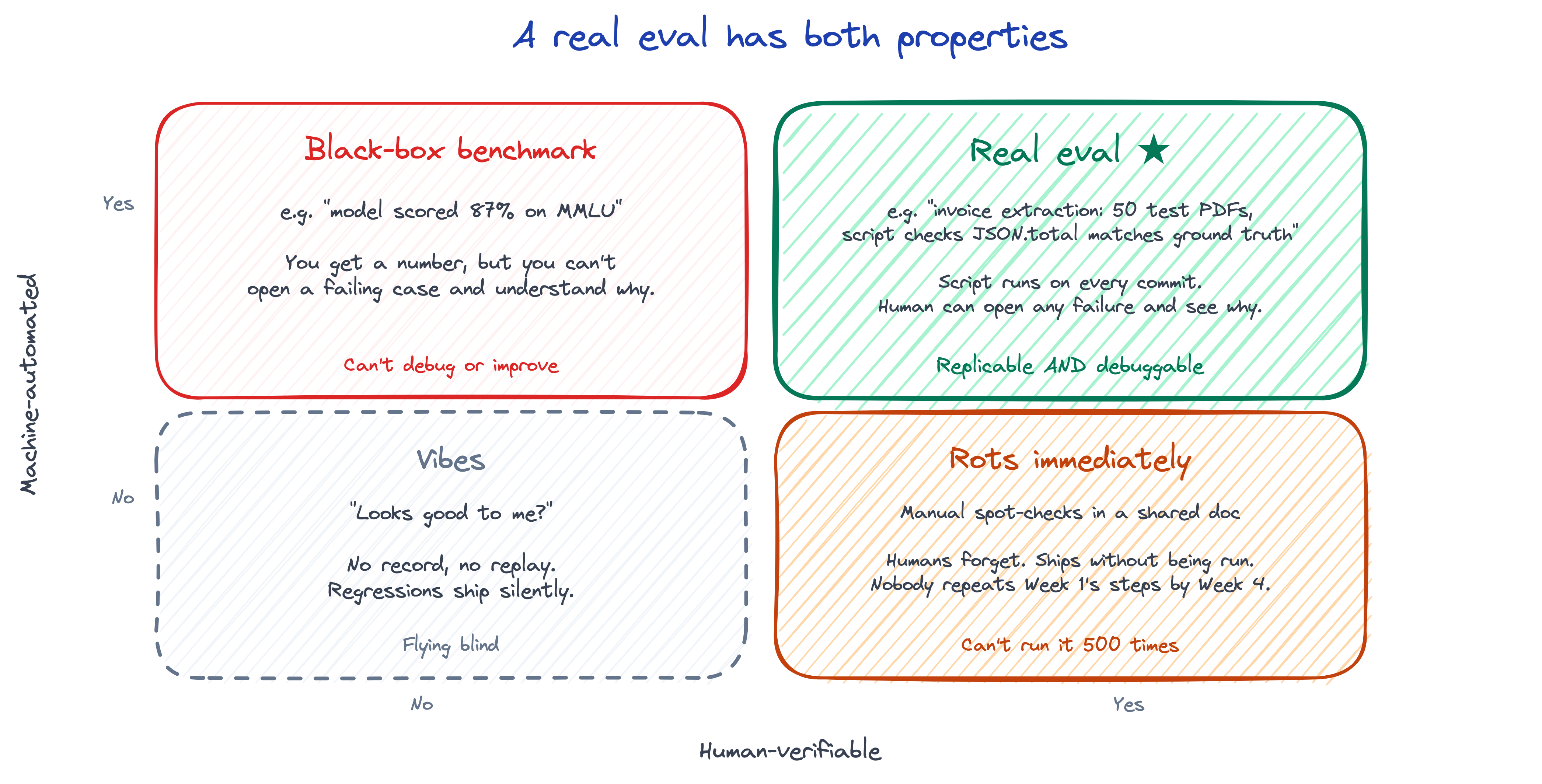
Miss either half → evals rot, or you can’t tell signal from noise. Benchmarks are scored. Evals are understood.

Running Evals in Practice

  • Start with 5–10 test cases, not 500. Evals compound.
  • Every real-world failure becomes a new test case. Your eval set grows with your product.
  • Run on every change: prompt edit, model upgrade, new tool, new context.

Three common check types:

  • Exact / format checks — cheap, deterministic (JSON keys match, regex matches, contains string)
  • LLM-as-judge — flexible, ~80% agreement with human reviewers. Use for subjective qualities (tone, helpfulness)
  • Human review — gold standard, reserved for the cases machines can’t score

Important

Teams that ship reliable AI invest in evals early. It’s what separates “works on my laptop” from “works in production.”

The Pace of Progress

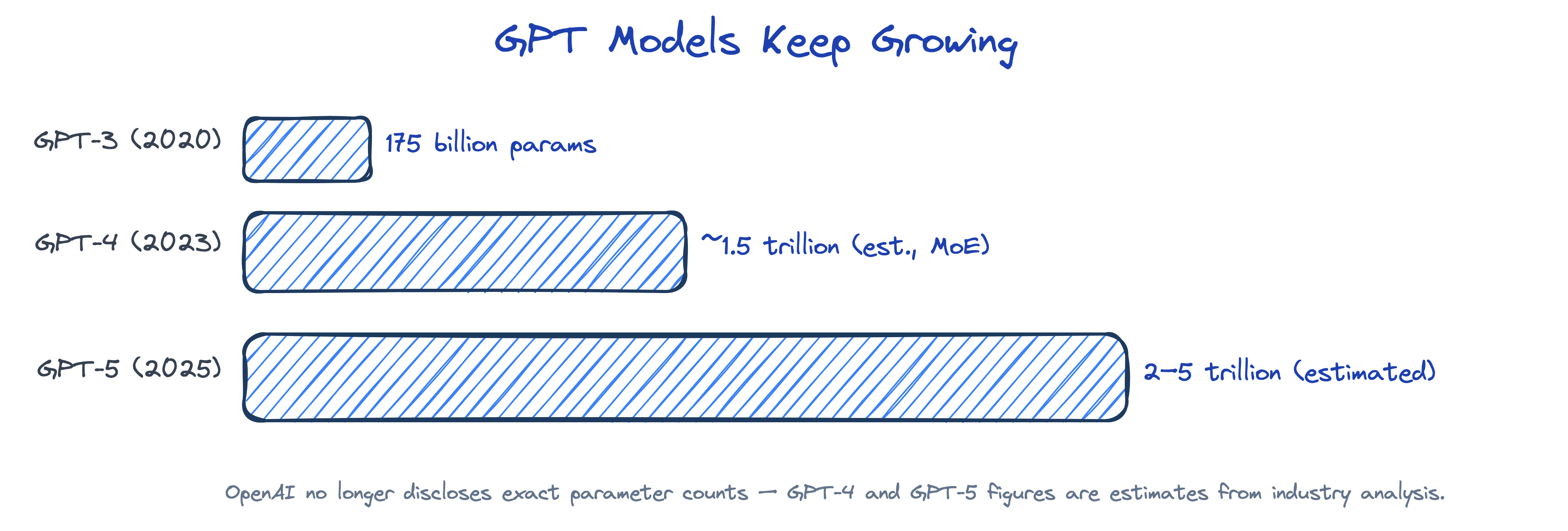
Models Keep Growing — Parameters

Takeaway: the exact counts matter less than the direction: frontier models keep scaling, even as labs disclose less.

Context Windows Keep Growing
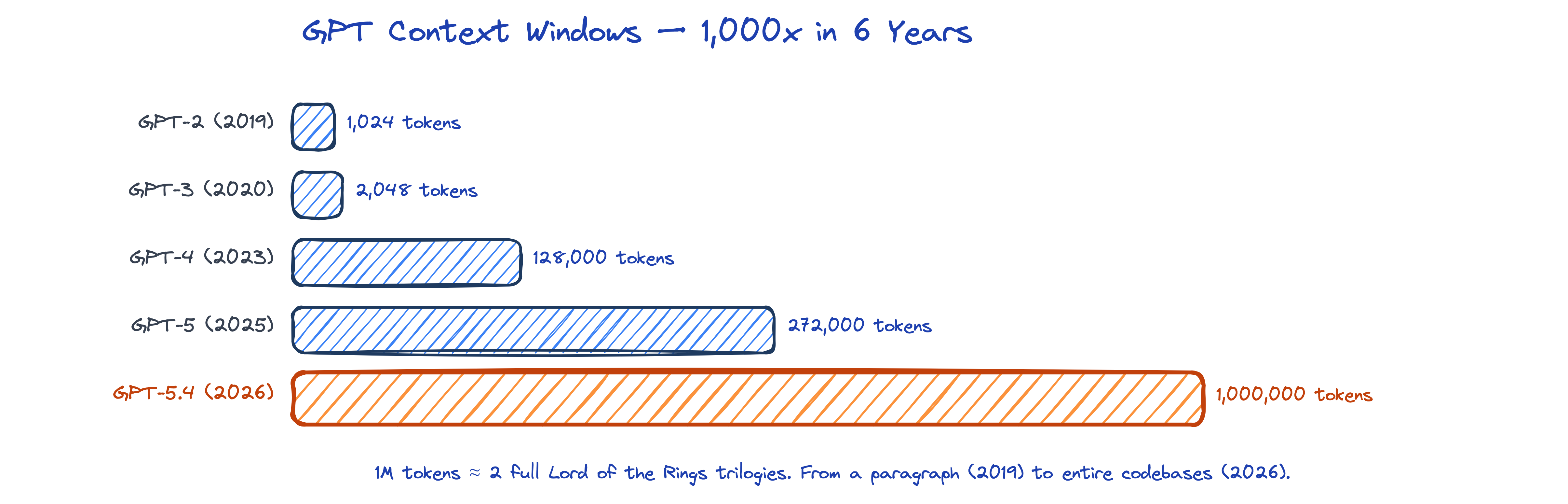
Takeaway: models can now hold much larger docs, codebases, and chat history in a single pass.

AI Can Follow Through on Longer Tasks
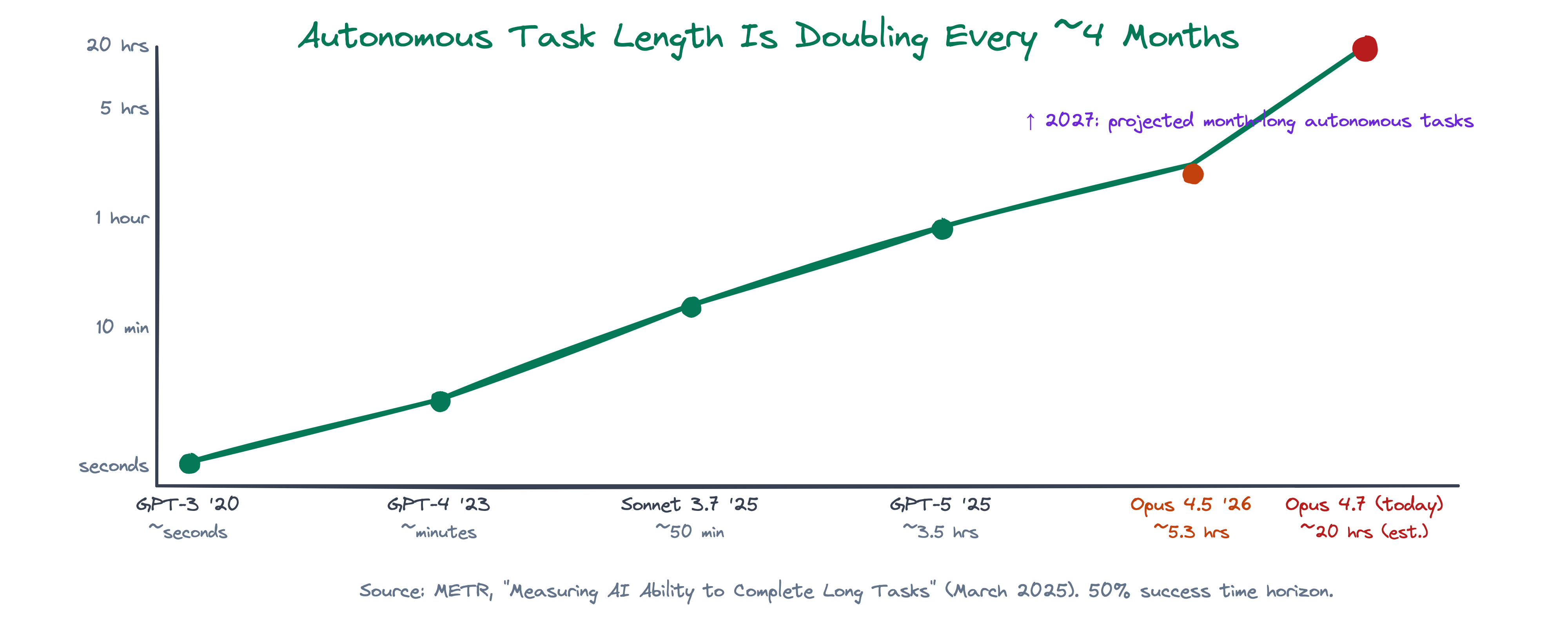
Takeaway: models are getting better at staying coherent across longer, multi-step tasks. Opus 4.7, released today, is pitched for ~20-hour background agentic work — a model you hand off a task to and come back to hours later, not one you babysit turn-by-turn. (The 20 hr figure is an extrapolation from the doubling trend; METR will publish the official number in the coming weeks.)

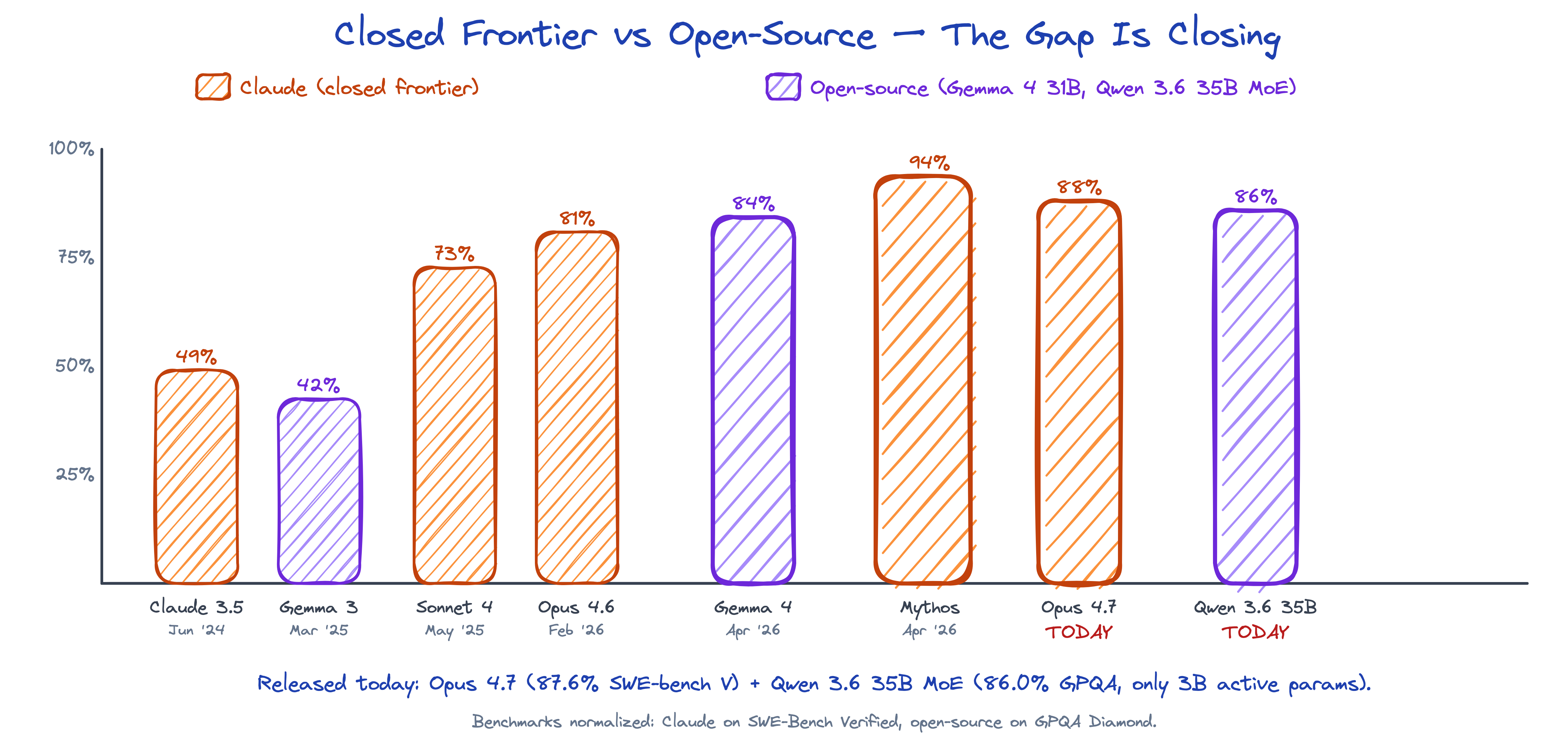
Frontier AND Open-Source Are Both Climbing
Important

The frontier keeps moving — but open-source is right behind it. Qwen 3.6 35B, released today, matches closed-frontier GPQA scores with only 3B active params. Opus 4.7 (also today) keeps Anthropic on the coding frontier at 87.6% SWE-bench Verified. A model you discarded last year may now pass your benchmark.

Staying Current

X Is the Front Page of AI

In AI, breakthroughs don’t start with press releases. They start with tweets. X (Twitter) is where researchers, CEOs, and engineers share what they’re building — often weeks before it hits the news.

If LinkedIn is where you find jobs, X is where you see the future first.

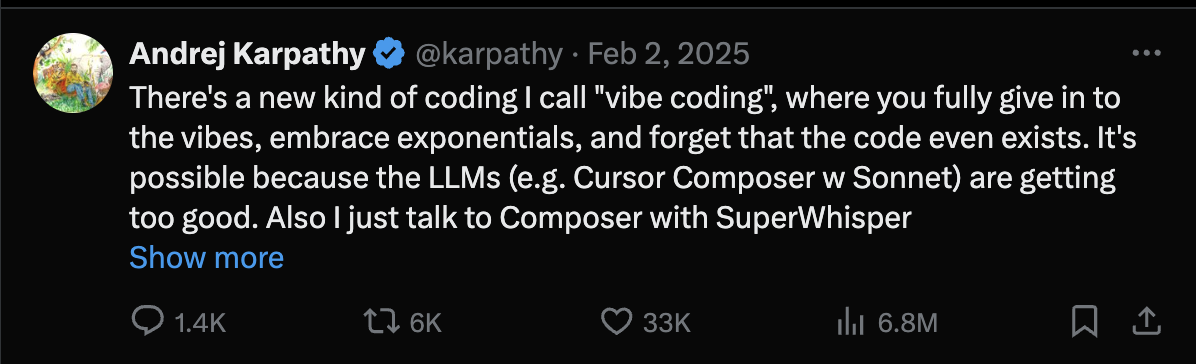
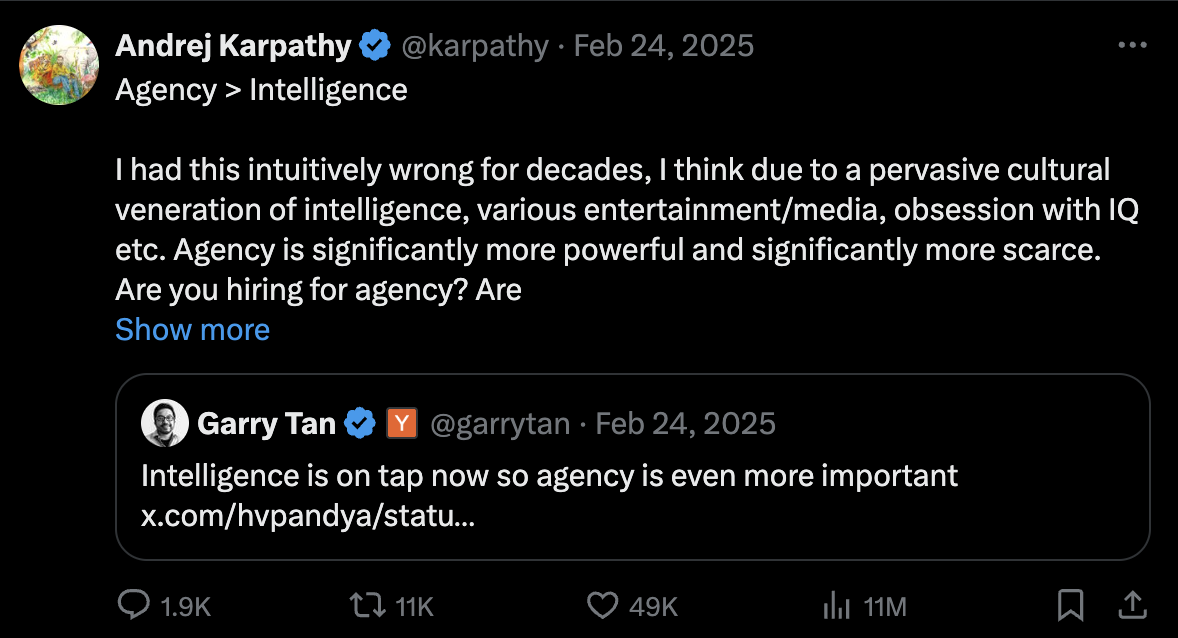
One account to start with: Andrej Karpathy (@karpathy) — founding member of OpenAI, co-creator of GPT, former head of Tesla Autopilot AI.

Who to Follow on X

Handle Who Why
@karpathy Andrej Karpathy OpenAI founding member, vibe coding, LLM wiki
@DarioAmodei Dario Amodei Anthropic CEO
@AnthropicAI Anthropic Claude, MCP, managed agents
@borischerny Boris Cherny Created Claude Code
@sama Sam Altman OpenAI CEO
@OpenAI OpenAI GPT, o-series, Codex
@DemisHassabis Demis Hassabis Google DeepMind CEO, Nobel laureate
@GoogleDeepMind Google DeepMind Gemini, AlphaFold, Gemma

Hands-On Project

Build Your Personal AI Knowledge Hub

Inspired by Karpathy’s LLM Wiki — a personal knowledge base that an LLM maintains for you.

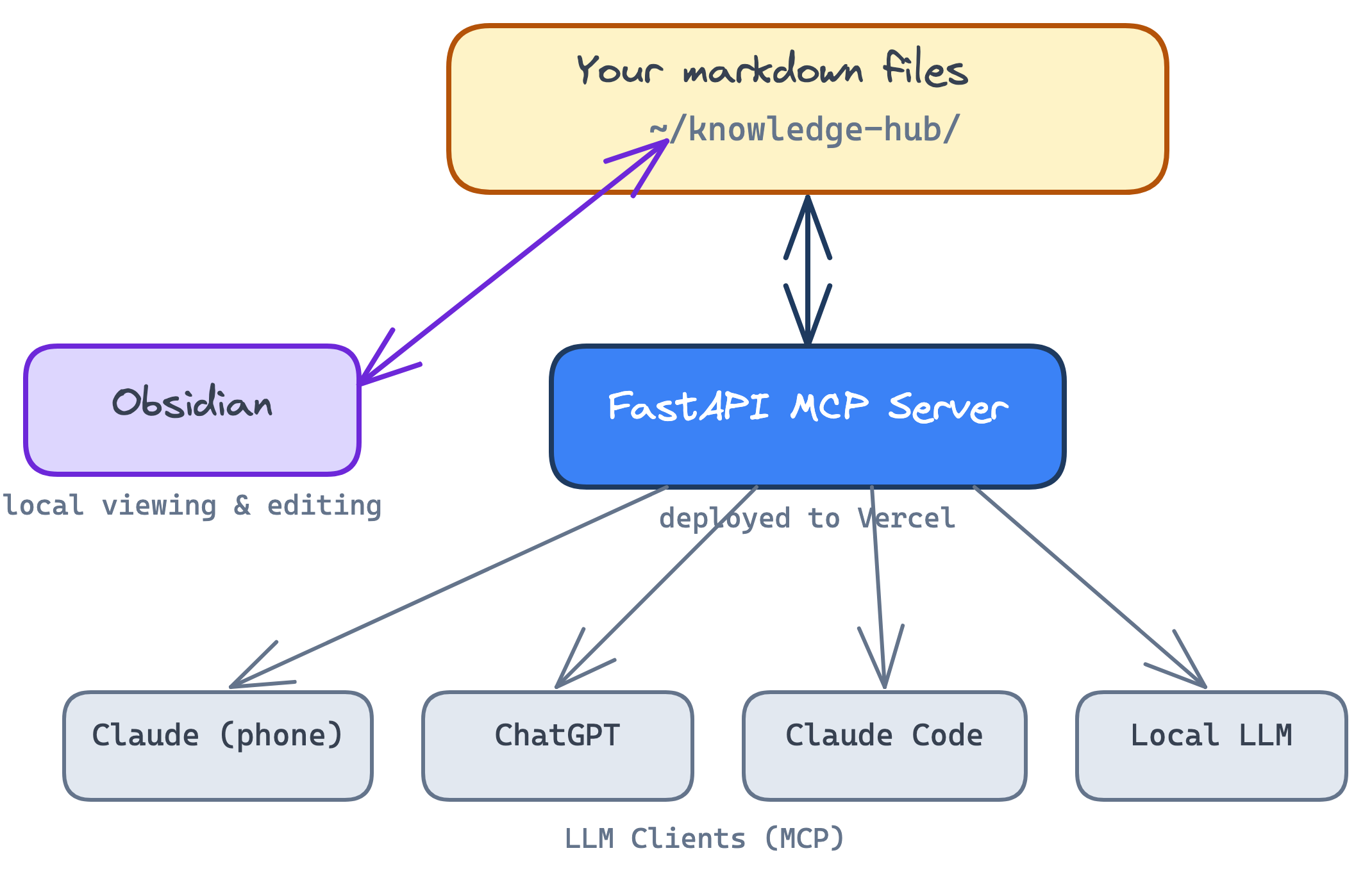
The idea: your notes, highlights, and summaries live as markdown files in a folder. A FastAPI backend serves them as an MCP server. Obsidian renders them locally. Any LLM — Claude on your phone, ChatGPT, a local model — can read and write to your hub via MCP.

Deploy to Vercel so it’s accessible from anywhere.

Architecture

The Karpathy Pattern: 3 Layers

Read Karpathy’s LLM Wiki gist before you build — it’s the spec. The pattern has three layers:

  • Raw sources (vault/raw/) — immutable input documents you drop in. Articles, papers, meeting notes, web clippings. Never modified.
  • Wiki (vault/wiki/) — LLM-maintained interlinked markdown pages: entity pages, concept pages, source summaries. Compounds over time.
  • Schema (CLAUDE.md at project root) — conventions telling the LLM how to maintain the wiki. Ingest workflow, query workflow, lint workflow. Loaded every session.

Important

Your job: curate sources, direct analysis, ask good questions. The LLM’s job: summarize, cross-reference, file, update, lint. The wiki compounds every time you add a source or ask a question.

Why Obsidian

Obsidian is a free, local-first markdown editor. Point it at a folder of .md files and it becomes a navigable knowledge base.

  • Files on disk — no lock-in, no cloud. The LLM writes files, you read them in Obsidian.
  • [[wikilinks]] render as clickable links between notes
  • Graph view visualizes the connections — orphan pages, hubs, and clusters become obvious
  • YAML frontmatter (tags, created, sources) powers filtering and Dataview queries

Tip

The workflow: LLM is the writer, Obsidian is the reader. Open your vault in Obsidian on one screen, Claude Code on the other — watch the graph grow as you ingest sources.

Setup: Open Obsidian → “Open folder as vault” → pick your vault/ directory. Done.

What the Hub Should Do

Important

  • Three-layer vault: raw/ (sources), wiki/ (LLM-maintained), CLAUDE.md (schema)
  • Six MCP tools: search_notes, get_note, create_note, update_note, ingest_source, lint_wiki
  • Supabase Auth (email/password) — your hub is private
  • Supabase Storage as the backing store (Vercel is stateless, no disk)
  • FastAPI JSON-RPC endpoint with JWT-protected /mcp
  • Deploy to Vercel → remote MCP URL works from Claude mobile/desktop
  • Obsidian opens the same folder of .md files for graph-view browsing
  • sync.py pulls remote vault to local for Obsidian, pushes local edits back

Suggested Build Prompt

First, read Karpathy’s LLM Wiki gist — this prompt is a concrete instantiation of that pattern. Then paste into Claude Code:

/plan Build a personal AI knowledge hub following Karpathy's LLM Wiki pattern:
https://gist.github.com/karpathy/442a6bf555914893e9891c11519de94f

=== STACK ===
- FastAPI (Python) for the MCP server backend
- Supabase Auth (email/password) for login
- Supabase Storage bucket as the backing store
  (Vercel serverless has no persistent disk — files cannot live on disk)
- MCP protocol for tool definitions over a JSON-RPC endpoint
- Obsidian for local viewing of the vault folder
- Vercel for deployment
- pytest for evals

=== 3-LAYER VAULT ===
vault/
  raw/                  # immutable source documents (never modify)
  wiki/                 # LLM-maintained interlinked markdown pages
  index.md              # content catalog, updated on every wiki change
  log.md                # chronological activity log, append-only
  schema.md             # human-readable wiki conventions
  templates/            # page templates the LLM follows
    entity.md           # entity pages (people, tools, companies)
    concept.md          # concept pages (ideas, techniques)
    source-summary.md   # digests of raw sources

CLAUDE.md at project root is the 3rd layer — the schema file.
It tells the LLM how to maintain the wiki (ingest / query / lint).

=== PAGE CONVENTIONS ===
Every wiki page MUST have YAML frontmatter:
  title, tags, created, updated, sources
Tag taxonomy: entity, concept, source-summary, comparison, analysis
Use [[wikilinks]] between pages — NEVER markdown [links](url)
Cite raw sources by linking to the source-summary page

=== 6 MCP TOOLS ===
search_notes(query, limit=5)   # index.md keyword match, TF-IDF fallback
get_note(path)                 # return full markdown of a page
create_note(path, title,       # create page with frontmatter,
            content, tags)     # update index.md, append to log.md
update_note(path, content)     # update body, bump `updated` date, log
ingest_source(title, content,  # create source-summary page in wiki/,
              source_type)     # update index + log
lint_wiki()                    # report broken [[wikilinks]], orphan pages,
                               # pages missing from index.md

=== SEARCH STRATEGY (NO VECTOR DB) ===
At personal-wiki scale (hundreds of pages), Karpathy's index.md approach works:
1. Read index.md, match query tokens against titles + tags + summaries
   (title weighted 3x, tags 2x, summary 1x)
2. If sparse results, fall back to TF-IDF + cosine similarity over
   the full text of all wiki/*.md files
Return top-K: {path, title, snippet, score}

=== AUTH (IMPORTANT) ===
Supabase now issues ES256 JWTs, not HS256.
Verify tokens via the JWKS endpoint:
  https://.supabase.co/auth/v1/.well-known/jwks.json
Use PyJWKClient from the `pyjwt` library.
Routes:
  POST /auth/signup  — proxy to Supabase auth
  POST /auth/login   — returns access_token
  GET  /health       — public, no auth
  POST /mcp          — JWT-protected, JSON-RPC

=== MCP ENDPOINT (SERVERLESS-COMPATIBLE) ===
The streamable HTTP transport with SSE does NOT work on Vercel serverless —
it needs persistent task groups that don't exist between invocations.
Implement a plain JSON-RPC POST /mcp that handles:
  method: "initialize"        → return server info + tool capabilities
  method: "tools/list"        → return the 6 tool schemas
  method: "tools/call"        → dispatch to the tool and return result
Same MCP protocol, stateless — works perfectly from Claude desktop/mobile.

=== SYNC SCRIPT ===
sync.py:
  python sync.py pull   # download all files from Supabase Storage → local vault/
  python sync.py push   # upload local vault/ edits → Supabase Storage
This lets Obsidian view/edit the vault locally, then push back to the
deployed server so Claude on your phone sees the changes.

=== EVALS (pytest) ===
- test_auth.py       — unauthenticated, invalid token, expired token all 401
- test_search.py     — index search + TF-IDF fallback return relevant pages
- test_crud.py       — create persists, update bumps date, index/log updated
- test_mcp.py        — tools/list returns 6 tools, tools/call for each works

=== DELIVERABLES ===
Working local (uvicorn) + deployed (Vercel) server
README with: env var setup, Supabase bucket creation, platform install notes
CLAUDE.md with ingest / query / lint workflows
Seed vault/ with schema.md, starter index.md, log.md, and all 3 templates
All 24+ evals passing
Obsidian-viewable vault after running `python sync.py pull`

IMPORTANT: The goal is the Karpathy pattern — a compounding wiki,
not a chatbot. The LLM is the writer, Obsidian is the reader,
CLAUDE.md is the discipline.

Tips & Gotchas From Building This

Things that will bite you (and how to fix them)

Vercel has no persistent filesystem. Serverless functions get a fresh, read-only container per request. You cannot store markdown files on disk. Use Supabase Storage as the backing store and a sync.py script to pull/push between remote and local Obsidian vault.

MCP’s streamable HTTP transport doesn’t work on serverless. It needs persistent connections and background task groups. Instead, implement a simple JSON-RPC endpoint (POST /mcp) that handles initialize, tools/list, and tools/call directly — same protocol, stateless.

Supabase now issues ES256 JWTs, not HS256. Your auth code needs to verify tokens via Supabase’s JWKS endpoint (/auth/v1/.well-known/jwks.json), not a shared secret. Use PyJWKClient from the pyjwt library.

Vercel env vars set via CLI can get trailing newlines. Always .strip() environment variables in your code, or use printf instead of <<< when setting them.

Obsidian won’t open a folder via URI until it’s been opened once manually. The first time, open Obsidian → “Open folder as vault” → select the vault directory. After that, the obsidian:// URI scheme works.

FastAPI and the MCP SDK can have version conflicts. The mcp package installs starlette 1.0, which requires fastapi >= 0.135. Pin your versions in requirements.txt.

CLI Tips: Vercel & Supabase

Vercel CLI — deploy and manage from the terminal

npm i -g vercel            # install
vercel                     # deploy (interactive, creates project)
vercel --yes --prod        # deploy to production, no prompts
vercel env add KEY production   # set an env var (pipe value in)
vercel env ls              # list all env vars
vercel env rm KEY production --yes  # remove an env var
vercel logs <url>          # stream runtime logs

Tip: set env vars with printf 'value' | vercel env add KEY production to avoid trailing newlines from <<<.

Supabase CLI — manage your project without the dashboard

brew install supabase/tap/supabase   # install on Mac
supabase login                       # authenticate (stores token in keychain)
supabase projects list               # list your projects
supabase link --project-ref <ref>    # link current directory to a project
supabase projects api-keys --project-ref <ref>  # get anon + service_role keys

Get the JWT secret (not exposed directly by CLI — use the management API):

# 1. Get your access token from the macOS keychain
TOKEN=$(security find-generic-password -s "Supabase CLI" -w \
  | sed 's/go-keyring-base64://' | base64 -d)

# 2. Fetch the JWT secret via the API
curl -s "https://api.supabase.com/v1/projects/<ref>/postgrest" \
  -H "Authorization: Bearer $TOKEN" | python3 -c \
  "import sys,json; print(json.loads(sys.stdin.read())['jwt_secret'])"

Create a storage bucket via the Supabase Storage API:

curl -X POST "https://<ref>.supabase.co/storage/v1/bucket" \
  -H "Authorization: Bearer <service_role_key>" \
  -H "Content-Type: application/json" \
  -d '{"id":"wiki","name":"wiki","public":false}'

Disable email confirmation (useful for personal projects):

curl -X PATCH "https://api.supabase.com/v1/projects/<ref>/config/auth" \
  -H "Authorization: Bearer $TOKEN" \
  -H "Content-Type: application/json" \
  -d '{"mailer_autoconfirm": true}'

What This Project Teaches

Concept Where it appears
markdown & .md files entire vault is plain markdown — portable forever
system prompts as files CLAUDE.md defines conventions the LLM reads every session
authentication Supabase Auth with ES256 JWTs verified via JWKS
evals 24+ pytest tests across auth, search, CRUD, MCP
RAG (done Karpathy-style) index.md as search catalog + TF-IDF fallback, no vector DB
tool use / MCP 6 tools via JSON-RPC, protected by JWT, works on serverless
agentic loops LLM ingests sources → updates entities → lints → synthesizes
deployment patterns Supabase Storage as stateless backing store for Vercel
the Karpathy pattern 3 layers: raw sources + LLM wiki + CLAUDE.md schema
human/LLM workflow you curate and ask; LLM summarizes, cross-references, files

Class 3 Survey

Thank You & What’s Next

Thank you for being here. You now understand how production AI systems actually work — prompting, context, RAG, agents, MCP, and evals.

→ Class 3 Survey

Help me improve — 1 minute, anonymous.

Next: Class 4 — Building AI Agents →