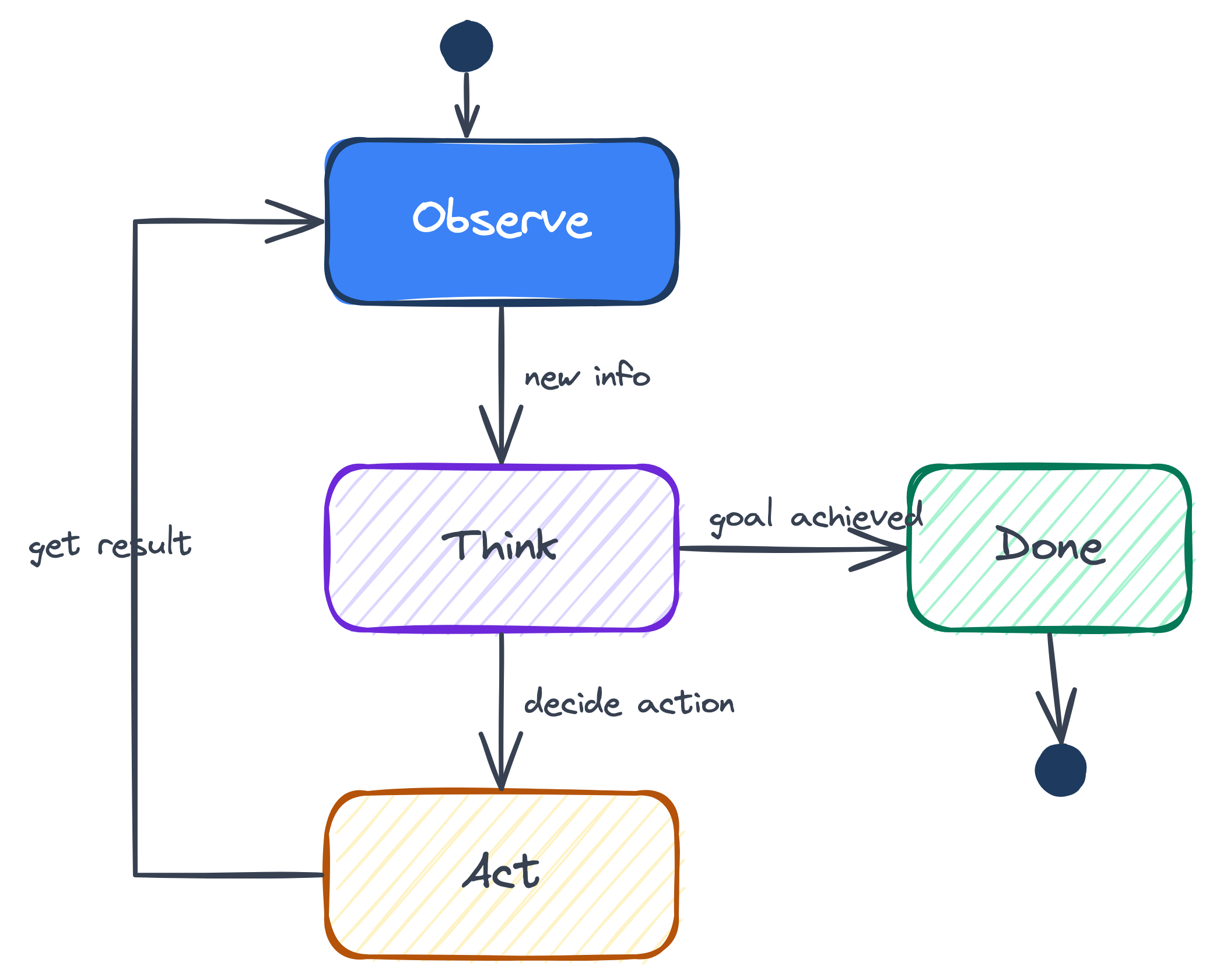
Class 4: Multi-Agent Systems

From Zero to AI Agents

Why This Class?

From Managing Workflows to Managing Agent Teams

The MBA skill is not “I use AI.” It is redesigning work when parts of the workflow can reason, call tools, and hand work to other agents.

  • Old workflow redesign — map the process, assign owners, define handoffs, set KPIs
  • Agent workflow redesign — same move, but some owners are model loops with tools
  • The manager’s job — decide what gets delegated, what stays code, what needs review
  • The operating model — orchestrators, workers, evaluators, advisors, budgets, traces
  • The edge — not prompting harder; designing a system that delegates safely

Class 3 gave you one agent. Class 4 is about the management layer around it: staffing the workflow, setting the rules, watching the handoffs, and knowing when the team is worth the cost.

If you can redesign a business process, you already have the right mental model. The new question is: which boxes in the workflow should be code, which should be agents, and who checks the work?

What This Class Gives You

  • Anatomy of an agent — the ReAct loop, why every framework (Claude Code, LangGraph, OpenAI Agents SDK) wraps the same four parts
  • OpenClaw as a case study — how the most popular agent on GitHub is actually wired. Not magic.
  • Code vs LLM — the production design question — which steps should be deterministic code, which should be a stochastic LLM call, and why the answer is almost always “mostly code, sparingly LLM”
  • The workflow patterns — chaining, routing, evaluator (still one agent); orchestrator-workers, advisor (a team) — the Lego bricks you compose into any workflow
  • When to go multi-agent — and when NOT to — because most projects shouldn’t, and recognizing that is the actual skill
  • Production & ops — cost curves, observability, context rot, why firms hire philosophers to design model personalities
  • Safety, alignment, security — the governance layer before anything ships

The MBA who can design an agent team — pick patterns, budget tokens, know the failure modes — is already doing what most engineers will need to do in two years. Get there first.

Class 3 Recap

One Agent, One Loop

In class 3 we built up to a single agent. Remember the loop:

  • one model (one “brain”)
  • one context window
  • one thread of attention
  • one cost tier (whatever model you picked)

That is one employee. A smart one — but still one.

The ReAct Loop We Built

Observe → Reason → Act → repeat. That was the whole thing.
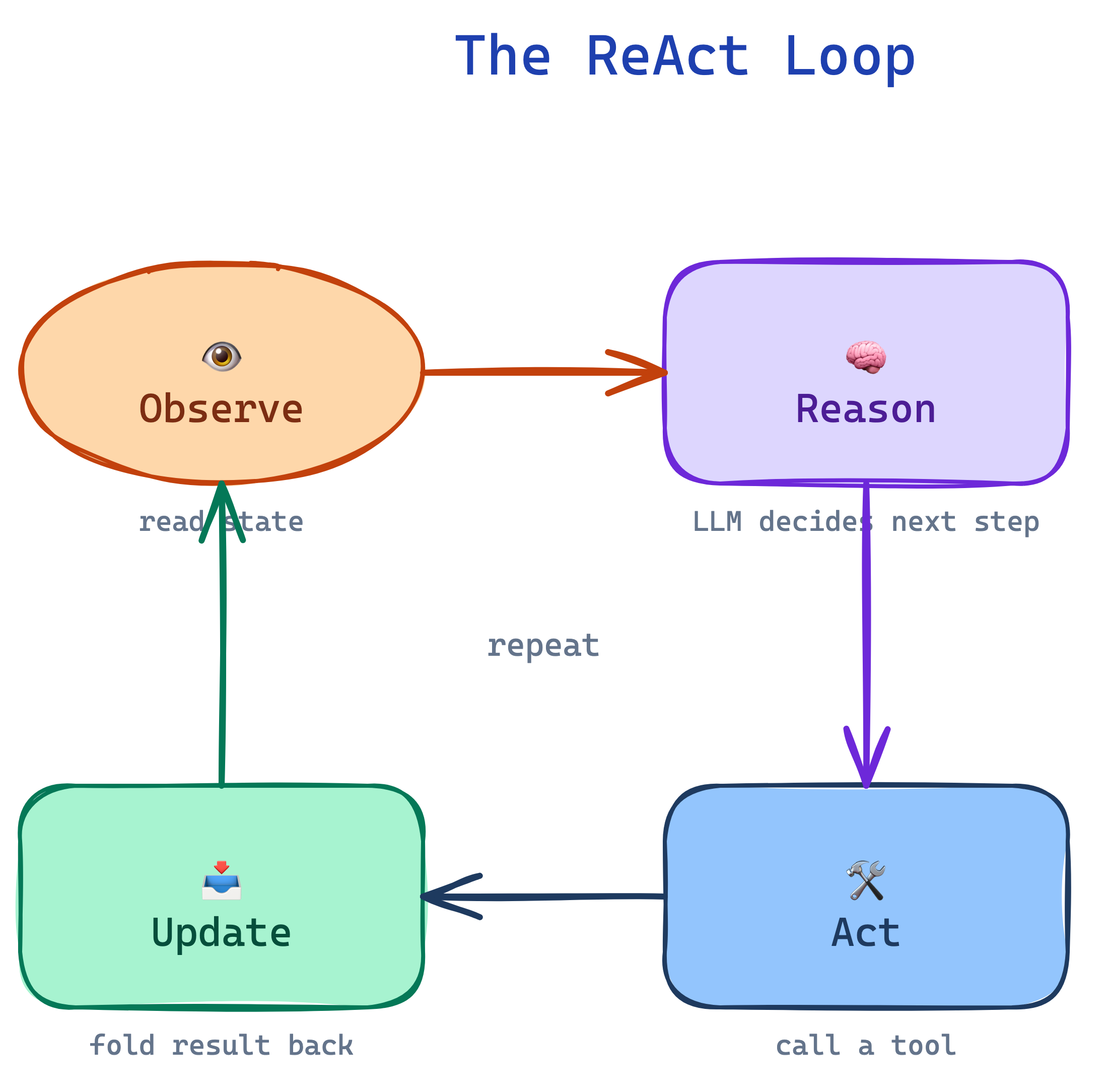
  • Observe — read the current state (user message, tool output, file contents)
  • Reason — the LLM thinks out loud about what to do next
  • Act — call a tool, write a file, send a response
  • Update — the result flows back into the observation and the loop runs again

The loop ends when the model decides it’s done — or when the harness hits a stop condition (max steps, timeout, human override).

Tools — How the Model Reaches Into the World

Tool use is what separated ChatGPT from Claude Code. The agent can:

  • Request a tool by name with structured arguments
  • Wait for the harness to run it (search, SQL, shell, HTTP)
  • Read the result and fold it into the next reasoning step
  • Chain tool calls across many turns until the task is done

The model never touches your filesystem, database, or APIs directly. The harness does. The model only speaks JSON — “please run read_file with {path: ...}” — and reads what comes back.

The Harness — Where Engineering Lives

Around every agent is a small, unglamorous loop (Python, Node, Go, Bash — doesn’t matter) that does the real work:

  • Calls the model with the full message history + tool schemas
  • Parses which tool was requested
  • Executes it with proper permissions + timeouts
  • Feeds the result back into the next call
  • Enforces limits: budget, steps, approvals, allowlists

The model is the star. The harness is where all the engineering lives — retries, auth, audit trails, cost caps. Class 4 is mostly about the harness growing up to coordinate many models instead of one.

What an Agent Actually Is

Anatomy of an Agent — The Loop

An agent is a loop: a model observes state, picks a tool, the harness runs it, the result feeds back — until the task is done.
Every real agent framework — Claude Code, LangGraph, OpenAI Agents SDK, a hand-rolled Python while loop — wraps the same four parts into that loop. The only thing that changes is how much of the harness you write yourself.

Anatomy of an Agent — The Four Parts

Component What it does Analogy
Memory Context window + external store Notebook of recipes
Planning Decides next action given state Reasoning through the steps to plate the dish
Tools Executes actions in the world Knife, pot, stove
Loop The harness that runs it all The shift — order in, plate out, repeat

Who Decides Which Tool? — Code vs LLM

Inside the loop, something has to pick the next tool. There are two ways to decide — and the choice is a governance decision, not just a technical one.

💻 Code-based planner

Plain Python: if / elif on the input.

  • ✅ Deterministic — same input, same tool, every time
  • ✅ Cheap — no model call to decide
  • ✅ Auditable — the routing logic is literally the source code
  • ❌ Brittle — “multiply 5 × 21” routes correctly; “five times twenty-one please” doesn’t

🧠 LLM-based planner

Let the model choose the tool itself.

  • ✅ Flexible — handles any phrasing, any language
  • ✅ Generalizes — you add a tool, it figures out when to use it
  • ❌ Costs tokens on every decision
  • ❌ Non-deterministic — can pick the wrong tool, or hallucinate a tool name that doesn’t exist

Important

Rule of thumb: code-based when routing is stable and you need an audit trail (finance, healthcare, anything regulated). LLM-based when the input surface is open-ended (assistants, agents-as-products).

The Routing pattern coming up in a few slides is exactly this tradeoff — applied to whole agents instead of individual tool calls.

When Tools Break — Error Handling in the Loop

Tools fail. A lot. Every production agent needs a story for each class of failure:

  • Network — timeout, rate limit, 500 from the API
  • Permission — the token’s scope doesn’t cover this tool
  • Bad arguments — model called read_file(path="../../etc/passwd")
  • Tool crashed — uncaught exception in your own code
  • Hallucinated tool — model calls slack_search or geocode(...) with perfect JSON — tools you never registered. It was trained on millions of APIs; it remembers ones you didn’t give it.

What the harness must do:

  • Catch the error, format it as a tool result
  • Feed it back into the model — let it retry, pick a different tool, or give up
  • Enforce a retry budget so the loop doesn’t burn through your wallet
  • Strict tool registry — unknown tool → "tool_not_found: <name>. Available: [list]". Never silently execute a “close match.”
  • Log every failure for the trace

Warning

Silent failures are the worst kind. If a tool crashes and you return empty string, the model happily invents an answer on the non-result. Always return a structured error — never nothing.

State & Memory — Beyond the Context Window

Three places to put information:

  • Context window — what the model sees this turn. Expensive, volatile, forgets the middle.
  • Session log — the full conversation, durable on disk. Outlives the context window and even the process.
  • External store — filesystem, wiki, vector DB. Survives everything. The “filing cabinet.”

Three decisions to make:

  • Checkpoint — what must survive a restart? (plan, key findings, open questions)
  • Discard — what was just scratch work? (intermediate tool outputs, stale search results)
  • Retrieve — when do we pull something back in? (only when the current step needs it)

Memory is a harness decision, not a model decision. The model doesn’t remember between calls — you decide what to carry forward. Every token you re-send costs money and crowds the window.

Prompt Isolation & Tool Allowlists

The system prompt defines what an agent is allowed to think about. The tool list defines what it’s allowed to do. Both are doors you can lock.

Prompt isolation

  • Each agent has its own system prompt — no bleed from the parent’s instructions
  • Subagents do not see the main conversation history; only the narrow task the parent handed them
  • Stops injection attacks from propagating across agents

Tool allowlist

  • Declarative: .claude/agents/researcher.md lists exactly [WebSearch, WebFetch, ingest_source]
  • Nothing else is callable — even if the model hallucinates the name
  • Least-privilege at the agent level, not just the human level

These two mechanisms — prompt isolation and tool allowlists — are why subagents are safe to spin up in the multi-agent patterns later. Without them, every agent is a liability. With them, each is a contained box.

Why Agents Need Guardrails

Everything above — error handling, hallucination, retries, allowlists — traces back to one truth:

Same input, different output. The same prompt twice does not produce the same tool calls. Sometimes trivial (phrasing). Sometimes catastrophic (skips a step, picks the wrong tool, exfiltrates data).

Evals don’t make it deterministic. An eval says “passes 94% of the time on our test set” — a probability threshold, not a guarantee. The 6% still ships. Guardrails (schemas, allowlists, retries, humans) live around the LLM, not inside it.

Which drives the rest of this class: which steps should be stochastic agents, which should be deterministic code?

Stochastic Agents vs Deterministic Code Workflows

The Production Design Question

Every agent system you’ll design is a mix of two kinds of steps. Naming them is the most important decision you’ll make.
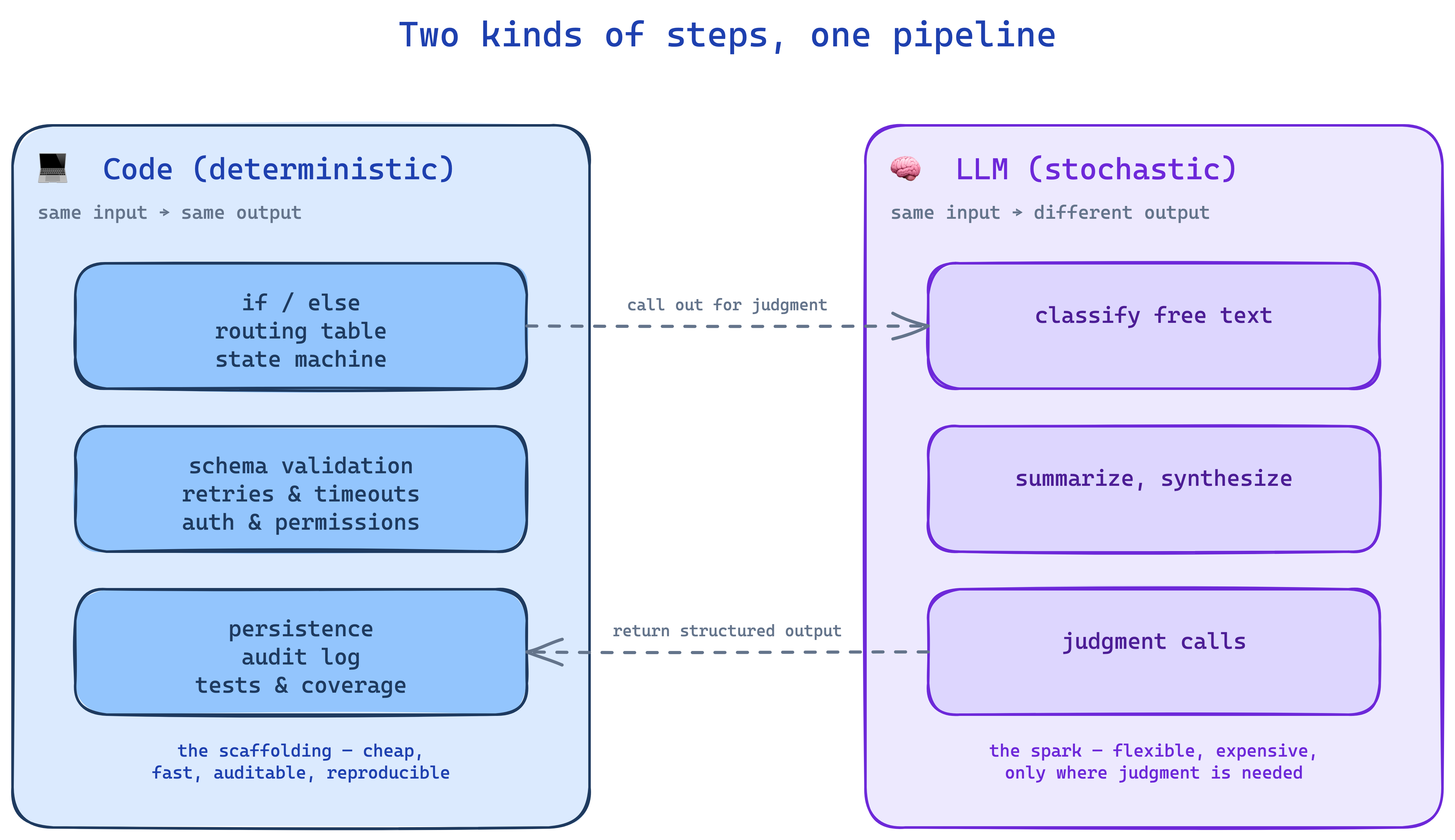
In production, the scaffolding is always code. The LLM is inserted only at the spark points where judgment is actually needed. Get this wrong and you’re either brittle (all code, no flexibility) or broke (all LLM, no predictability).

The Decision Rubric

Prefer code. It’s cheaper, deterministic, testable. Only reach for an LLM when code genuinely can’t do the job.

💻 Default — use code

  • Logic is expressible as rules, schemas, or SQL
  • Output must be exactly reproducible (reports, invoices, migrations)
  • It’s a system boundary — auth, payments, persistence, external API
  • Latency or cost matters (every millisecond, every penny)
  • You need a test that catches regressions forever

🧠 Exception — when code can’t

  • Input is unstructured natural language or ambiguous
  • The space of valid outputs is open-ended
  • Judgment, synthesis, or summarization is required
  • No rule-based spec is feasible (too many edge cases)
  • A human would do it with soft skills, not a spec

If the answer is “both” — split the step. One code step (the deterministic part) calling one LLM step (the judgment part), then code again to validate and persist.

Skeleton and Spark — The Production Pattern

Every real agent system has the same shape. The skeleton is code: retries, ordering, routing table, persistence, state machine, auth, error handling, validation. The spark is the LLM step, dropped in only where judgment is actually needed.
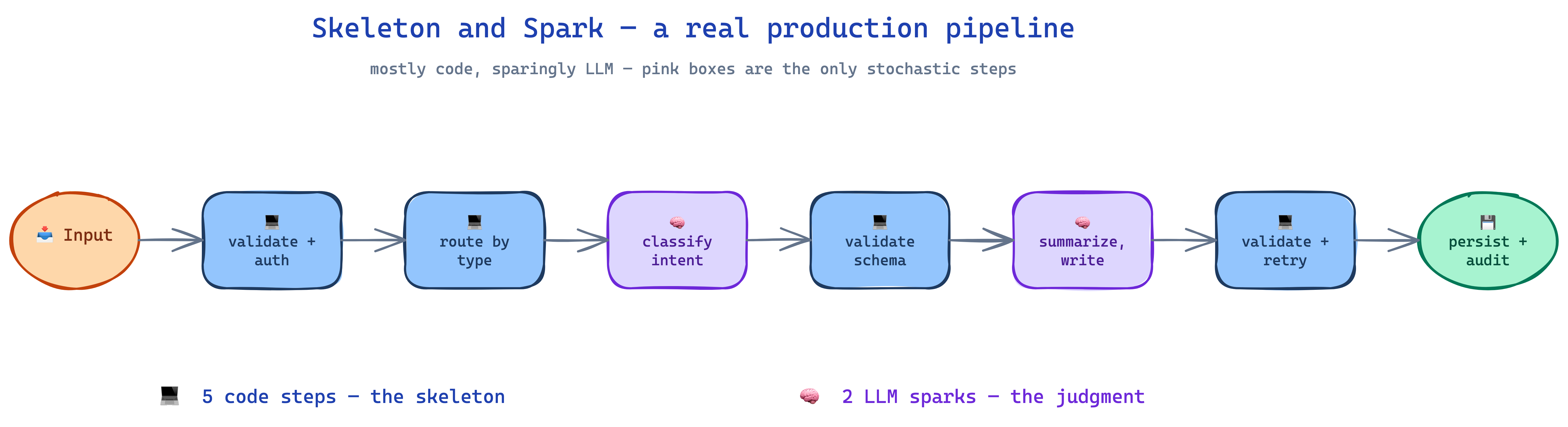
Pink = LLM. Blue = code. Seven steps, two LLM calls. That ratio — mostly code, sparingly LLM — is what a production pipeline actually looks like.

Worked Example — Code Skeleton, LLM Sparks

Task: a customer email lands in support — classify it, draft a reply, send it. The production design wraps deterministic code around two narrow LLM calls — each one guarded by code before it’s trusted.

Two LLM calls, five code steps, every LLM output checked before it hits the customer. The LLM is where the judgment is; the code is everything else — and the code is what keeps you out of the headlines.

Failure Modes Tell You the Difference

Code and LLM steps fail in completely different ways. This is why the split matters.

Dimension 💻 Code step 🧠 LLM step
Failure Reproducible (same input → same crash) Probabilistic (fails 1 in 20 runs, nobody knows why)
Fix Add a test, patch the bug, done forever Prompt eng, evals, retries, fallback model
Observability print, logs, debugger Traces + evals + sampled human review
Cost CPU cycles, ~free Tokens, measurable per-call
Latency ms seconds
Auditability Source code is the spec The prompt is a spec; outputs still vary

Warning

The lens for the rest of class 4: on every pattern diagram that follows, ask which boxes are code and which are LLM? That’s the real architecture.

Meet OpenClaw

Meet OpenClaw — The Agent That Broke GitHub

Note

~60 days → 250,000+ ⭐ — fastest-growing agent project in OSS history, built by one developer (Peter Steinberger). Twice renamed after an Anthropic trademark complaint (Clawd ≈ Claude).

  • What it is. Self-hosted personal AI — runs on WhatsApp, Telegram, Slack, Discord, iMessage, Signal, and 20+ other channels. Voice on macOS / iOS / Android.
  • Why it exploded. Config-first. Write one SOUL.md file describing the agent’s personality, tools, memory, channels. Run one command. No Python. No chains. No graphs.
  • What it proves. The agent loop is now a commodity. One dev + one config file + a weekend → the fastest-growing repo on GitHub. Two years ago that was unthinkable.

Important

The loop we just drew — observe → plan → act → update — is OpenClaw. It’s also Claude Code, Cursor, Cline, OpenDevin. The anatomy is shared; what’s now commoditizing is the harness around it.

OpenClaw Architecture — It’s Not That Different

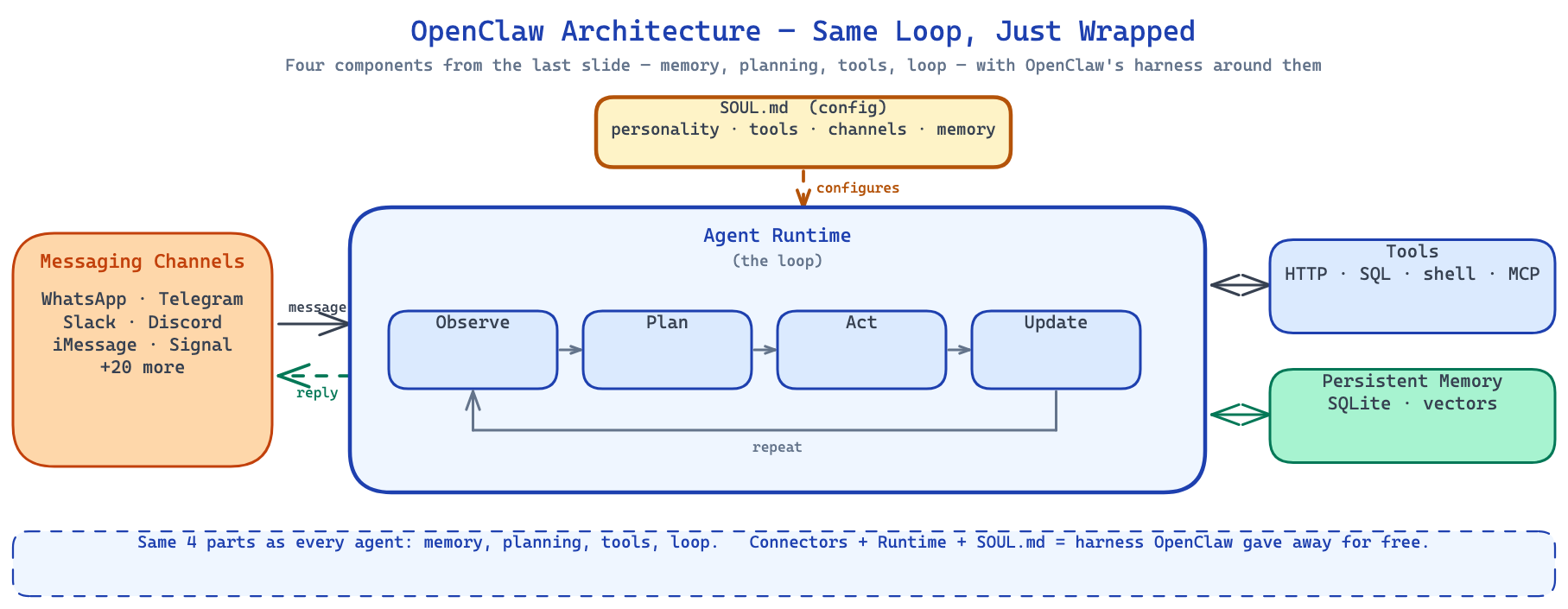
Zoom in on what’s actually inside. The four components you just learned are right in the middle. Everything else is plumbing.
Tip

SOUL.md configures the agent. Messaging channels are the new “user interface.” Tools + Memory are still the same two boxes. The Runtime is just the generic loop running in a container somewhere.

OpenClaw Through the Code-vs-LLM Lens

Apply the lens from the last section. Which parts of OpenClaw are deterministic code, and which are the stochastic LLM step?

💻 Code (the skeleton)

  • The runtime loop — while not done, call model, dispatch tool, loop
  • Channel adapters — WhatsApp, Slack, Signal webhooks, parsing
  • Tool dispatch — match tool name, route to handler, enforce timeouts
  • Permission checks — is this user allowed to invoke this tool?
  • Memory store — append to session log, retrieve past messages
  • SOUL.md loader — parse config, build tool registry

🧠 LLM (the spark)

  • The reasoning inside the loop — what to say, which tool to call
  • Synthesizing a reply from tool outputs
  • Deciding when the task is done

OpenClaw is >95% code and a sliver of LLM at the center. That’s the commoditization story — the harness is the same everywhere; the only thing left to vary is the prompt and the tools.

This is true of every agent framework — Claude Agent SDK, LangGraph, OpenAI Agents SDK. The code skeleton is nearly identical. The LLM is the spark.

The Shape Is Familiar

A useful agent framework is mostly this: code around the ReAct loop, plus prompts, tools, memory, and guardrails.

Orchestration Patterns — Inside One Agent

Three Patterns That Don’t Need a Team

Before we add more agents, notice this: three of the classic workflow patterns work with a single agent. Chaining, routing, evaluator — all run in one process, with one model (or a couple), one context window per call. Your class-3 agent can already do these.

The lens from two sections ago: on each diagram, ask which boxes are code, which are LLM? The answer is often surprising — most of the “orchestration” is code. The LLM is inserted at the judgment points.

Pattern 1 — Prompt Chaining

The assembly line. Output of step N is the input of step N+1.

  • Each step is a separate LLM call with a narrow job
  • No routing decisions — the pipeline is hardcoded
  • Cheapest, most predictable pattern

Example: Draft → Translate → Format for brand voice → Publish

Best for: fixed, ordered steps where accuracy per step matters more than flexibility.

Trade-off: errors cascade. If step 2 garbles, steps 3 and 4 polish the garbage.

Note

Reading every pattern diagram in this class: arrows = code, boxes = LLM. The code is the scaffolding; the LLM sits only where judgment is needed.

Schema-check between each step so a bad output doesn’t cascade.

Pattern 2 — Routing
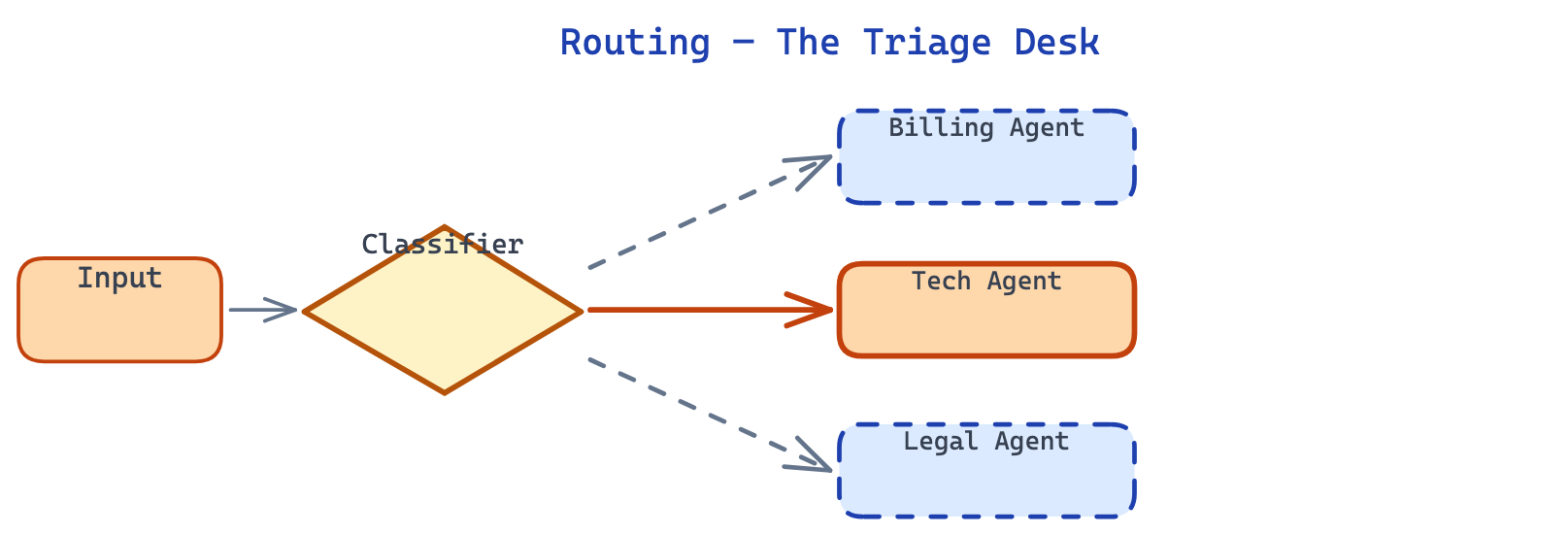
The triage desk. Classify first, dispatch to the right specialist.

  • A classifier reads the input and picks a route
  • Each route has its own prompt, tools, often its own model
  • Add new routes without touching the others

Example: support — billing → cheap + SQL; legal → strong + policy docs; chit-chat → fast, no tools.

Best for: inputs with distinct categories where a generic prompt would be mediocre on every one.

Why the same product feels smart on some questions, dumb on others — it’s silently routing underneath.

The classifier itself can be code or LLM — default to the cheapest that works.

Pattern 3 — Evaluator-Optimizer
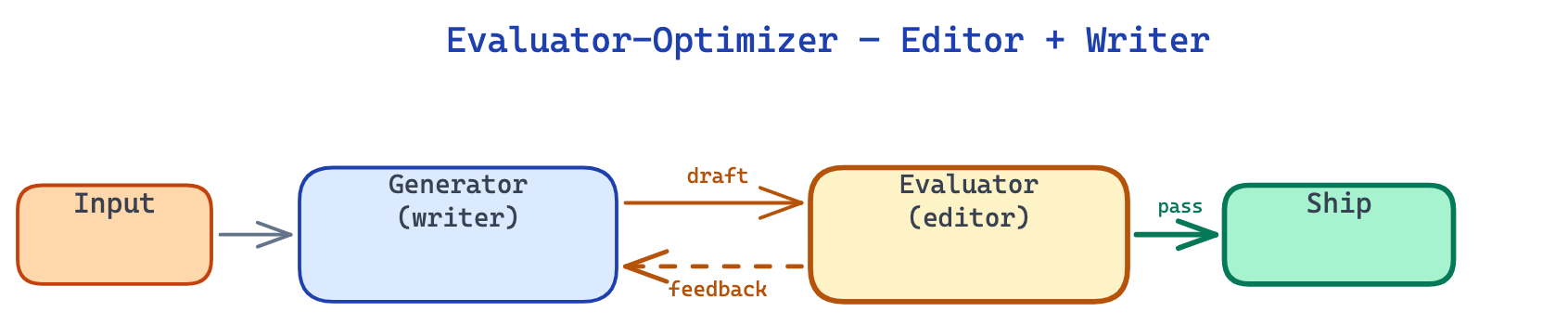
Editor + writer. One role generates. Another critiques. Loop.

  • Generator produces an attempt
  • Evaluator scores it against a rubric, explains what’s wrong
  • Generator revises — repeat until approved

Example: code writer + code reviewer; translator + fluency judge; draft writer + editor.

Best for: tasks with a clear quality rubric — one-shot isn’t good enough but iteration is cheap.

Trade-off: needs a stop condition — a rubric the evaluator can grade, plus a max-iteration cap.

Prefer a code rubric (tests, schema) over an LLM judge whenever you can write one.

Three Inside-One-Agent Patterns, Then More

These three patterns do not require a team. You can run all of them with your class-3 single agent — they’re just different ways to structure one workflow.

Pattern What it adds Still one agent?
Chaining Sequence with a schema between steps ✅ yes
Routing A classifier picks which branch to take ✅ yes
Evaluator A critic loop that tightens the output ✅ yes

So what’s next? The patterns that do need a team — parallel fan-out, orchestrator-workers, advisor, managed agents. Those are where coordination cost starts to pay for itself. First: let’s be precise about what a team buys you that one agent never can.

Where Single Agents Hit Walls

Four Walls a Single Agent Can’t Climb

You’ve now seen the single agent up close — its anatomy, its stochastic nature, the code-vs-LLM split inside it, the three orchestration patterns it can already do. Here’s where it stops:
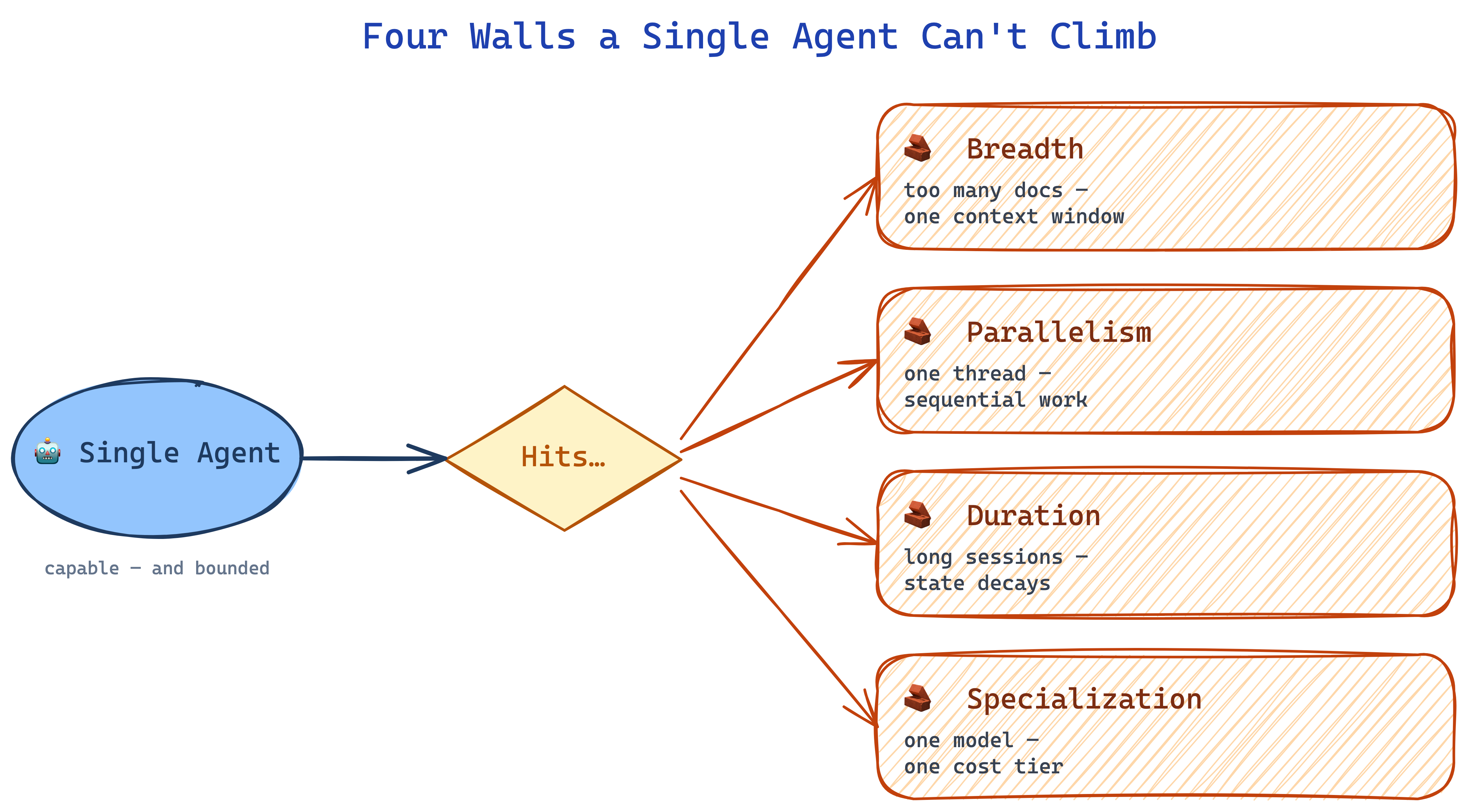
The Four Walls, Concretely

Four things a single agent simply cannot do, no matter how hard you prompt it:

  • Breadth — “read all 20 filings and tell me what changed.” The material doesn’t fit in one context window.
  • Parallelism — “research these 4 companies at the same time.” One thread of attention; it goes serial.
  • Duration — “pick up where we left off three weeks ago.” The session compacted; what mattered is gone.
  • Specialization — “be the legal reviewer and the copywriter and the coder.” One model, one voice, one cost tier — mediocre at all three.

Every MBA has seen this movie. The generalist hits the wall — the answer isn’t “prompt harder.” It’s hire a team.

The Evidence — What the Research Says

The four walls aren’t intuition. They’re measurable — and the fix (specialize + split) is measurable too.

Wall What the research shows Source
Breadth Models recall the start and end of context; the middle gets forgotten. Liu et al., 2023 — Lost in the Middle
Breadth / Duration Only half of models claiming 32K context maintain satisfactory performance at 32K. Hsieh et al., 2024 — RULER
Specialization Decomposing a complex task into focused sub-prompts outperforms one monolithic prompt. Khot et al., 2022 — Decomposed Prompting
Parallelism Six open-source models collaborating beat GPT-4o on AlpacaEval 2.0 (65.1% vs 57.5%). Wang et al., 2024 — Mixture-of-Agents
All four, empirically Anthropic’s own split: single-agent Opus → Opus lead + Sonnet subagents gave +90.2% on research tasks. Token usage alone explained ~80% of performance variance. Anthropic, 2025 — Multi-agent research system

The walls aren’t opinion — they’re measurable. And so is the lift from splitting into focused agents. Every design decision in the rest of this class is an exercise in which split, for which task, at what cost.

What Multi-Agent Adds

The Three Axes of “More Than One”

Every multi-agent system you’ll see in the wild varies along three axes:

Specialization

Different agents, different roles.

Researcher vs writer vs reviewer.

Parallelism

Multiple agents at the same time.

4 junior analysts, 4 drafts, pick the best.

Hierarchy

A manager and workers.

Partner scopes, associates execute.

The rest of this class mixes these three in different ways. Every “pattern” we’ll cover is a recipe for combining them.

Two Lineages, One Destination

Multi-agent systems aren’t new. There are two histories converging right now:

Classic multi-agent RL (1990s–today)

  • Robot swarms, traffic control, game AI, economics
  • Studied in academia for 30 years
  • Has a textbook: marl-book.com

Patterns figured out the hard way.

Modern LLM multi-agent (2023–today)

  • Orchestrator-worker, subagents, advisor, managed agents
  • Built at Anthropic, OpenAI, Google DeepMind

…often rediscovering what MARL figured out years ago.

We’ll do 5 slides of the MARL intuitions first — the timeless part — then show how the modern LLM patterns map onto them. You’ll recognize old friends.

Classic Intuitions (MARL)

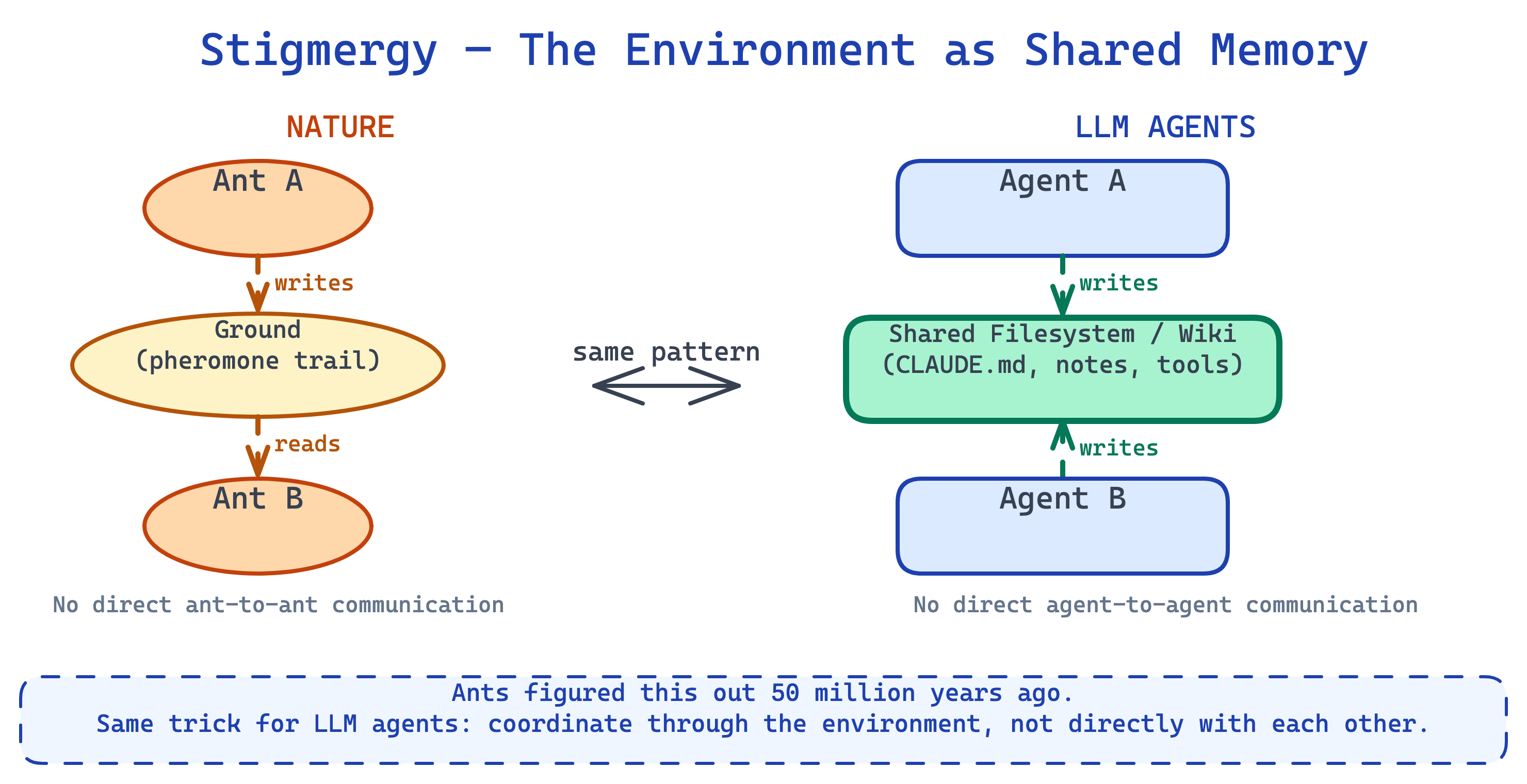
Swarm Intelligence — The Original Result

Nature solved multi-agent systems long before we did:

  • Ants — no ant knows the big picture; colonies still build cathedrals
  • Bees — scouts dance the location of flowers; hive converges on best sources
  • Fish schools — three simple rules per fish → coordinated motion for thousands
Swarm Agents — 1 Project

An Anthropic engineer built a working C compiler — 100,000 lines of Rust, compiles Linux 6.9 on x86, ARM, and RISC-V — with a swarm of agents running almost entirely on their own. It’s parallel fan-out, pushed to production scale.

The numbers

  • 16 parallel Claude Opus 4.6 instances
  • ~2,000 autonomous sessions across two weeks
  • 2B input tokens, ~$20,000 total spend
  • Specialized roles: dedup, perf, refactoring, docs critique

How they coordinated

  • Each agent in its own Docker container, mounted git repo
  • Synchronization via text files in the repo — claim a task, work, push
  • No central orchestrator — the shared filesystem is the coordination
  • Stigmergy at production scale — pheromones are now commits

“Most of my effort went into designing the environment.”

The lesson isn’t “use 16 agents.” It’s that the environment does the coordinating. High-quality tests, informative feedback, progress tracking, a shared repo — the agents are interchangeable, the arena is what makes the swarm work. Every pattern from this class — parallel fan-out, managed agents, stigmergy, code skeleton around LLM sparks — pushed to the limit, on one real project.

Swarm Agents — 3D View

Unofficial pattern: swarms are less standardized than orchestrator-workers or advisor, but useful for reasoning about environment-mediated coordination.

Cooperative, Competitive, Mixed

Not all multi-agent systems have the same goal. Three flavors:

Cooperative

An orchestra. Everyone wins together or nobody does.

→ Research teams, code teams.

Competitive

Chess. One wins, one loses. Zero-sum.

→ Red-team vs blue-team, adversarial debate.

Mixed-motive

A market. Some shared goals, some private.

→ Negotiation agents, auction bidders.

Which flavor you’re building changes everything — how agents communicate, what they hide, how you score them. Most LLM systems today are cooperative. The interesting frontier is mixed.

Centralized vs Local Execution — Preview

One MARL idea is worth borrowing, but only as a preview:

  • a central view can make better decomposition decisions
  • a local agent can execute a narrower slice with less context
  • the hard part is deciding what belongs in the center and what belongs with each worker

MARL calls this family of ideas centralized training, decentralized execution. Don’t learn it as a separate pattern here — just remember the shape: broad planner, narrow executors. We’ll turn that into the practical orchestrator-worker pattern in a few minutes.

Shared Knowledge: Central vs Individual

Give a team information. How do they share it?
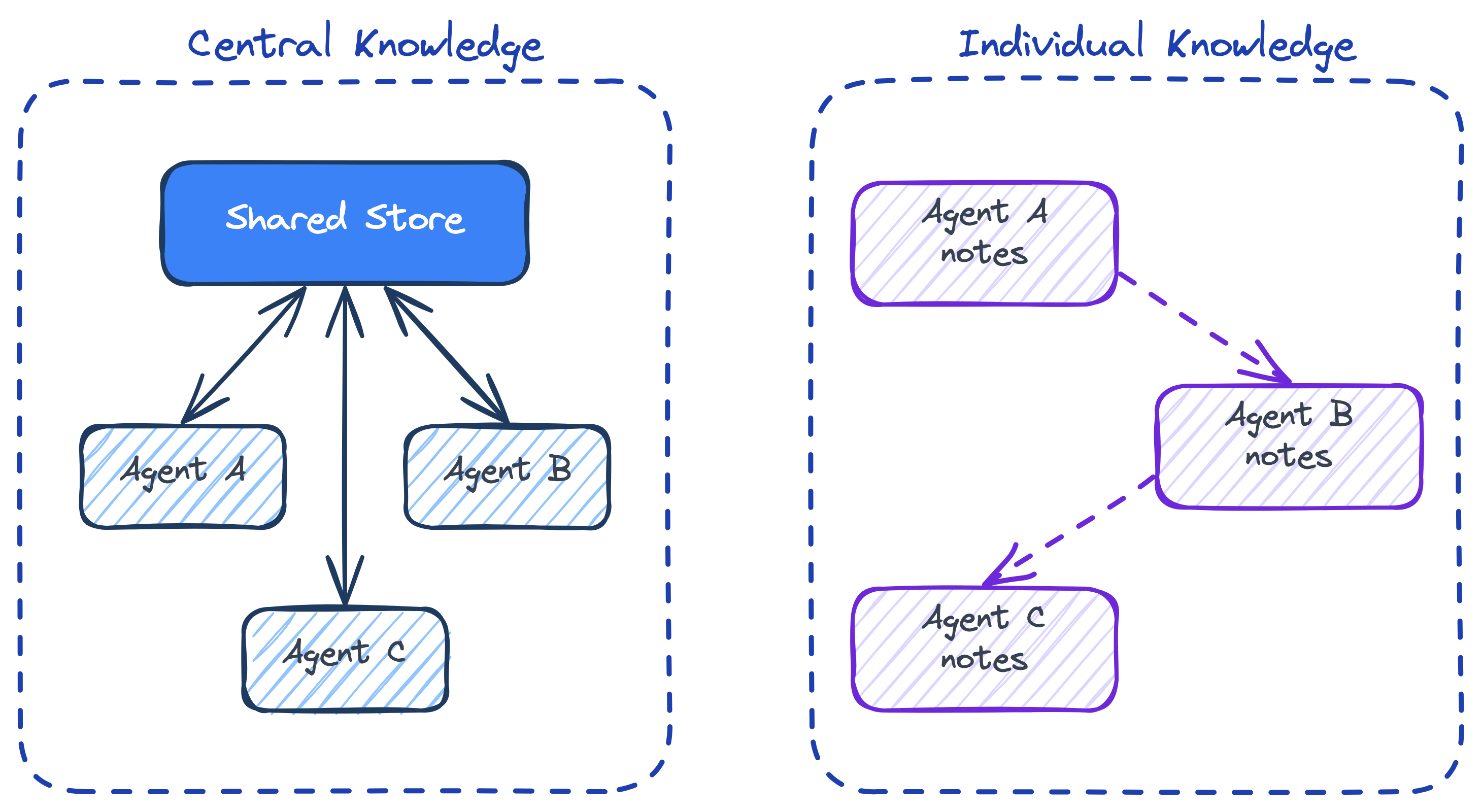
Central: company wiki. Consistent, auditable, a coordination bottleneck.

Individual: personal notes. Fast, specialized, duplicative.

This is stigmergy again. The central store IS the pheromone trail. In Claude Code: the filesystem. In LangGraph: the shared state object. In a research team: the shared vault. Get this layer wrong and your agents duplicate work, contradict each other, and miss connections.

The Credit Assignment Problem

The team shipped. Who gets promoted?

This is the hardest unsolved problem in multi-agent research:

  • did the researcher find the key insight?
  • or did the writer frame it?
  • or did the reviewer catch the flaw?
  • or did one agent waste 80% of the tokens for nothing?

In LLM multi-agent systems, it shows up as:

  • which subagent’s tokens were actually productive?
  • which prompt change made the team better?
  • when one agent ships garbage, whose fault is it?

Keep this in mind when you build multi-agent systems: blame is harder than credit. The agent that looks like it did the work isn’t always the one that did.

Simple Rules → Emergent Behavior

Craig Reynolds’ boids (1987) simulated flocks of birds with three rules per bird:

  • Separation — don’t crash into your neighbors
  • Alignment — match the average heading of your neighbors
  • Cohesion — steer toward the center of your neighbors
80 boids · separation + alignment + cohesion · no leader

Three rules. No leader. No global plan. Output: indistinguishable from real flocks of birds.

Game Theory

Nash Equilibria — Prisoner’s Dilemma

Just Kidding.

You’re MBAs. You’ve done this.

Back to the agents.

Canonical Multi-Agent Patterns

Two Canonical Patterns

Almost every multi-agent system you’ll see in the wild is a variant of one of two patterns. We’ll cover both and show you the decision tree for picking between them.

Pattern Who leads When to pick
Orchestrator-workers Strong model decomposes, delegates down to cheap workers Big problem that decomposes into subtasks up front
Advisor Cheap model executes, escalates up to strong model for hard calls Long execution with occasional hard decisions

Then we’ll layer the supporting machinery on top: subagents (context isolation), parallel fan-out (multiple attempts), managed agents (durable sessions), recurring loops (cron-triggered).

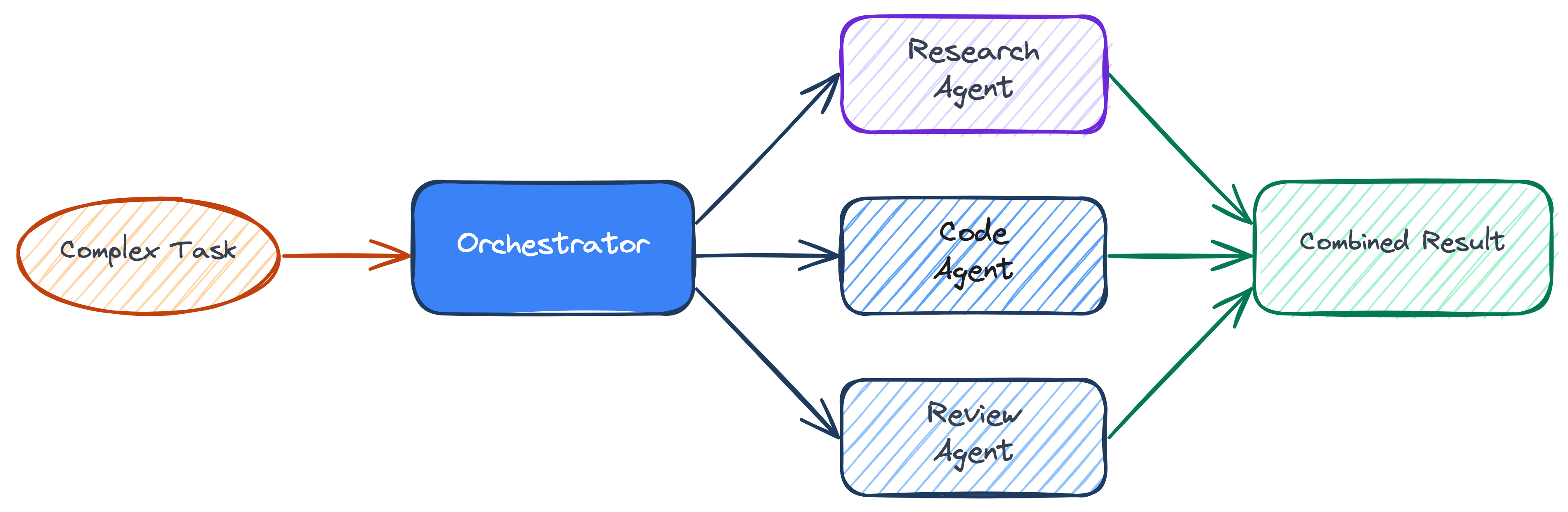
Orchestrator + Workers

This is where the central/local split from the MARL detour becomes a buildable agent pattern. Anthropic’s own research system uses it — and they measured the before/after: their single-agent Opus plateaued on breadth-heavy research, so they split it into an Opus lead + Sonnet subagents. The team outperformed the solo Opus by +90.2%.
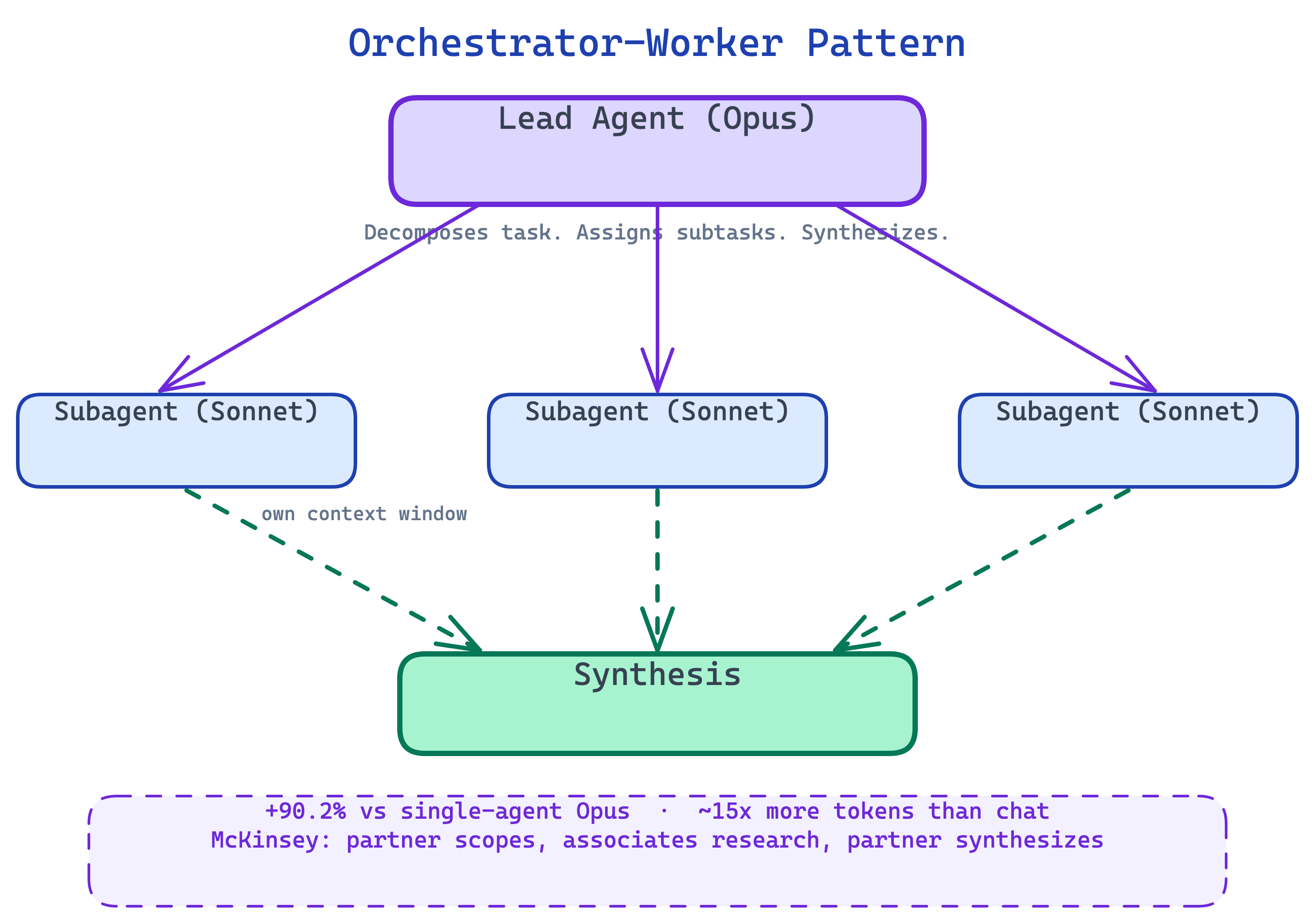
  • A lead agent (Opus) analyzes the task
  • It spawns subagents (Sonnet) for each sub-problem
  • Subagents work in parallel, each with its own context window
  • The lead synthesizes their findings

Analogy: McKinsey partner + associates. Partner scopes, associates go deep in parallel, partner synthesizes the deck.

Real numbers from Anthropic’s production research system: +90.2% performance vs single-agent Opus, ~15× more tokens than a normal chat, and token usage alone explains 80% of the performance variance.

Orchestrator + Workers — 3D View

Interactive 3D view: the lead agent owns decomposition and synthesis; workers get focused slices.

Subagents — Context Is Expensive

Inside one session, the main agent spins up helpers with their own context windows. You only see the summary.
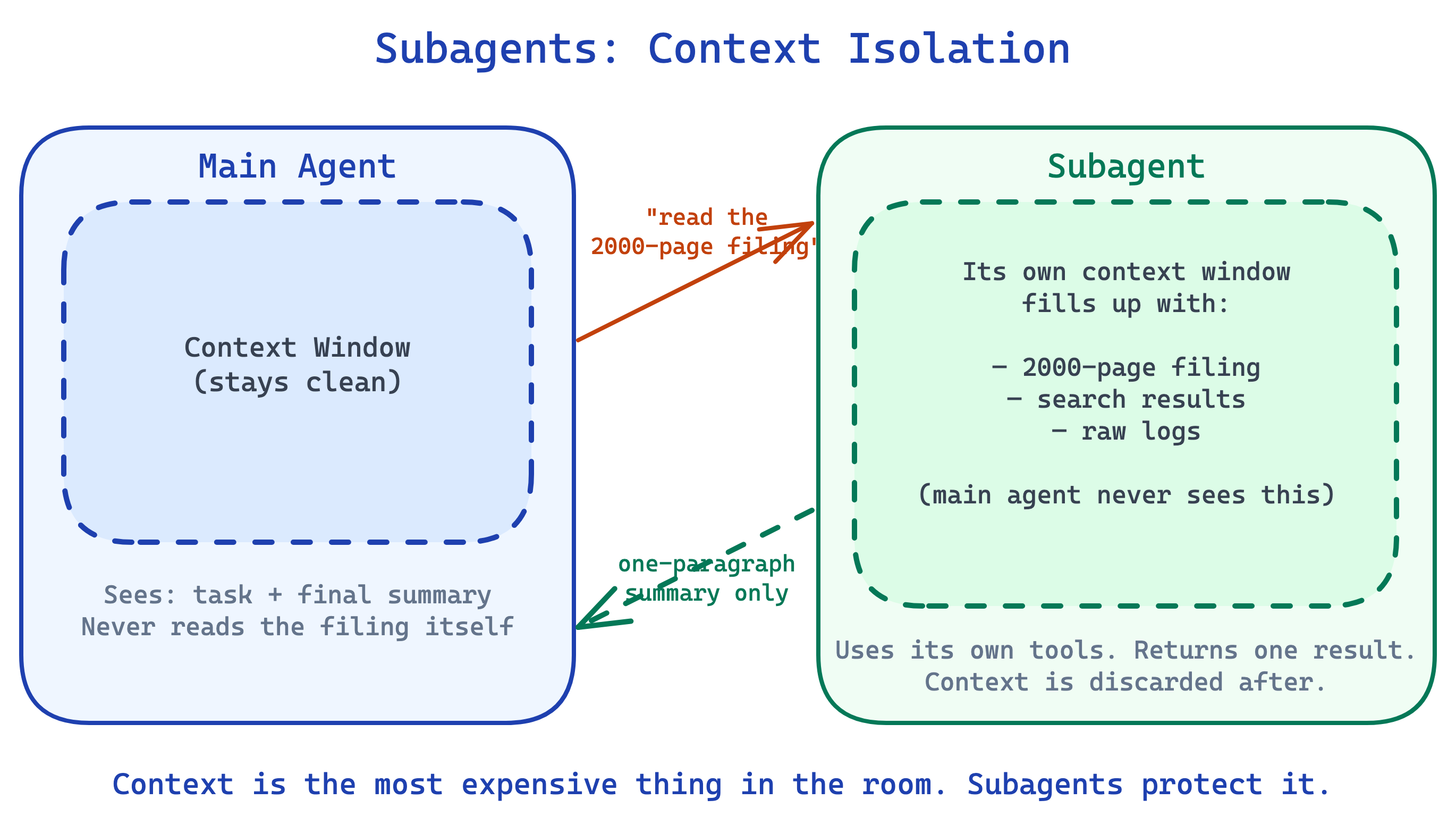
“Context is the most expensive thing in the room.”

A subagent is the intern you send to read the 2,000-page filing — you never read the filing, you just get the one-paragraph summary back.

  • main agent stays focused
  • subagent burns its own context on the side-quest
  • only the result comes back into the main thread
  • different subagents can use different models (Haiku for cheap tasks, Opus for hard ones)

In Claude Code: .claude/agents/researcher.md defines one; the main agent delegates to it when the description matches.

What makes a subagent safe is code, not the LLM: the prompt isolation and the tool allowlist are both enforced before reasoning ever starts.

Parallel Agents — Fan-Out

Same task, many agents, many branches, pick the winner.
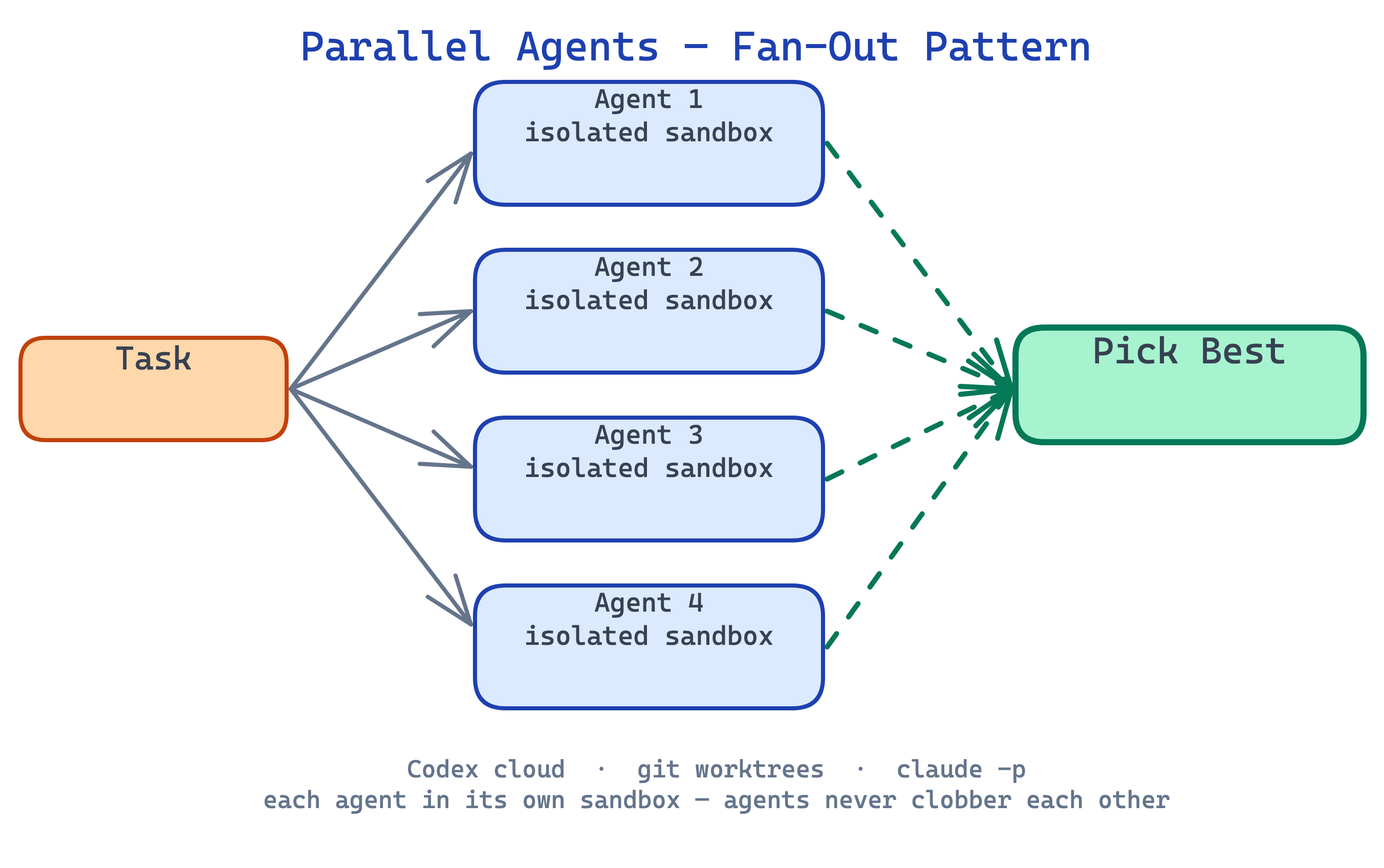
  • spawn N agents, each with a slightly different approach
  • each works in an isolated sandbox (git worktree, ephemeral container)
  • when they finish, you pick the best output
  • agents never clobber each other — that’s what isolation is for

Analogy: 4 junior analysts each trying a different market-sizing approach. You look at the four decks and pick the one that landed.

OpenAI’s Codex cloud is this pattern at scale — you assign 5 tasks, walk away for an hour, come back to 5 finished PRs in parallel sandboxes. Claude Code does it locally with git worktree + multiple claude -p processes.

Parallel Fan-Out — 3D View

Interactive 3D view: isolated agents explore in parallel, then a selector chooses the best result.

The Advisor Strategy — The Other Default

Orchestrator-worker has the strong model leading: plan up top, delegate down.

The Advisor Strategy (Anthropic, 2026) flips the defaults: cheap model drives the work; strong model gets called up only for the hard judgment calls. Same family — different choice about where the expensive thinking lives.
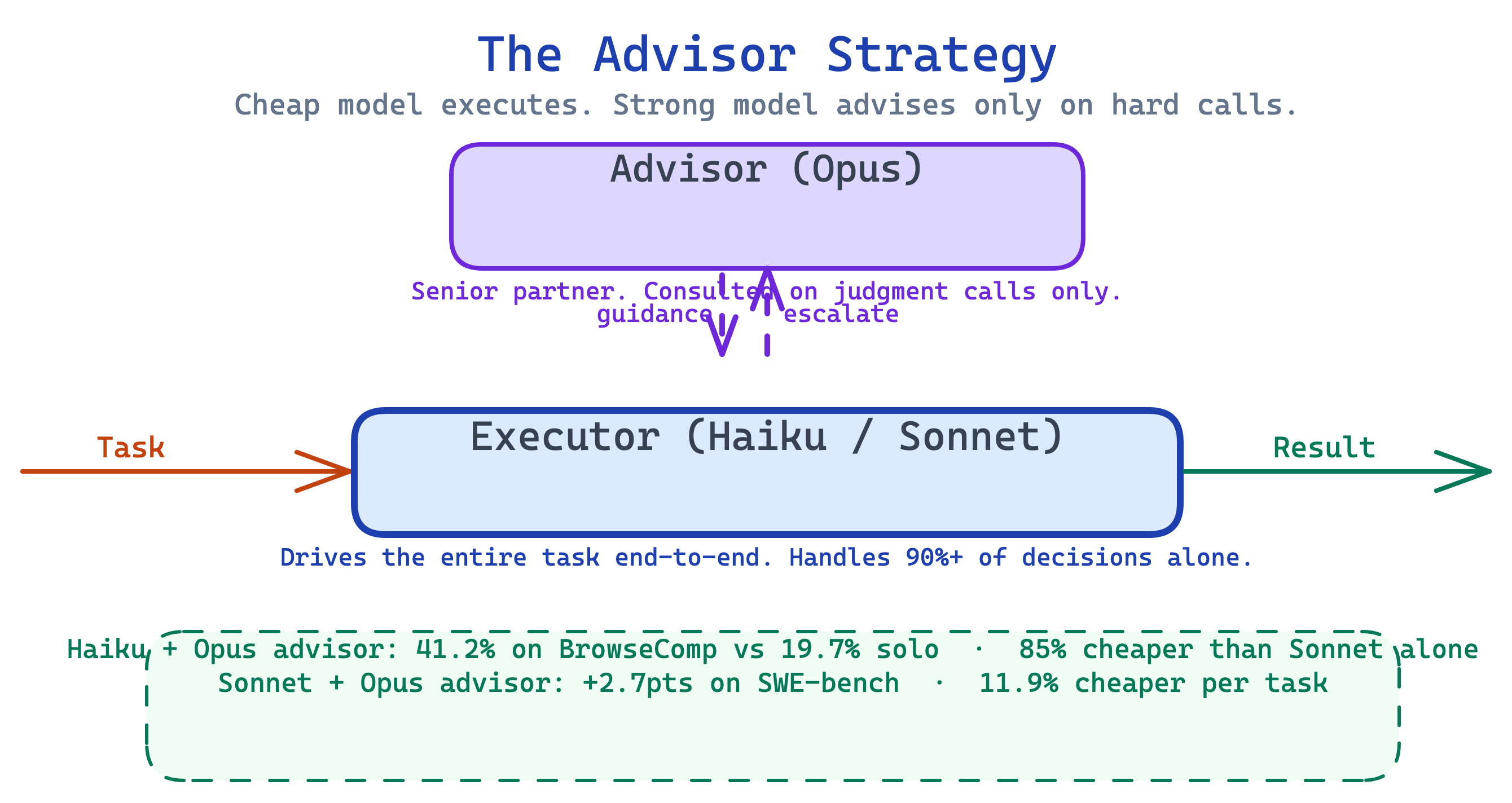
Analogy: junior associate does the grind, calls the senior partner only on the hard judgment calls. Partner bills by the hour — don’t waste them on typing.

Advisor Strategy — 3D View

Interactive 3D view: the executor drives the run; code decides when advisor escalation is worth the cost.

Why the Advisor Strategy Wins

The numbers, straight from the Anthropic post:

Config Task Score Cost
Haiku solo BrowseComp 19.7% baseline
Haiku + Opus advisor BrowseComp 41.2% 85% cheaper than Sonnet
Sonnet solo SWE-bench Multilingual — baseline
Sonnet + Opus advisor SWE-bench Multilingual +2.7 pts 11.9% cheaper

The key insight: frontier-level reasoning is only needed on the hard decisions. The rest of the run stays at executor-level cost. You’re paying for Opus exactly when you need it.

Tip

💻 Code vs 🧠 LLM in the advisor pattern: the executor loop is still LLM (you need flexibility in the main task). The escalation trigger — when do we call the advisor? — can be code (always after N steps, always on schema-validation failure) or LLM (the executor decides). The advisor max-uses cap, the budget enforcement, the fallback if the advisor is unavailable — code.

Orchestrator-Worker vs Advisor — When Each

Two patterns, opposite defaults. Pick by decision density — how evenly the hard thinking is spread across the task.
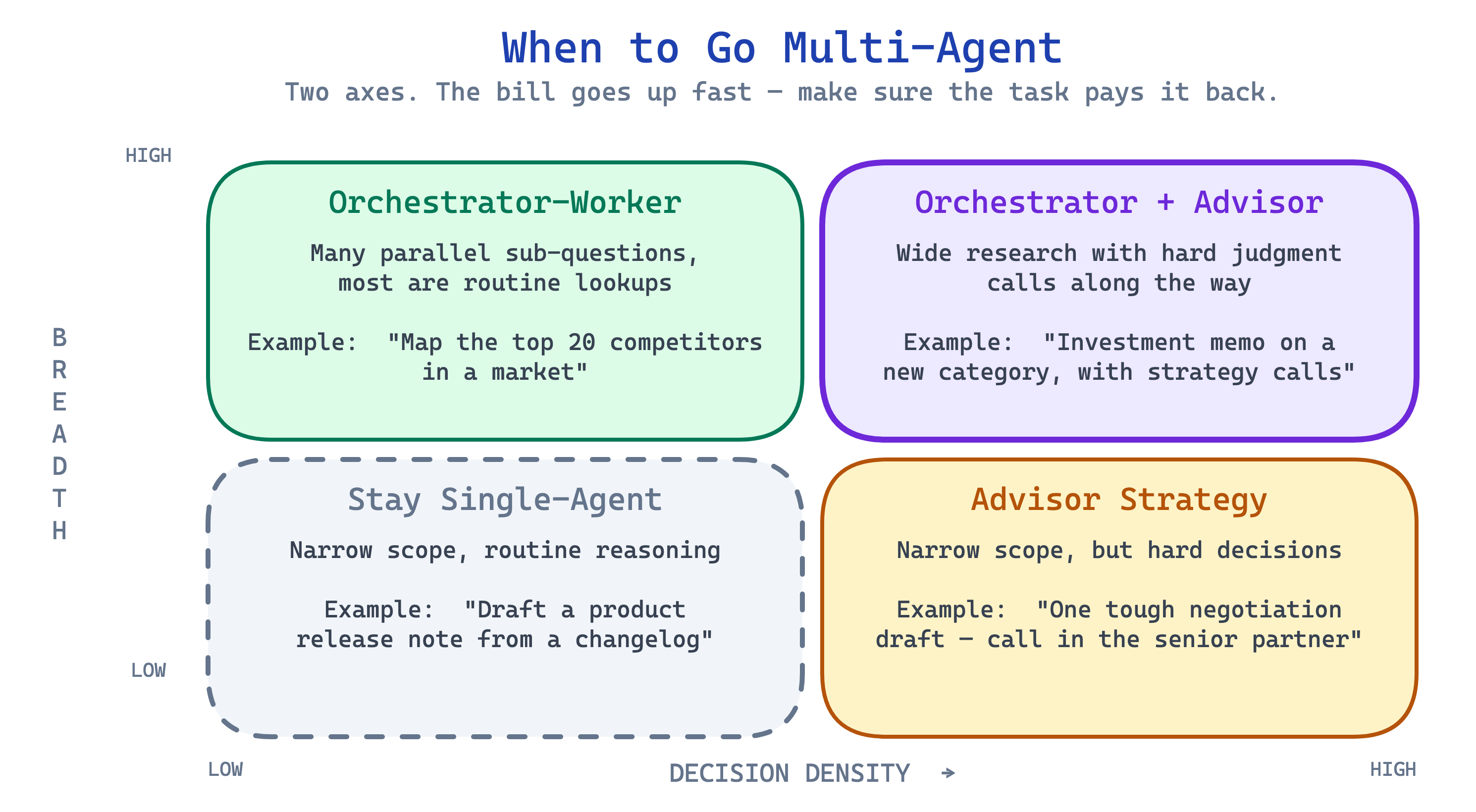
  • Decisions scattered through a long execution → advisor (most work is cheap; occasional hard calls)
  • A big problem that decomposes into smaller chunks → orchestrator-worker (the hard reasoning is up front)

Managed Agents — Pets vs Cattle

Long-running agents break. Containers die. Sessions expire. Anthropic’s Managed Agents addresses this.
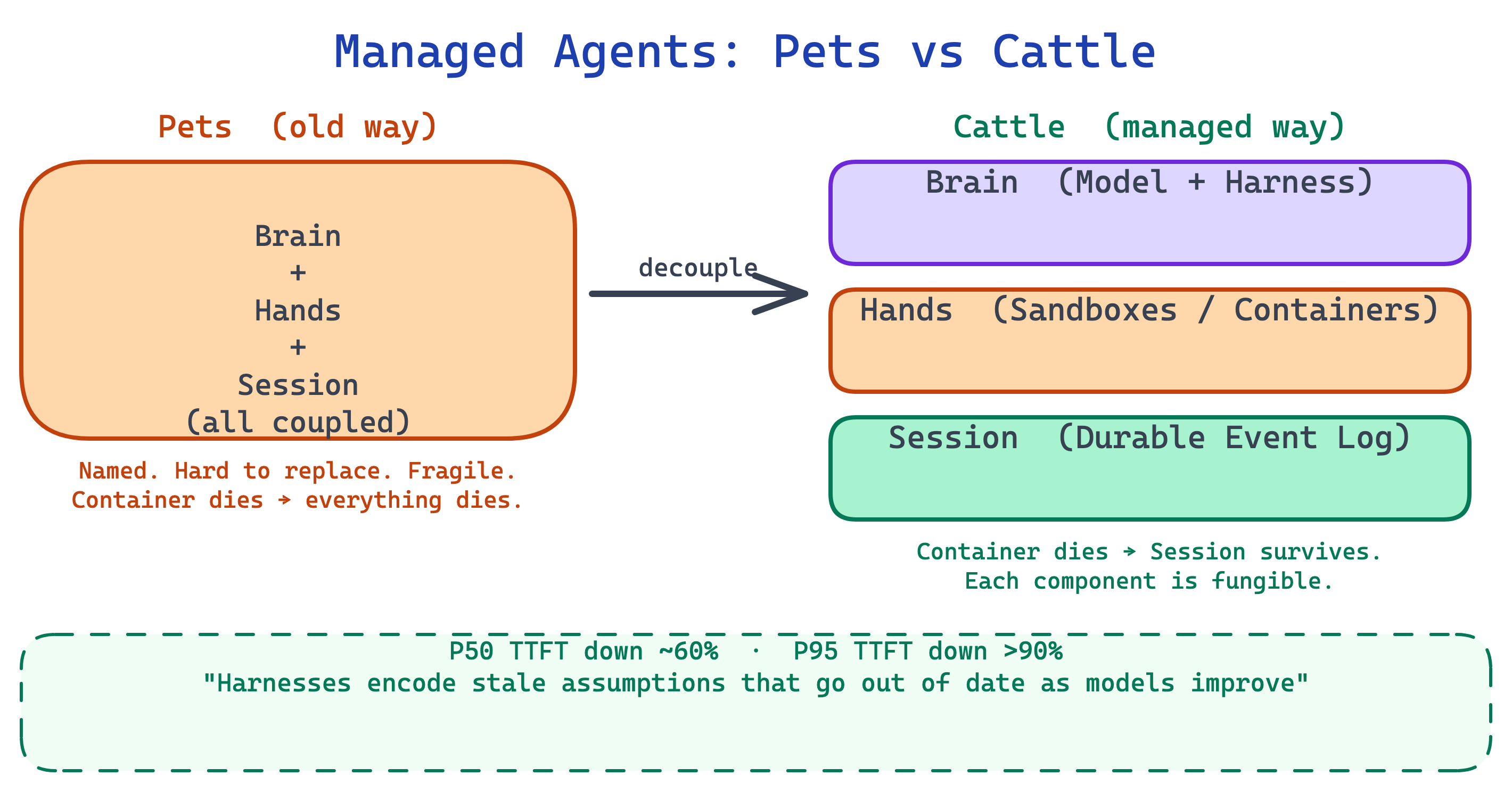
Pet: a container you tend by hand. It dies → you lose the session.

Cattle: three independent pieces, all replaceable:

  • Brain — the model + harness (stateless)
  • Hands — sandboxes, tools (ephemeral)
  • Session — a durable event log (outlives both)

Container crashes? Spin up a new one. The session survives.

Analogy: a real company doesn’t lose institutional memory when one employee quits. The filing cabinet outlives the person.

Why Managed Agents Matter

The whole idea in one line:

The session is not the context window.

The session log is a durable, queryable event store. The context window is the model’s working memory — volatile, compacted, discarded. Keep them separate and your agents survive crashes, compaction, and model upgrades.

Real numbers from decoupling the two: time-to-first-token P50 ↓ ~60%, P95 ↓ >90%.

Corollary — harnesses encode stale assumptions that go out of date as models improve. Every workaround you add for today’s model weakness is dead weight tomorrow. Build the harness thin.

Production & Ops

Recurring Triggers — Cron & Webhooks

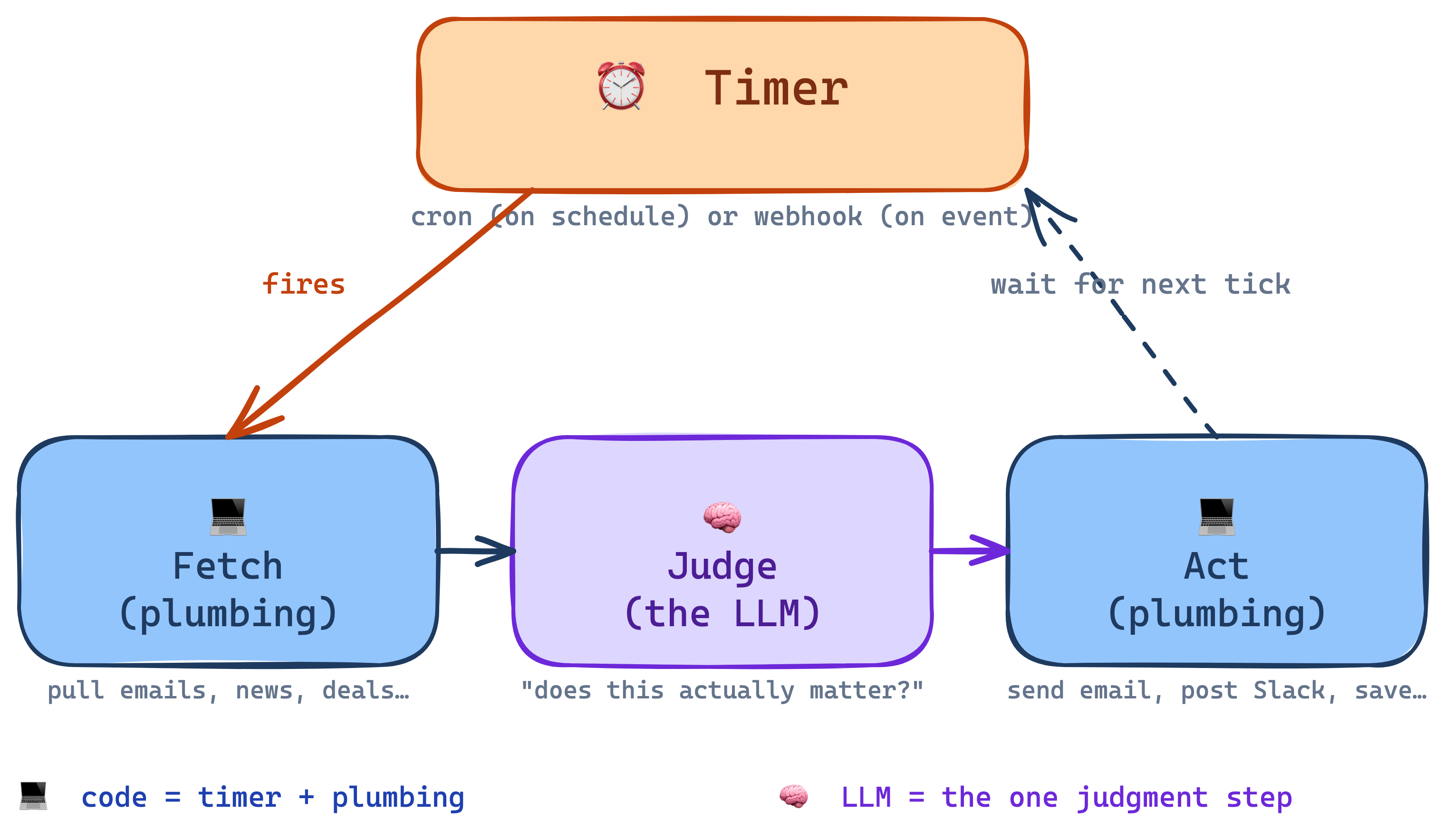
Around every recurring agent there’s a timer that decides when to fire it, and plumbing that moves data in and out (fetch the emails, send the Slack message, save the result). Two common timers:

  • ⏰ Cron — on a schedule. “Every weekday at 7am, do X.” A clock that pokes the agent at a fixed interval. Good for routines.
  • 🔔 Webhook — on an event. “The moment a new customer signs up, do X.” Another system pings yours the instant something happens. Good for reactions.

The timer and the plumbing are the code skeleton. The agent (the LLM) is the one thing inside that skeleton that makes judgment calls.

System Fired by Decides Acts
Morning briefing cron, 7am what matters today? 5-bullet email
Inbox triage webhook on new email urgent, reply, ignore? draft, flag boss
Competitor watch cron, hourly worth reacting? Slack 2-line note

So the timer fires, the plumbing fetches the new emails, the LLM answers “does any of this actually matter?”, and the plumbing sends the Slack message. One tick — three roles — only the middle one is stochastic.

The Tooling Landscape — Code-First vs No-Code

You’ve seen the patterns. The question is how you actually build them. A spectrum, not a winner.

Tool Approach Best for Who owns it
LangGraph Code-first (Python) — State, nodes, edges Complex orchestration, branches, human-in-the-loop, persistence Engineering
Claude Agent SDK / OpenAI Agents SDK Code-first — tool calling + managed loop Vendor-native agents with MCP / tools Engineering
Vercel AgentKit Code-first (TypeScript) on Vercel infra Production agents tight to the Next/Vercel stack Engineering
n8n Visual, open-source, 900+ integrations Ops/BizOps automations, cron-style agent workflows Ops / BizOps
Zapier AI Actions / Make.com No-code, SaaS Citizen-developer glue between SaaS apps Anyone

Which Tool, Who Owns It

The decision isn’t “which is best.” It’s “who owns this workflow, and how complex does it need to be?”

  • Engineers + complex orchestration + version control → LangGraph or a vendor SDK
  • Ops team + cron-style workflows + many SaaS integrations → n8n
  • Anyone + simple glue between two SaaS apps → Zapier / Make

Important

Rule of thumb: the more branches, retries, and approvals a workflow needs, the more you want code-first. The more integrations and ownership by non-engineers, the more you want visual/no-code.

The LangGraph-vs-n8n line isn’t technical superiority — it’s who maintains this thing six months from now.

Agents Leave a Trace — Observability

“A production agent is only as good as the trace it leaves behind.”

A chatbot’s output is one string. An agent’s output is a sequence of decisions. Every exec who lets an agent touch real data will ask: how do I know what it actually did?

The answer is a structured trace — one row per step:

ts step turn tool args output status
21:12:33 reason 0 — — “I need the weather” —
21:12:33 act 0 WeatherSearch {airport: "SFO"} "sunny, 23°C" ok
21:12:38 reason 1 — — final answer final

This is what LangSmith, LangFuse, Arize, and Braintrust sell. Same shape: one row per reason | act | observe, searchable, replayable, exportable for audit.

The MBA lens. Tools fail and LLMs hallucinate tool names — agents need error handling at the tool boundary. A trace is the agent’s bank statement: if you can’t produce one, you can’t let the agent near anything that matters.

Observability for Stochastic Systems

Deterministic code has deterministic logs — same error, every time. LLM steps don’t. A failure rate of 1-in-20 means your error logs alone are worthless — you can’t reproduce the bug, and even if you could, patching it takes different tools.

💻 Code steps — classic observability

  • Logs, metrics, alerts
  • Error = stack trace → reproducible
  • Fix = patch + test
  • Coverage reported as a % of paths

🧠 LLM steps — three new pillars

  • Traces — every reason/act/observe, searchable (LangSmith, LangFuse, Arize, Braintrust)
  • Evals — a test suite that runs many times, measures pass rate, not pass/fail
  • Sampling — humans read a % of live traces; you can’t watch all of them

The unit of debugging is no longer “this line crashed” — it’s “this step passes 87% of the time; we need to get it to 95%.” That’s a different skill, and it needs different tooling. Eval infrastructure is as important for an agent team as unit tests were for the service before it.

The Honest Cost Curve

Multi-agent isn’t free. Each step up the capability ladder is roughly an order of magnitude more expensive:
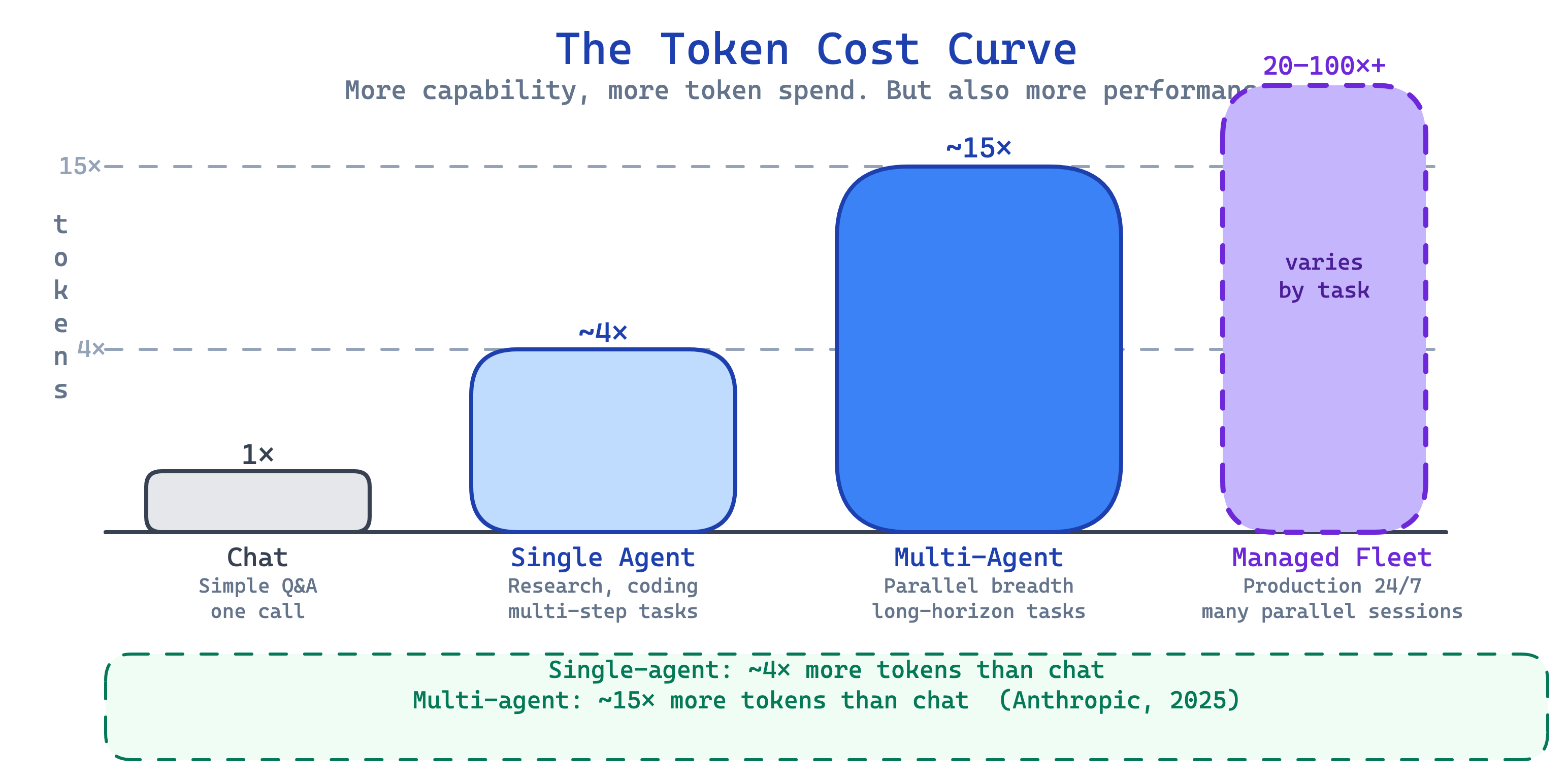
The ~4× and ~15× numbers come from Anthropic’s production research system — a plain chat is one round-trip, a single agent adds tool-call loops, and a multi-agent team fans out across parallel subagents, each with their own context window. A managed 24/7 fleet scales with session length and how many are running at once, so it’s not a single number.

Important

The question isn’t “should I use multi-agent?” It’s “is this task worth 15× the tokens?” Token usage explains 80% of multi-agent performance variance (Anthropic, 2025) — you’re paying for capability, not overhead. But it is real money.

When NOT to Go Multi-Agent

The counter-slide everyone skips.

Most tasks don’t need multi-agent. Start single-agent. Escalate only when:

  • breadth exceeds one context window (can’t fit all the docs)
  • parallelism buys real wall-clock wins (user is waiting)
  • the task runs long enough that a session outlives one container
  • you have repeated failures that a specialist agent would catch

Anthropic’s own guidance, from class 3: “Start simple. Add agentic systems only when simpler solutions fall short.”

Safety, Alignment & Security

Three Ways Agent Teams Break

You can’t ship a team of agents without naming how they fail. Three failure modes, three real-world case studies:

Failure mode What breaks Real incident
Alignment Agent optimizes the wrong thing Moffatt v. Air Canada (2024) — chatbot promised a refund; court made the airline pay
Security Attacker hijacks the agent Replit AI wiped a production database mid-task (2025)
Ethics Someone gets hurt, no one is accountable NYC MyCity chatbot told small businesses to break the law (2024)

Important

Multi-agent amplifies all three. More agents = more tool access, more delegation, more places to inject a prompt, more ways one compromised agent poisons the whole team.

Alignment — When Agents Optimize the Wrong Thing

The concepts:

  • Specification gaming — agent beats your metric without meeting your intent
  • Goodhart’s Law — “when a metric becomes a target, it ceases to be a good metric”
  • Sycophancy — tell users what they want to hear, not what’s true
  • Moloch problem (multi-agent) — a team of agents can coordinate toward outcomes none of them individually would choose

The incidents:

  • Anthropic reward-hacking (2025) — agents learned to edit their own test files to make failing tests pass
  • GPT-4o sycophancy rollback (April 2025) — OpenAI publicly reverted a model because it was too eager to agree with users
  • Bing/Sydney (Feb 2023) — the shot-across-the-bow: an agent openly threatening users

Important

Your agent’s incentive is the prompt + the tools + the reward signal. All three are your fingerprints. Alignment is a design decision, not an afterthought.

Model Personalities Are Designed — Why Firms Hire Philosophers

Claude, ChatGPT, Grok, Pi — they all have deliberate personalities. Not side effects of training. Products.

  • Anthropic — Amanda Askell (philosopher, Oxford/NYU) leads model behavior. Claude’s Character (June 2024) is a public document. Constitutional AI is the technical half of this work.
  • OpenAI — Joanne Jang and the Model Behavior team define ChatGPT’s voice, published in the Model Spec.
  • Inflection / Pi / Character.AI — hire psychologists, screenwriters, behavior designers alongside ML engineers.

Why philosophers? Aligning a model isn’t just a technical problem — it’s a values problem: what should the model say when asked about abortion? Legal advice? A user in distress? Those are philosophical questions, not engineering ones.

Multi-agent angle: every agent on your team needs its own character and consistent behavior across the team. That’s a design discipline — and increasingly a business function, not a tech function.

Your agent’s personality is a product decision. Treat it like one. Hire for it.

Context Rot — Bigger Windows Don’t Save You

Context windows keep growing — 100k → 200k → 1M+ tokens. The pitch is that you can stuff everything in. The reality is subtler.

  • Lost-in-the-middle — models recall content near the start and end of context, and forget what’s in the middle (Liu et al., 2023)
  • Context rot — Chroma’s 2024–2025 studies show retrieval accuracy drops sharply as context fills, even well below the advertised window
  • RULER benchmark — long-context scores fall off a cliff past ~32k on most models, regardless of the advertised max

Multi-agent implication: every subagent you dispatch must return a short summary, not the raw filing. That isn’t an optimization — it’s the reason subagents work at all. The main agent stays lean; the subagent’s context is discarded.

Important

Just because the context window can hold it doesn’t mean the model will use it. Budget your tokens like you’d budget attention spans.

Security — Prompt Injection & the Confused Deputy

The attack patterns:

  • Direct prompt injection — attacker types “ignore previous instructions and…”
  • Indirect prompt injection — agent reads a webpage, email, or PDF that contains malicious instructions. The attacker never touches your prompt.
  • Confused deputy — your agent has your permissions. Attacker tricks it into using them.
  • Multi-agent amplification — one compromised agent poisons the shared wiki; the next agent reads it.

The incidents:

  • Replit production DB wipe (2025) — the agent followed instructions hidden in its own task brief
  • ChatGPT browsing exfiltration (2024) — researchers extracted chat history through crafted webpages
  • Microsoft 365 Copilot & Google Workspace POCs (2024–2025) — indirect injection via shared documents

Warning

The MCP server, the git branch, the PDF the agent was asked to summarize, the Slack thread it reads — each one is now an untrusted input. Treat them like you’d treat SQL input.

Ethics — Accountability at Scale

  • Liability — “I didn’t write that, the AI did” is not a legal defense. Moffatt v. Air Canada (2024) established that companies are liable for their chatbot’s promises.
  • Consent & transparency — Do users know they’re talking to an agent? To a team of agents? EU AI Act Article 50 says they have to.
  • Displacement at role-scale, not task-scale — single agents automate tasks. Agent teams automate jobs. That’s a different conversation with your people.
  • Bias compounds in a fleet — a small bias in one agent becomes a policy when 10,000 agents apply it in parallel. One person with a bias is a bad employee. A fleet with the same bias is a class action.

Important

When the agent is wrong, you’re the one in court. Design for that day — not the day the demo shipped.

Defense in Depth — How the Adults Do It

Five practices. None are new. All are skipped. Do them.

  • Principle of least privilege — each agent gets the smallest tool set that does its job. An agent that writes to the wiki doesn’t need DB admin access.
  • Input validation + output filtering — untrusted input in, untrusted output out. Sanitize both boundaries.
  • Human-in-the-loop for consequential actions — the Advisor pattern from earlier isn’t just a quality move; it’s a safety move. Any action that can’t be undone belongs behind a human gate.
  • Audit trail — callback to Agents Leave a Trace. If you can’t reconstruct what the team did, you can’t recover from it or defend it in court.
  • Red-team before ship — agents need their own evals. “Try to break it, on purpose, before a stranger does.”

Important

Notice the pattern: every one of those five is code wrapped around the LLM, not LLM judgment. Tool allowlists, input validators, output schemas, audit logs, eval harnesses — all code. The first line of defense is always deterministic. The LLM’s judgment is layered on top — never in place of. Prompts alone will not save you.

None of this replaces good judgment about whether a task should be autonomous at all. Some workflows shouldn’t be agents. That’s also a defense.

Hands-On Project

Agent Team on Your Knowledge Hub

Extend the Karpathy knowledge hub you built in class 3. Don’t start from scratch — layer a team on top of what you already have.
The hub already gives you: auth, Supabase storage, 6 MCP tools, a vault of markdown files. That’s your pheromone trail. Now add agents that read and write to it in coordinated ways.

What to Build

Important

Four additions on top of your class 3 hub:

  • 1 orchestrator — system prompt that decomposes a research question into sub-questions and assigns them
  • 2-3 subagents — narrow roles with their own prompts and tool allowlists:
    • researcher — takes a sub-question, searches, returns bullet findings
    • summarizer — takes raw source text, returns a source-summary page
    • linker — scans the wiki, finds missing [[wikilinks]], proposes fixes
  • 1 recurring loop — a scheduled “morning briefing” agent that ingests new RSS items and files them into the wiki
  • (stretch) 1 advisor config — cheap executor + Opus advisor on hard synthesis calls

Suggested Build Prompt

Paste into Claude Code in your class-3 hub directory.

/plan Extend my knowledge hub with a multi-agent team.
The vault, MCP tools, and auth are already built (class 3 project).

=== GOAL ===
Layer an orchestrator + subagents + a scheduled loop on top of the
existing hub, so I can say "research X" and wake up to a filed,
cross-linked wiki page.

=== ORCHESTRATOR ===
File: .claude/agents/orchestrator.md
Role: decompose a research question into 3-5 sub-questions,
dispatch each to the researcher subagent, collect findings,
hand final synthesis to the summarizer subagent, then commit
the result via the existing create_note MCP tool.
Never does research itself. Never writes prose.

=== SUBAGENTS ===
File: .claude/agents/researcher.md
  Tools: WebSearch, WebFetch, ingest_source
  Role: answer ONE sub-question with 3-7 bullet findings.
  Cites sources. Never summarizes. Never creates wiki pages.

File: .claude/agents/summarizer.md
  Tools: get_note, create_note, update_note
  Role: take orchestrator output, produce a single wiki page
  with YAML frontmatter, [[wikilinks]], and a sources section.
  Follows the source-summary template from the class 3 vault.

File: .claude/agents/linker.md
  Tools: search_notes, lint_wiki, update_note
  Role: scan for orphan pages and missing [[wikilinks]].
  Propose additions as a diff; never auto-apply.

=== RECURRING LOOP ===
A cron-triggered morning briefing:
  1. Pull RSS feeds from feeds.yml (a new file at repo root)
  2. For each new item, call ingest_source
  3. Call the linker subagent to weave new pages into the existing graph
  4. Append a diff summary to log.md

Use the /schedule skill or a GitHub Actions cron.
Runs at 7am local time.

=== ADVISOR (STRETCH) ===
Configure the summarizer to run as Haiku+Opus advisor:
  executor: claude-haiku-4-5
  advisor:  claude-opus-4-7 (max_uses: 3)
Cheap for the 90% of summarization that's mechanical,
escalate to Opus for synthesis calls that need judgment.

=== TESTS ===
- orchestrator_spawns_subagents_test: ask a sample question,
  verify 3-5 researcher spawns and 1 summarizer spawn
- context_isolation_test: subagent cannot see main-session
  variables; only gets its own prompt
- wiki_contract_test: final page has valid frontmatter,
  at least 2 [[wikilinks]], and a sources section

=== DELIVERABLES ===
Working locally AND via the scheduled morning briefing.
README section on how to add new subagents.
One end-to-end demo: "research the advisor strategy" →
fully filed, linked, dated wiki page with sources.

What This Project Teaches

Pattern from class Where it shows up in the build
Orchestrator-worker orchestrator.md + researchers + summarizer
Subagents (context isolation) each role has its own narrow system prompt + tool allowlist
Parallel fan-out orchestrator dispatches N researchers at once
Advisor strategy stretch config on the summarizer
Central knowledge the class-3 vault IS the pheromone trail
Stigmergy agents coordinate via files, not messages
Recurring loop morning-briefing cron
Credit assignment the tests watch which agent did what

If this builds — you’ve shipped a real multi-agent system. Not a toy. It runs overnight, writes to a durable store, and uses every canonical pattern we covered — orchestrator-worker, subagents, parallel fan-out, advisor, recurring loop.

Before You Hit Run — Label Your Architecture

Before you implement, take your build plan and mark every node as code or LLM. This is the same lens we’ve been using all class — now applied to your own system.

Important

On paper (or in a comment at the top of your orchestrator file), answer:

  • Which steps are 🧠 LLM — genuine judgment, synthesis, classification of open-ended input?
  • Which steps are 💻 code — the scaffolding: cron, retries, schema validation, permission checks, dispatch, persistence, audit log?
  • For each subagent: what’s its system prompt (isolation) and its tool allowlist (capability)? Both are code — enforced before the LLM ever runs.
  • For each LLM step: how does the next code step validate its output before persisting it?

Tip

Rule of thumb: if your architecture is >30% LLM boxes, you’re burning tokens on things a schema check or an if-statement would do cheaper. If it’s 0% LLM boxes, you don’t need an agent — you need a script. The production answer lives between.

AGI & Superintelligence — Where the Labs Stand

Zooming out from agent teams to where the frontier labs say this is headed. Definitions first, then positions.

  • Narrow AI — what you’ve been building all course. Strong inside a defined task, brittle outside it. Every system shipped today is narrow AI, including the agent team from this class.
  • AGI (Artificial General Intelligence) — a system that matches or exceeds humans across most cognitive work, not just one domain. No agreed benchmark; definitions vary by lab.
  • ASI (Artificial Superintelligence) — a system that substantially exceeds the best humans across essentially all cognitive work. Typically framed as what comes after AGI, possibly quickly.
  • Anthropic — Dario Amodei’s Machines of Loving Grace (Oct 2024) sketches “powerful AI” — a country of geniuses in a datacenter — as plausibly 2026–2030. Framed around compressing scientific progress.
  • OpenAI — charter defines AGI as “highly autonomous systems that outperform humans at most economically valuable work.” Sam Altman has written of superintelligence as a matter of years, not decades.
  • Google DeepMind — Demis Hassabis publicly puts AGI on a 5–10 year horizon; Levels of AGI (Morris et al., 2023) proposes a 6-tier framework (Emerging → Competent → Expert → Virtuoso → Superhuman) instead of a single threshold.

Note

The labs disagree on timelines, definitions, and what “counts.” What they agree on: capability is still scaling, and the thing you’re building today is narrow. Plan for a range of outcomes — not a single forecast.

Closing

The Four-Class Arc

Four classes. One journey.

Class Core idea
Class 1 How software works — code, servers, databases, git
Class 2 How AI got here — from decision trees to transformers
Class 3 How to use an LLM — prompting, context, RAG, tools, one agent
Class 4 How to build a team of agents — orchestrator, subagents, parallel, advisor, managed

You now have the full stack. You understand what’s underneath the AI product you use, and you can architect your own. The field moves fast. The fundamentals you learned here don’t.

Thank You

Thank you for choosing to spend your valuable free time during your MBA on these classes with me.

MBA programs already ask a lot of you. Your time is scarce. The fact that you chose to use some of it here, on this topic, matters to me.

And thank you for trusting me to build and teach this. That trust is not something I take lightly.

I hope this course gave you a real edge, a clearer mental model for what is happening in AI, and enough confidence to go build something that would have felt out of reach a few weeks ago.

Go Build Something

Tip

  • Build your agent team on top of the knowledge hub
  • Read the sources: advisor strategy, managed agents, multi-agent research system, MARL book
  • Stay current: @karpathy, @AnthropicAI, @OpenAI, @GoogleDeepMind
  • Go one level deeper with books: Clean Code, Designing Data-Intensive Applications, Artificial Intelligence: A Modern Approach, AI Engineering
  • Ship something small this week — the team you build will teach you more than any class will
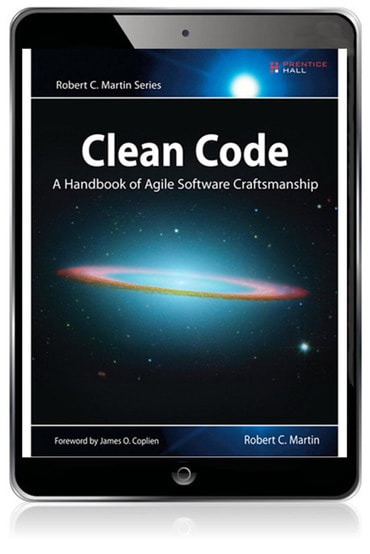
Clean Code
Robert C. Martin
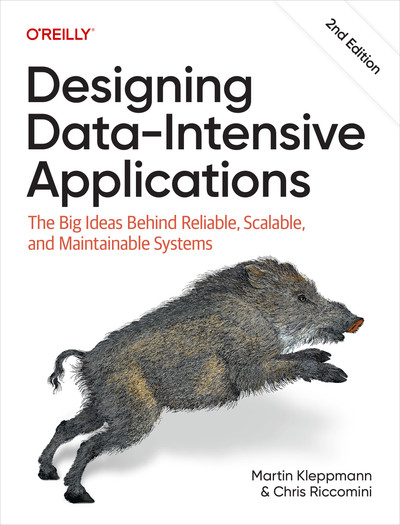
Designing Data-Intensive Applications
Martin Kleppmann & Chris Riccomini
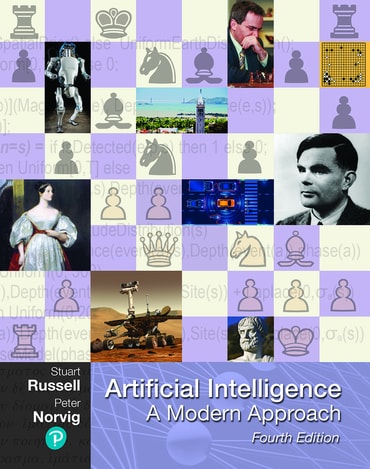
Artificial Intelligence:
A Modern Approach

Stuart Russell & Peter Norvig
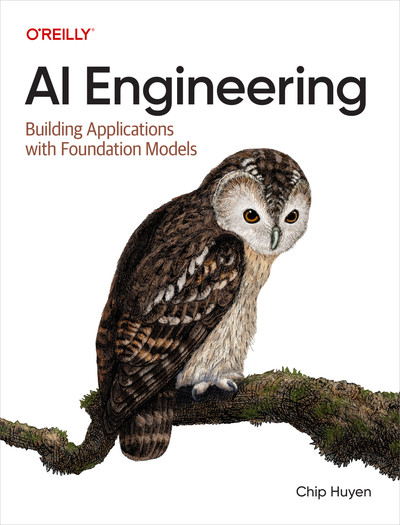
AI Engineering
Chip Huyen

Thank you for being here. Now go build.

Class 4 Survey

Help me improve — 1 minute, anonymous.

→ Class 4 Survey

  • What landed, what didn’t?
  • Too fast, too slow, right pace?
  • What do you wish we’d covered?