Class 1: Introduction to Software
From Zero to AI Agents
Why Learn Code in the Age of AI?
What AI Tools Actually Do
Claude Code, Codex, Copilot, Cursor — they all do one thing:
Generate code.
The magic is code. The output is code. The thing that runs on servers, powers apps, and costs your company money is code.
It’s Code All the Way Down
Even “no-code” tools generate code under the hood.
- Zapier writes API calls
- Vercel runs build scripts
- AI agents execute shell commands
- Websites are HTML, CSS, and JavaScript
You may never write code yourself. But code is what’s running — and someone needs to understand it.
Why This Matters for You
In your next job, you will:
- Review AI-generated code in pull requests
- Evaluate technical vendors and their architectures
- Make build-vs-buy decisions that cost real money
- Debug production issues when things break
- Manage engineers who speak in code
Without the basics, you’ll be flying blind.
The Goal of This Class
The goal is not to make you a software developer.
But you will be prototyping with AI. You’ll vibe-code internal tools, A/B tests, dashboards. AI makes that easy now.
What AI won’t tell you:
- Your prototype is leaking user data or exposing API keys
- You’re running experiments against production data instead of a safe copy
- Your company already has code and APIs you could reuse instead of building from scratch
- Your database connection is open to the internet with no authentication
Important
Don’t be the employee who shipped a vibecoded A/B test to real users and leaked the company’s API keys. Understanding the basics is what keeps you safe, fast, and effective.
What is Code?
Code is a Recipe
Imagine you’re writing a recipe. You list ingredients, describe each step, and someone follows your instructions to make a dish.
Code is exactly that — a set of instructions that tells a computer what to do.
The difference? Computers are incredibly literal.
If your recipe says “add salt” but doesn’t say how much, a human figures it out. A computer would crash (or add infinite salt).
How Computers Think
At the lowest level, computers only understand binary — ones and zeros.
01001000 01100101 01101100 01101100 01101111 = "Hello"Every photo, video, song, and app on your phone is ultimately a sequence of 1s and 0s.
Writing programs in binary would be insane. That’s why we have programming languages — human-readable ways to write instructions that get translated into binary.
How Code Runs
The journey from your code to computer action:
- You write source code in a language like Python
- An interpreter (or compiler) translates it to machine instructions
- The CPU executes those instructions
Tip
Compiled languages (C, Go, Rust) translate all the code at once before running. Like translating a whole book.
Interpreted languages (Python, JavaScript) translate line by line as they run. Like having a live translator.
How Code Runs — Visually

Your First Program
Building Blocks: Variables
Every program is built from just a few pieces. Let’s start with variables — storing data.
Building Blocks: Conditionals
Conditionals let your program make decisions.
Building Blocks: Loops
Loops repeat things so you don’t have to.
Building Blocks: Functions
Functions are reusable blocks of logic.
How Code Executes — All 4 Building Blocks
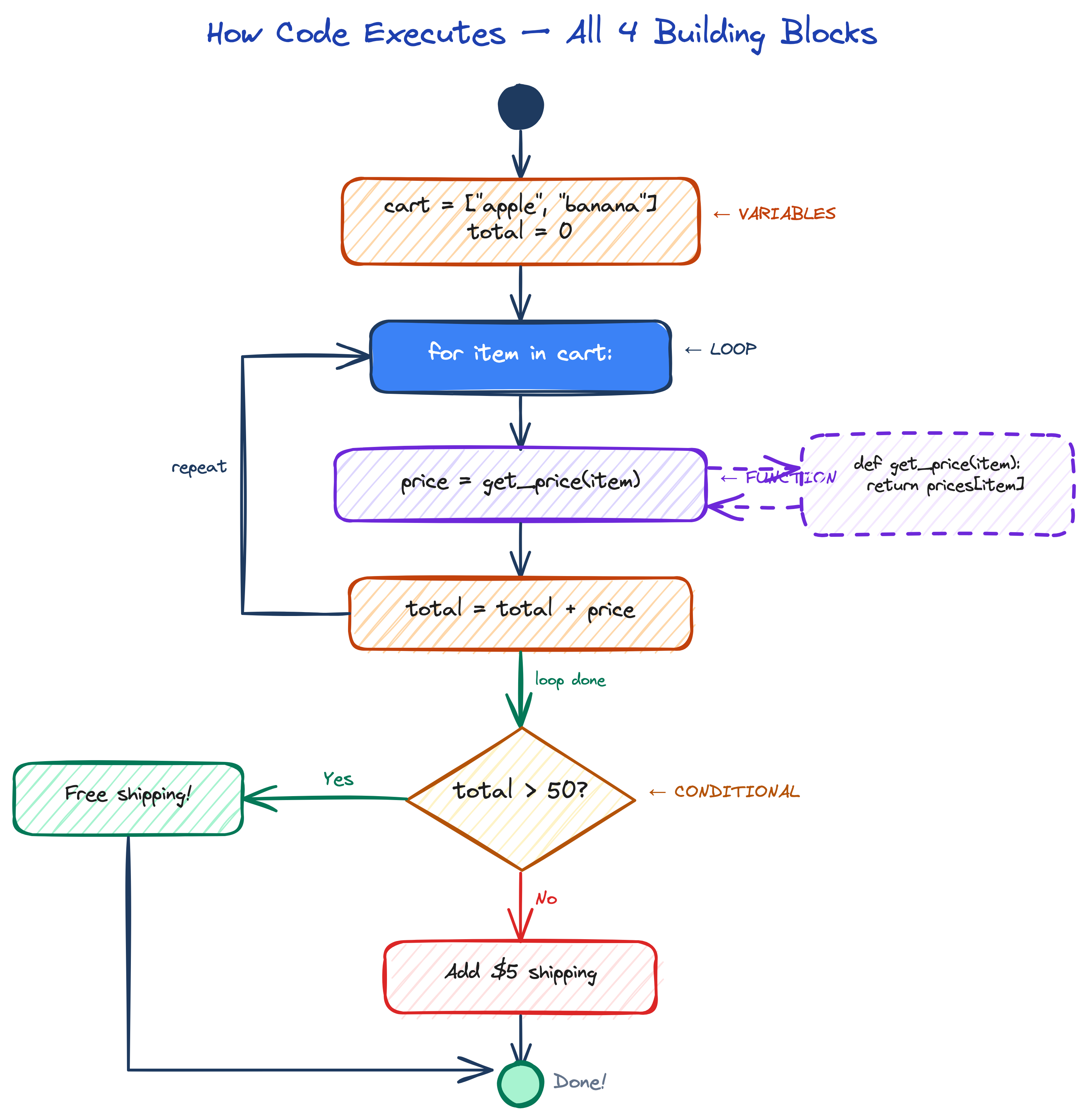
Key Takeaway
Important
All software — from Instagram to self-driving cars — is built from these same building blocks: variables, conditionals, loops, and functions.
The complexity comes from combining them in clever ways.
Programming Languages
Why So Many Languages?
If code is a recipe, then programming languages are the different human languages you can write that recipe in.
A chocolate cake recipe in English, French, or Japanese — same result, different words.
Languages Are Tools
Different languages are optimized for different tasks:
| Language | Best For | Example Use |
|---|---|---|
| Python | Data science, AI, scripting | ChatGPT, Instagram backend |
| JavaScript | Web browsers, frontend | Every website you visit |
| Go | Fast servers, cloud tools | Docker, Kubernetes |
| Java | Enterprise, Android apps | Banking systems |
| C/C++ | Operating systems, games | Windows, Unreal Engine |
| Rust | Safe, fast systems | Firefox, Cloudflare |
Why Python?
Tip
Python reads almost like English, has a massive ecosystem for AI/ML, and is the most popular language in data science. That’s why we use it throughout this course.
Compiled languages (C, Go, Rust) — translate the entire program to machine code before running. Faster execution.
Interpreted languages (Python, JavaScript, Ruby) — translate code line-by-line while running. Slower, but you can run code instantly.
FizzBuzz — The Classic Coding Exercise
The most famous programming interview question:
- Print numbers 1 to 20
- If divisible by 3, print “Fizz” instead
- If divisible by 5, print “Buzz” instead
- If divisible by both, print “FizzBuzz”
The Same Idea, Different Languages
Python wins on simplicity — one line vs four or more.
Git, GitHub & Version Control
The Problem: Tracking Changes
You’re working on a project. You make changes, break something, and want to go back. Without version control:
project_final.pyproject_final_v2.pyproject_final_v2_FIXED.pyproject_final_v2_FIXED_for_real.py
Git solves this — it tracks every change, lets you go back in time, and lets multiple people work on the same project.
What is Git?
Git is a version control system. It keeps a complete history of every change to every file.
- commit — a snapshot of your project at a point in time
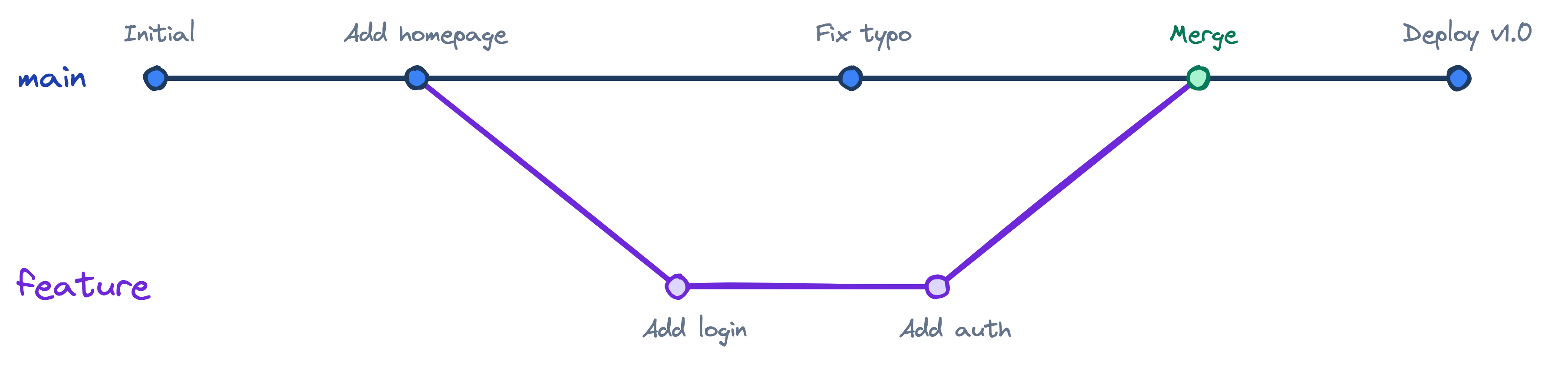
- branch — a parallel version (experiment without breaking main)
- merge — combine changes from different branches
- diff — see exactly what changed
What a Diff Looks Like
When you run git diff, you see exactly what changed — red lines were removed, green lines were added:
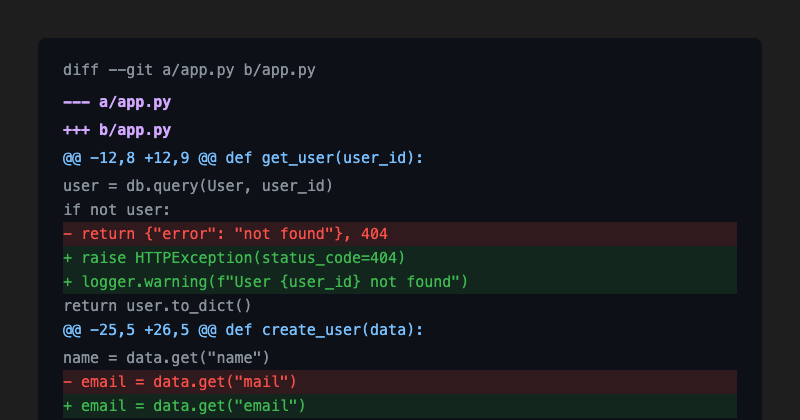
Tip
This is how code review works. Before merging, your team reads the diff to check what changed. You’ll see this view constantly in pull requests.
Git Branching — Visually
What is a Repository?
A repository (repo) is a project folder tracked by Git:
- Your code files
- The full history of changes (
.git/folder) - Configuration files
Tip
Every repo has a main branch — the “official” version. You create branches to work on features, then merge them back.
What is GitHub?
GitHub hosts Git repositories in the cloud. It adds:
- Remote storage — code is backed up online
- Collaboration — multiple people work on the same repo
- Pull Requests — propose changes, get code review before merging
- Issues — track bugs and feature requests
- Actions — automate testing and deployment (CI/CD)
Note
GitHub is to Git what Gmail is to email. Git is the technology, GitHub is the popular service. Alternatives: GitLab, Bitbucket.
Essential Git Commands
The Git Workflow — Visually
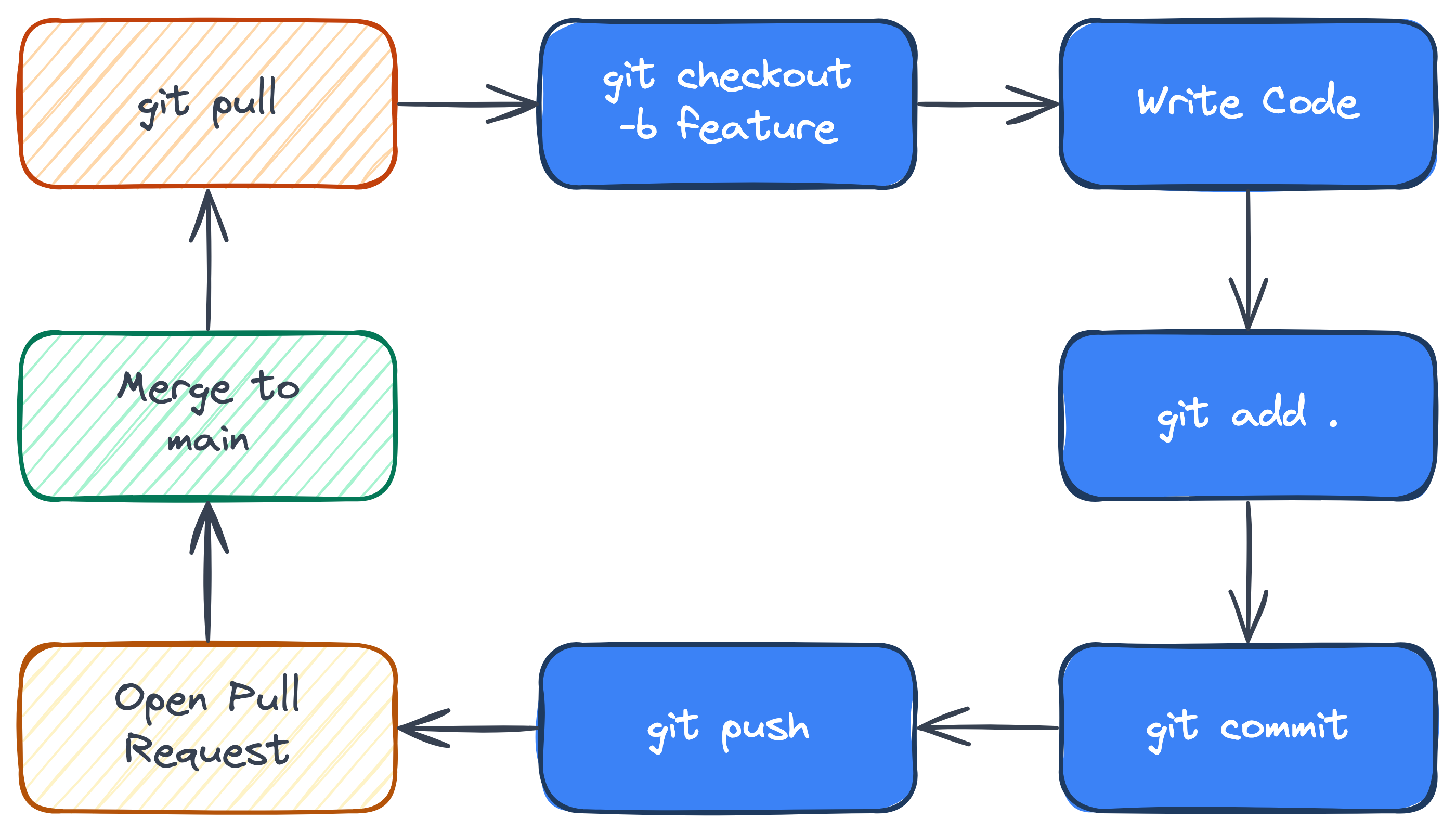
The Git Workflow
1. git pull                  ← Get latest changes
2. git checkout -b feature   ← Create a branch
3. (write code)
4. git add .                 ← Stage changes
5. git commit -m "Add feature" ← Save snapshot
6. git push                  ← Upload to GitHub
7. Open a Pull Request       ← Ask for code review
8. Merge to main             ← Ship it!
Important
Never commit secrets (passwords, API keys, tokens) to Git. Once in history, it’s very hard to remove. Use .gitignore to exclude sensitive files.
Frontend
Frontend — What the User Sees
When you open a website, everything you see and interact with — the buttons, text, images, animations — that’s the frontend.
It runs in your browser (Chrome, Safari, Firefox).
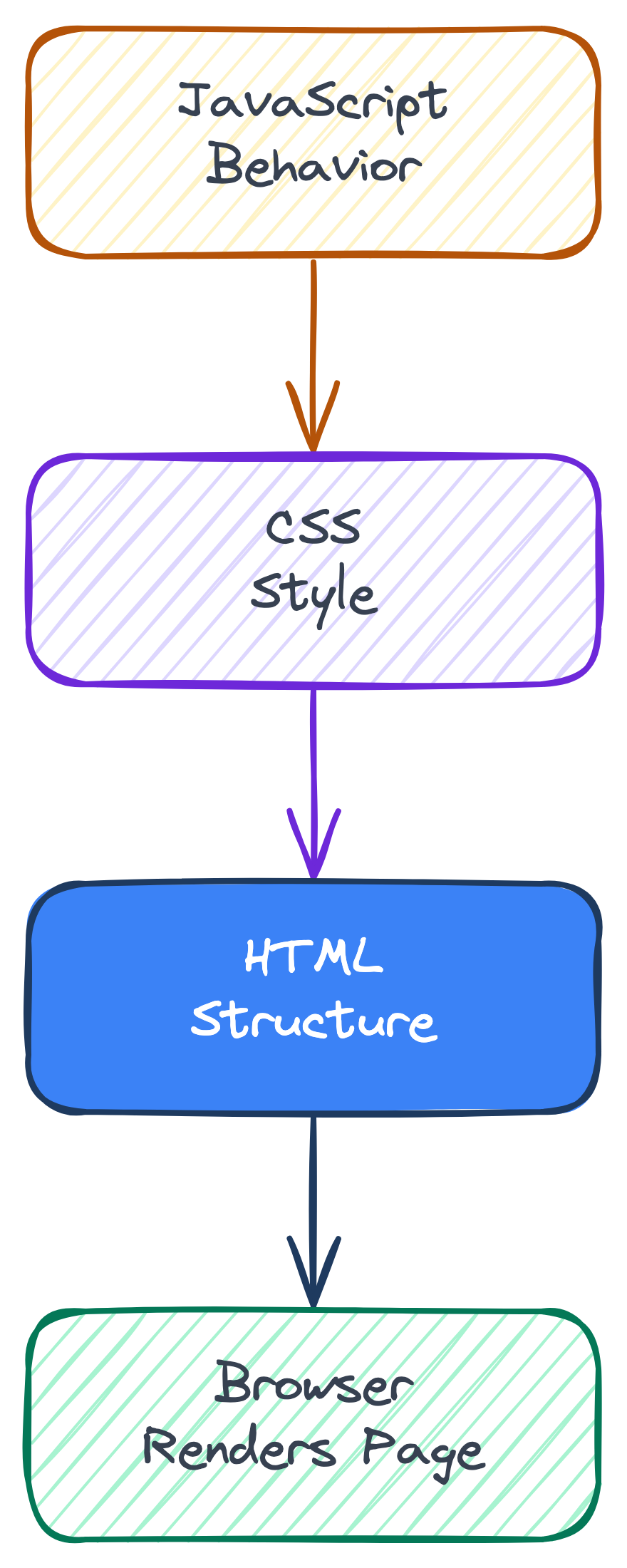
The Three Languages of the Web
Every website is built with three technologies:
| Technology | Role | Analogy |
|---|---|---|
| HTML | Structure | The skeleton / blueprint |
| CSS | Style | The paint, furniture, decoration |
| JavaScript | Behavior | The electricity, plumbing, moving parts |
How They Stack Together
HTML — The Structure
HTML (HyperText Markup Language) defines what’s on the page:
Try It: HTML
Try It: CSS
The DOM — A Tree of Elements
The browser reads your HTML and builds a tree structure called the DOM (Document Object Model):
document
  └── html
       ├── head
       │    └── title
       └── body
            ├── h1
            ├── p
            └── button
JavaScript can add, remove, or change any node in this tree — that’s how modern web apps work.
Building HTML with Python
We can use Python to generate HTML. This is actually how many web frameworks work — the server builds HTML and sends it to the browser.
Note
What we just did — generating HTML with code — is the core idea behind server-side rendering. Django, Express, and Rails all do this at scale.
Try It: JavaScript
Modern Frontend Frameworks
Today, most web apps use frameworks that make frontend development easier:
- React (by Meta) — Build UIs from reusable “components”. Often paired with Vite for fast dev tooling
- Next.js — React + server-side rendering + routing + API routes (frontend AND backend in one)
- Vue — Simpler alternative to React, great for beginners
These frameworks let you build complex, interactive apps without manually manipulating the DOM.
Backend
Backend — The Brain Behind the App
The frontend is what you see. The backend is the brain behind it — it decides what happens, enforces the rules, and keeps your secrets safe.
When you open Instagram, the frontend shows photos. But the backend decided which photos to show you, checked you’re allowed to see them, and billed the advertiser who paid to be in your feed. All invisible to you.
Why Do You Need a Backend?
- Centralized logic — The rules of your business live in one place. Change a pricing formula once, it updates everywhere (mobile, web, API).
- Controlled access — Your secret sauce stays on the server. Users get results, not your algorithms or data.
- One version of truth — All devices talk to the same backend. No sync conflicts, no stale data.
- Security — API keys, passwords, and business logic never leave the server. The frontend is public — anyone can inspect it.
The Spotify Example
Imagine Spotify with no backend:
- Your phone has a playlist. Your laptop has a different one.
- You buy Premium on your phone — your laptop doesn’t know.
- Your friend can’t see your playlist at all.
- Anyone could reverse-engineer the app and get free music.
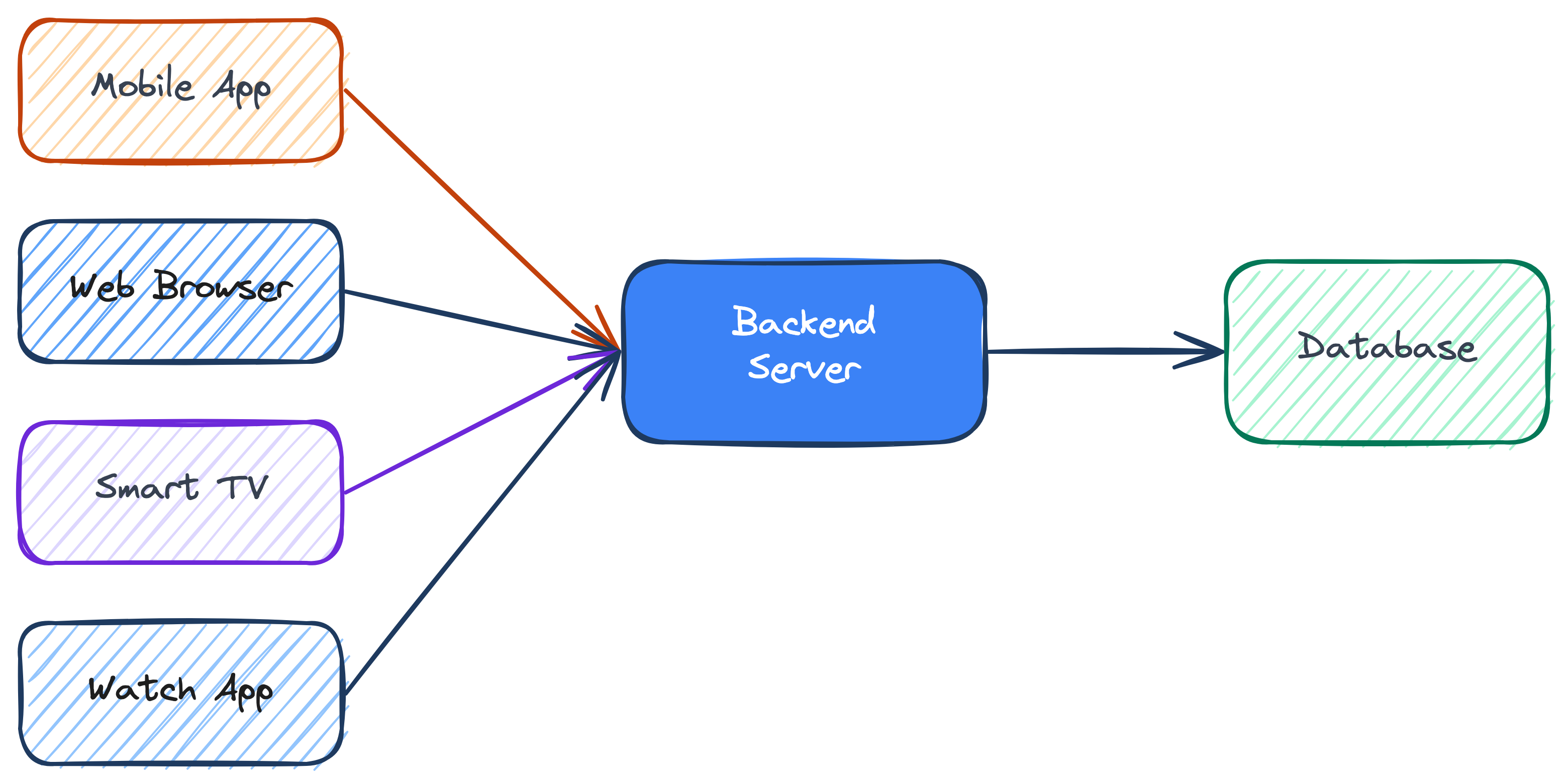
The backend solves all of this. It’s the single source of truth that every device talks to.
Multiple Frontends, One Backend
Important
Mobile, web, TV, watch — they’re all just different frontends. The backend is the one brain they all share. Change the logic once, every device gets the update.
What is a Server?
A server is just a computer that’s always on, always listening for requests.
- Your browser sends a request to Google’s server
- The server processes it (finds search results)
- The server sends back a response (the HTML page)
Note
Any computer can be a server. Your laptop could be one right now. “The cloud” is just someone else’s servers in a data center.
APIs — The Waiter Metaphor
An API (Application Programming Interface) is like a waiter at a restaurant:
- You (the client) look at the menu (API documentation)
- You tell the waiter (API) what you want
- The waiter goes to the kitchen (server/database)
- The waiter brings back your food (data)
You never go into the kitchen yourself. The API is the middleman.
HTTP Methods
When your browser talks to a server, it uses HTTP methods:
| Method | Purpose | Example |
|---|---|---|
| GET | Read data | “Show me user #42’s profile” |
| POST | Create data | “Create a new account” |
| PUT | Update data | “Change my email address” |
| DELETE | Remove data | “Delete this photo” |
JSON — The Language of APIs
APIs send data as JSON (JavaScript Object Notation) — a simple text format that both humans and computers can read:
Simulating a Server in Python
Testing Our Server
Tip
In production, you’d use a framework like FastAPI or Flask (Python), Express (Node.js), or Gin (Go) to build real API servers.
Databases
Why Databases?
Every app needs to store data somewhere. User accounts, posts, messages, orders — all of it lives in a database.
Without databases, every time you closed an app, all your data would vanish.
What is a Database?
Think of a database as a highly organized filing cabinet — everything is neatly arranged in tables with rows and columns.
| id | name | role | |
|---|---|---|---|
| 1 | Alice | alice@example.com | engineer |
| 2 | Bob | bob@example.com | designer |
| 3 | Charlie | charlie@example.com | data scientist |
- Table = the spreadsheet (e.g., “users”)
- Row = one record (e.g., Alice’s data)
- Column = one field (e.g., “email”)
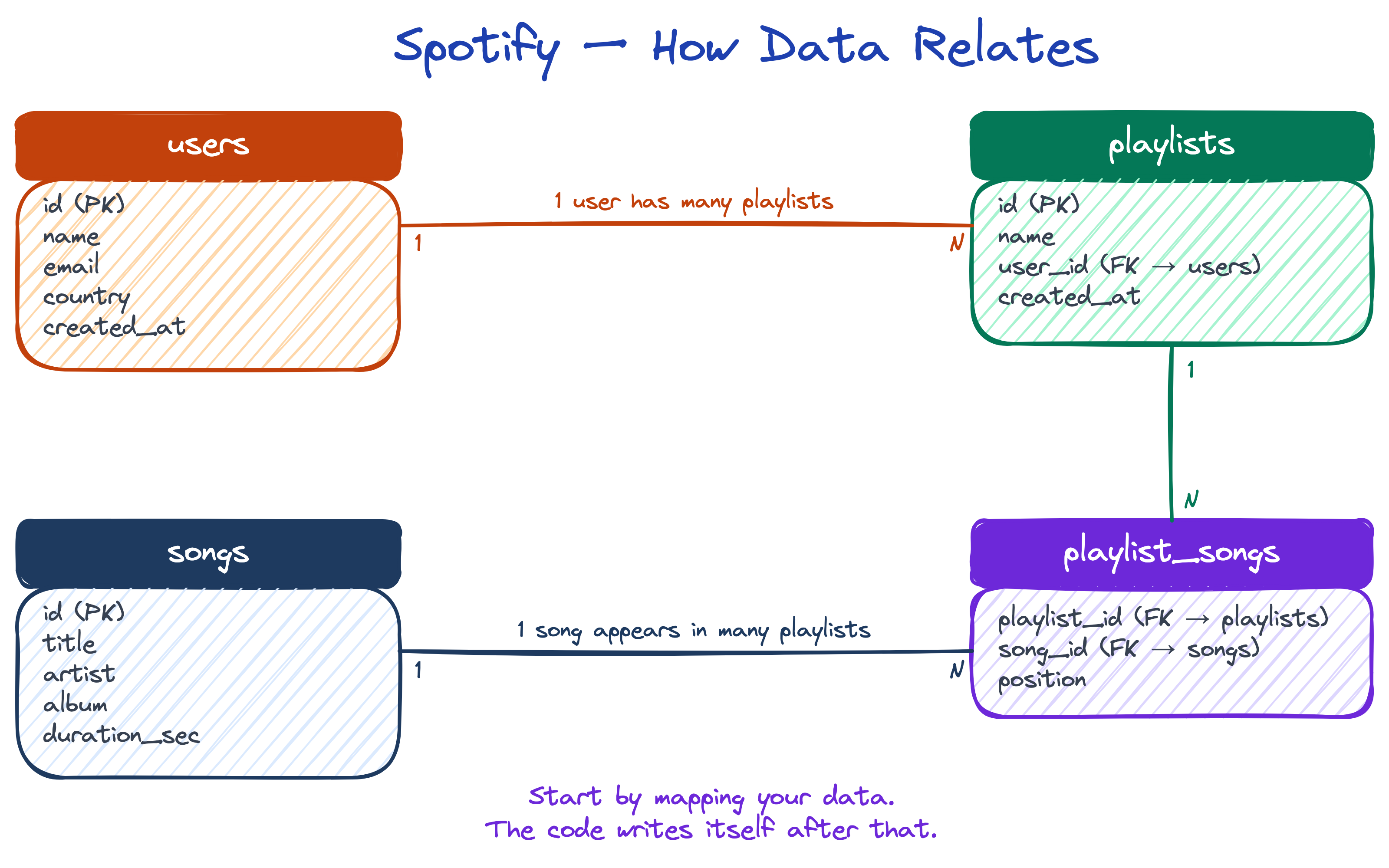
Designing with Data First
Start with the data. Before writing any code, ask: what am I storing, and how does it relate? Think about Spotify: a user creates many playlists, a playlist contains many songs, a song can be in many playlists.
Tip
Once you map your data and relationships, the code almost writes itself. This is called a data model — the first thing engineers design before touching code.
SQL — Talking to Databases
SQL (Structured Query Language) is how you ask a database for data:
Note
SQL has been around since the 1970s and is used by virtually every company. Learning SQL is one of the highest-ROI skills in tech.
Try It: SQL (runs in your browser!)
Simulating a Database in Python
Querying with Python
Types of Databases
Not all databases are tables. Different data needs different structures:
| Type | Example | Best For |
|---|---|---|
| Relational (SQL) | PostgreSQL, MySQL | Structured data, relationships |
| Document | MongoDB | Flexible data, JSON-like documents |
| Key-Value | Redis | Caching, sessions, fast lookups |
| Graph | Neo4j | Social networks, recommendations |
Tip
When in doubt, use PostgreSQL. It’s free, open-source, reliable, and handles everything from a small side project to Instagram-scale.
What Is a Cache?
A cache is a quick-access copy of data. Your fridge is a cache. The supermarket is the database.
- You don’t drive to the supermarket every time you want milk — you grab it from the fridge (fast!)
- But the fridge has limited space, things expire, and it might not have what you need
- When the fridge is empty, you go to the supermarket (the real source of truth) and restock
Important
That’s exactly how a cache works in software. The fridge (cache) is fast but limited and can go stale. The supermarket (database/backend) is the real source — slower to reach, but always has everything.

Environment Variables & Secrets
What Is a Secret / API Key?
An API key is like a password that lets your app access someone else’s data or service.
- Your app needs to talk to Stripe? You need a Stripe API key.
- Your app needs to read from a database? You need a database URL with credentials.
- Your app needs to call OpenAI? You need an OpenAI API key.
Important
API keys are passwords for machines. If someone steals your key, they can use your account, rack up charges, and access your data. Treat them like you treat your bank password.
The Problem: Configuration
Your app needs different settings in different places:
| Setting | Development | Production |
|---|---|---|
| Database URL | localhost:5432 |
prod-db.aws.com:5432 |
| API Key | test_key_123 |
live_key_abc |
| Debug Mode | true |
false |
You can’t hardcode these — the same code runs in both environments.
Environment Variables
Env vars are key-value pairs set outside your code:
The .env File & Secrets
Locally, developers use a .env file:
# .env file (NEVER commit this to Git!)
DATABASE_URL=postgresql://localhost:5432/myapp
API_KEY=sk-test-12345
SECRET_KEY=super-secret-value
DEBUG=true
Important
Add .env to your .gitignore immediately. Leaked API keys can cost thousands — bots scan GitHub for exposed keys.
In production, secrets are stored securely:
| Platform | Where Secrets Live |
|---|---|
| Vercel | Dashboard → Settings → Environment Variables |
| GitHub Actions | Repo → Settings → Secrets |
| AWS | Secrets Manager / Parameter Store |
Authentication — Who Are You?
Why Authentication Matters
Without authentication, anyone can access anyone’s data. Your app has no idea who is making a request.
Authentication answers one question: “Are you who you say you are?”
Important
If you build a prototype with no auth, every user can see every other user’s data. This is the #1 mistake in vibecoded apps.
How It Works
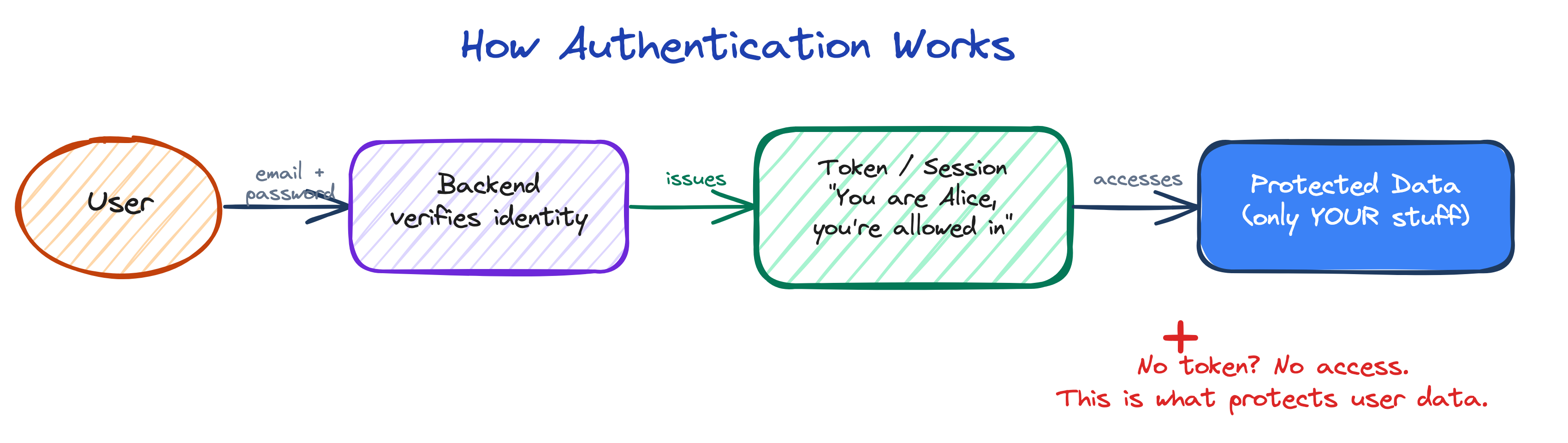
- User sends email + password to the backend
- Backend checks credentials against the database
- If valid, backend issues a token (like a wristband at a concert)
- Every future request includes that token — “I’m Alice, here’s my proof”
- No token, no access
Tip
Services like Supabase, Auth0, and Firebase handle all of this for you. You don’t build auth from scratch — you plug in a provider.
Cloud Platforms
What is “The Cloud”?
You’ve built an app on your laptop. But how does the rest of the world use it?
The cloud is just someone else’s computers in a data center. Instead of buying servers, you rent them by the hour from Amazon, Google, and Microsoft.
Note
Your laptop goes to sleep, loses internet, and can only handle a few users. Cloud servers run 24/7, handle millions of requests, and scale up when traffic spikes.
The Big Players
| Platform | Company | Best For |
|---|---|---|
| AWS | Amazon | Everything — the biggest cloud (32% market share) |
| GCP | AI/ML workloads, BigQuery data analytics | |
| Azure | Microsoft | Enterprise, Windows-heavy organizations |
| Vercel | Vercel | Frontend apps, Next.js, simple deploys |
- AWS — 200+ services. Database? Compute? Storage? ML? AWS has it.
- GCP — Google’s cloud. Excellent for AI (they invented TensorFlow).
- Vercel — Connect your GitHub repo, push code, get a live website in seconds.
Fetching Data from the Cloud
Every cloud service exposes APIs that you can call. Let’s fetch real data from GitHub’s API:
Tip
Every time an app shows you the weather, stock prices, or your Uber driver’s location, it’s calling a cloud API just like this. APIs are the backbone of the modern internet.
Testing
Why Tests Exist
Imagine you fix the kitchen sink, and accidentally the bathroom toilet stops flushing.
That’s a regression — something that used to work breaks because of a new change.
In code, this happens constantly. You fix one feature, another breaks. The codebase is bigger than any one person can hold in their head.
Unit Tests — Automated Checklists
A unit test is a small piece of code that checks if another piece of code works correctly.
You write them once, and they run every time you change code — catching regressions automatically.
The Plumbing Analogy
- You have a house with 50 pipes
- You fix one pipe
- A unit test is like turning on every faucet in the house after any plumbing work
- If something broke, you find out immediately — not when a guest is taking a shower
Important
Without tests, you only discover regressions when users find them. With tests, you discover them before you ship.
Why This Matters for AI-Generated Code
- AI tools generate code fast — but they don’t know what they might break
- Tests are your safety net for vibe-coding
- Professional teams won’t merge code without passing tests
- CI/CD (coming next) runs tests automatically on every push
Note
You don’t need to write tests by hand. AI coding agents can generate them for you. But you need to know they should exist and insist on them.
Deploying to Vercel
How Vercel Works
Vercel is the fastest way to get a website live on the internet. Free for personal projects, takes about 2 minutes.
Vercel connects to your GitHub repository. Every time you push code, Vercel automatically builds and deploys it.
This is called CI/CD (Continuous Integration / Continuous Deployment).
Note
CI/CD means: every time you save your code, it automatically gets tested and published. No manual uploading, no FTP, no server configuration. Push code, site updates.
Step-by-Step: Your First Deploy
- Create a GitHub Repository — Go to github.com and create a new repo with an
index.htmlfile - Sign Up for Vercel — Go to vercel.com and sign up with your GitHub account
- Import Your Repository — Click “New Project”, select your repo, click “Deploy”
- Your Site is Live! — Within 30-60 seconds, Vercel gives you a URL like
your-project.vercel.app
Behind the Scenes
When you push code to GitHub:
- GitHub notifies Vercel via a webhook
- Vercel pulls your code from the repository
- Build step — Vercel runs
npm run buildto compile your code - Deploy — Built files are distributed to Vercel’s global CDN
- Live — Users anywhere in the world can access your site
The Deployment Pipeline

Every subsequent push repeats the cycle automatically. If the build fails, Vercel keeps the previous working version live.
Note
Vercel also creates preview deployments for every pull request — a unique URL to test features before merging.
Other Deployment Options
| Platform | Best For | Effort Level |
|---|---|---|
| Vercel | Frontend, Next.js, static sites | Very easy |
| Railway | Full-stack apps with databases | Easy |
| Fly.io | Docker containers, global distribution | Medium |
| AWS / GCP | Anything, full control | Advanced |
Important
Don’t spend weeks learning AWS when Vercel can deploy your project in 2 minutes. Use the simplest tool that meets your needs. You can always migrate later.
Tech Stack Overview
What is a Tech Stack?
A tech stack is the combination of technologies used to build an application.
Just like a house needs a foundation, walls, and a roof, an app needs a database, backend, and frontend.
Databases
| Database | Type | Strengths | Used By |
|---|---|---|---|
| PostgreSQL | Relational (SQL) | Reliable, feature-rich, free | Instagram, Stripe, Reddit |
| MongoDB | Document (NoSQL) | Flexible schema, JSON-native | Adobe, eBay |
| Redis | Key-Value (cache) | Blazing fast, in-memory | Twitter, GitHub |
Tip
Start with PostgreSQL for almost everything. Add Redis later if you need caching.
Backend Frameworks
| Framework | Language | Strengths | Used By |
|---|---|---|---|
| FastAPI | Python | Fast, modern, great for AI APIs | Uber, Netflix |
| Next.js (API routes) | JavaScript/TypeScript | Backend built into your frontend | Vercel, TikTok |
| Node.js / Express | JavaScript | Lightweight, massive ecosystem | Netflix, PayPal |
| Go (stdlib / Gin) | Go | Extremely fast, great concurrency | Google, Uber, Docker |
Tip
For AI/ML projects, FastAPI (Python) is ideal — your backend and your ML code are in the same language. Django and Flask are also popular Python options (Django for large apps, Flask for simple ones).
Frontend Frameworks
| Framework | Language | Strengths | Used By |
|---|---|---|---|
| React + Vite | JavaScript/TypeScript | Component-based, fast dev server | Facebook, Airbnb |
| Next.js | JavaScript/TypeScript | React + SSR + API routes (full-stack) | TikTok, Hulu |
| Vue | JavaScript/TypeScript | Simpler than React, gentle learning curve | GitLab, Nintendo |
Note
Next.js can be both your frontend AND backend — it has built-in API routes. React + Vite is frontend-only and needs a separate backend (like FastAPI or Express).
Tech Stacks — Visually
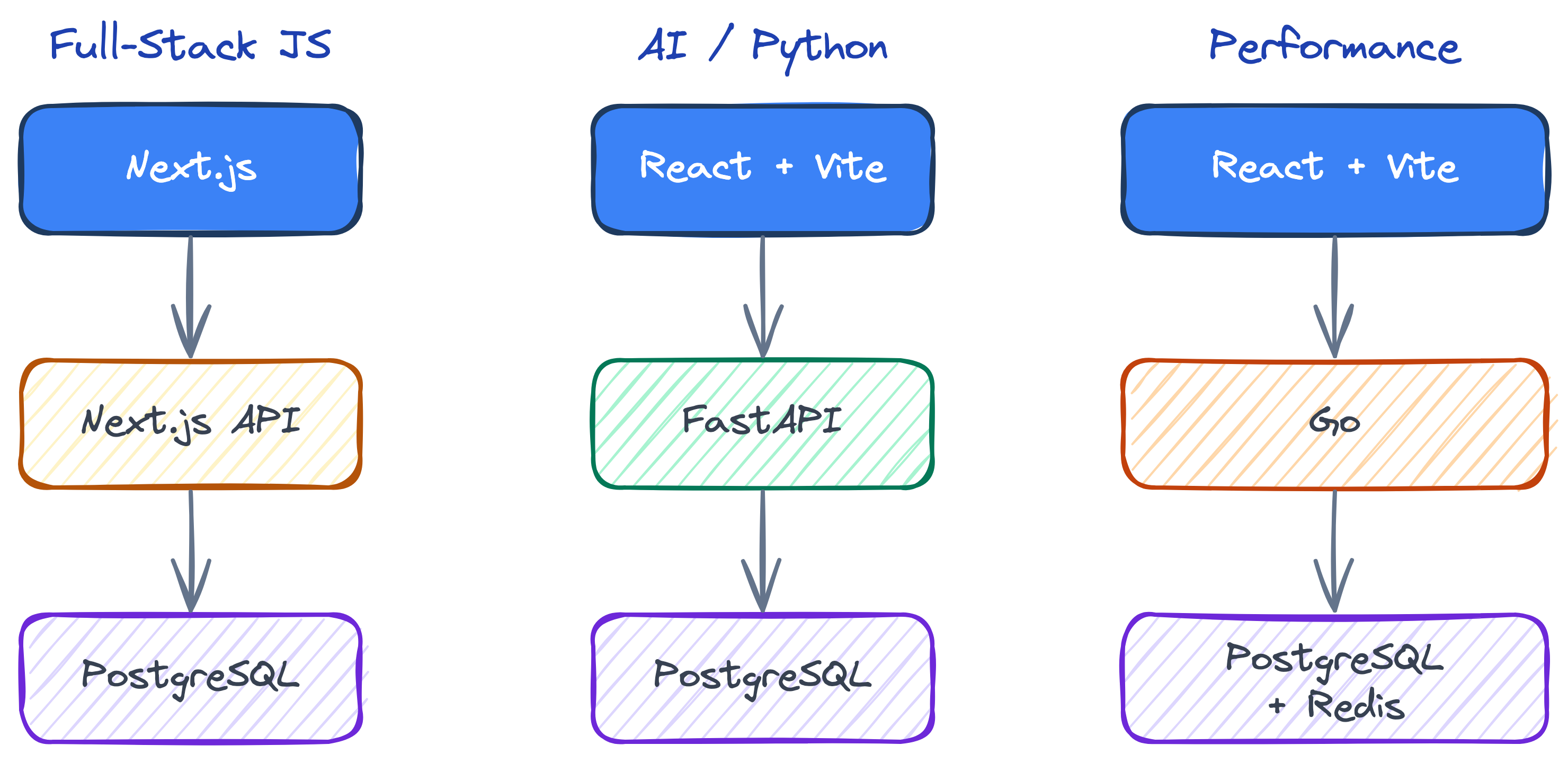
Common Stack Combinations
The Full-Stack JS
(one language, one framework)
- Frontend: Next.js
- Backend: Next.js API routes
- Database: PostgreSQL
The AI / Python Stack
(great for ML)
- Frontend: React + Vite
- Backend: FastAPI
- Database: PostgreSQL
The Performance Stack
(max speed)
- Frontend: React + Vite
- Backend: Go
- Database: PostgreSQL + Redis
Final Takeaway
Important
Don’t overthink the stack. Pick something popular with good documentation, and start building.
Shipping beats perfecting.
The Terminal
What Is the Terminal?
The terminal is just a text-based way to talk to your computer.
Instead of clicking buttons and dragging icons, you type commands.
Think of it like texting your computer instead of pointing at things. Same computer, same capabilities — just a different interface.
Tip
Every developer, every server, and every AI tool ultimately runs through a terminal. Learning it is like learning to drive stick — not strictly necessary, but it unlocks everything.
How to Open It
Mac
- Press Cmd + Space (Spotlight)
- Type “Terminal”
- Press Enter
Or find it in Applications → Utilities → Terminal
Windows
- Press Win key
- Type “PowerShell”
- Press Enter
Or install Windows Terminal from the Microsoft Store for a better experience.
You Are Now a Hacker
Congratulations. You opened a terminal.
You are now officially a hacker.

Basic Terminal Commands
Just enough to get around:
Mac / Linux
Note
To stop a running command: Ctrl + C (both Mac and Windows). This is your emergency brake — use it whenever something is stuck or you want to cancel.
That’s it. That’s all you need to know to get started. Everything else you can look up — or ask Claude.
Setting Up Your Tools
What We’re Installing
- Node.js — JavaScript runtime (needed for everything)
- Git — Version control (we covered this earlier)
- Claude Code — AI coding agent in your terminal
- Vercel CLI — Deploy websites with one command
- Supabase CLI — Database and auth in one command
Tip
Don’t worry — we’ll do this together. And once you have Claude Code, it can install the rest for you.
Installation
Mac
1. Install Homebrew
2. Install Node.js (includes npm & npx) and Git
3. Install the CLI tools via npm
Or Just Ask Claude Code
Once you have Claude Code installed, you can ask it to do the rest:
Tip
This is the whole point — Claude Code can run terminal commands for you. You don’t need to memorize any of this.
AI Coding Agents
Claude Code & OpenAI Codex
These are AI agents that run in your terminal — not chatbots in a browser.
| Claude Code | OpenAI Codex | |
|---|---|---|
| By | Anthropic | OpenAI |
| Launch | claude |
codex |
| YOLO | --dangerously-skip-permissions |
--yolo |
| Models | Sonnet, Opus, Haiku | GPT-5.4, 5.4 mini, 5.4 nano |
Both can read your codebase, write files, run commands, and iterate autonomously. Use whichever you prefer — the workflow is the same.
Why the CLI Is the Most Powerful Version
- Full filesystem access — it can read any file in your project, not just what you paste
- Runs commands — it can install packages, run builds, execute tests
- Iterates autonomously — run tests → see failure → fix → repeat
- Works with any project — not locked to one editor or platform
- Multiple model versions — pick speed vs depth depending on the task
Important
The chat UI (claude.ai, ChatGPT) is great for questions. But for building software, the CLI is in a different league.
YOLO Mode
Skip all permission prompts — let the AI just go:
Warning
YOLO mode means the AI will create files, install packages, and run commands without asking you first.
Use it for greenfield projects where you trust it to figure it out. Don’t use it on production code you care about.
Think of it like autopilot. Great for takeoff on an empty runway. Maybe not for landing in a thunderstorm.
Plan Mode
Start with a plan before letting Claude execute:
- Type
/planin Claude Code to enter plan mode - Describe what you want to build
- Claude creates a detailed plan — review it
- Exit plan mode and let Claude execute
Tip
Best workflow: Plan first (so you understand what’s about to happen), then run in YOLO mode to execute the plan without interruptions.
Your First Project
The Assignment
Important
Build a networking tracker — a website to record the people you need to network with at Berkeley.
- Add contacts with name, company, role, where you met, and notes
- View, edit, and delete contacts
- Deployed live on the internet
Stack: Next.js + Supabase + Vercel
Step 1: Create the Project
Open your terminal and run:
This creates a folder, enters it, and launches your AI agent in YOLO mode.
Step 2: The Prompt
Paste this into Claude Code:
/plan Build a networking tracker web app with this stack:
- Next.js (App Router, TypeScript, Tailwind CSS)
- Supabase (PostgreSQL database)
- Deploy to Vercel

The app should:
1. Have a simple, clean UI to add contacts with: name, company, role,
   where you met them, notes, and a priority level (high/medium/low)
2. Display contacts in a sortable table/list
3. Let you edit and delete contacts
4. Use Supabase for the database (create the table schema)
5. Include a .env.local file template for NEXT_PUBLIC_SUPABASE_URL
   and NEXT_PUBLIC_SUPABASE_ANON_KEY

Install all dependencies with npx create-next-app@latest, set up
the project structure, and create all necessary files.
Step 3: Let It Build
Note
After reviewing the plan, exit plan mode. Claude will:
- Scaffold the Next.js project
- Install dependencies (Supabase, Tailwind, etc.)
- Create the database schema
- Build all the pages and components
- Set up the API routes
Just watch it work. This is what AI-assisted development looks like.
Step 4: Deploy
When Claude is done building, deploy to the world:
One command. Follow the prompts. Your app is live.
Important
You just built and deployed a full-stack web application with a database, a UI, and a live URL — in one class session.
This is what Level 2 fluency looks like in practice.
Congratulations — You Are Now AI Engineers
You walked in today not knowing what a terminal was.
You just:
- Opened a terminal
- Installed developer tools
- Used an AI coding agent
- Built a full-stack web app
- Deployed it live to the internet
Important
That’s not a tutorial. That’s software engineering.
Welcome to the club. See you in Class 2.
Class 1 Survey
Help me improve! Take 1 minute to fill out this anonymous survey:

→ Class 1 Survey (Google Form)
- Was this class useful/insightful?
- How was the pacing?
- What would you like done better?